

Key takeaways
- Automating customer support starts with a ticket audit, not a software purchase: your top 20 questions reveal exactly what to automate first.
- Build 20–30 approved knowledge base answers before any automation goes live, or the bot will produce wrong answers.
- Define escalation rules before launch so customers never get trapped in bot loops.
- Start with one channel and one use case, prove it works, then expand.
- Track containment rate and re-contact rate weekly using your help desk's basic reporting.
Why your current support process is breaking (and what automation actually fixes)
Learning how to automate customer support is not about replacing your team. It is about stopping the volume of repetitive, low-stakes requests from outpacing your capacity to handle them.
The symptoms are specific: SLA slippage on tickets that should have been answered in minutes, your team spending two hours a day on the same 20 questions about pricing, hours, return policies, and booking links, and you personally triaging a 40-message inbox at 9pm. These are capacity problems, not quality problems.
Here is the fear worth naming directly: many business owners worry that automation will make their service feel cold, robotic, and impersonal. That fear is understandable. But the cold, rushed interactions customers actually hate are not caused by bots. They are caused by an exhausted human team stretched too thin to give anyone a real answer. Automation does not threaten the human touch. It is what makes the human touch sustainable.
The goal is not fewer humans. It is better-deployed humans. As Zendesk's automated support framework defines it, automated customer support handles predictable, repeatable requests so your team can focus on interactions requiring judgment, empathy, or expertise. Automation handles the predictable. People handle the irreplaceable.
arsuno.ai clients have reported significant reductions in operational overhead after deploying custom AI automation. That result is not about cutting staff. It is about reclaiming the hours your team currently spends on work a well-configured system could handle in seconds.
The path from overloaded to well-deployed starts with a two-hour exercise, not a software purchase.
Step 1: Audit your tickets before you build anything
The most common mistake in customer support automation is buying a chatbot before understanding what customers actually ask. Before configuring anything, export the last 30 days of support messages from your email, chat tool, or help desk. Group them by topic in a spreadsheet and count how many fall into each category. This takes about two hours and requires no software beyond a shared spreadsheet.
What you are looking for is your top 20 questions: high-volume, low-complexity, factual requests. Typical examples include business hours, pricing tiers, order status, booking links, return policies, and password reset instructions. These are safe to automate because they are specific, factual, and require no judgment.
Flag anything requiring negotiation, emotional sensitivity, or context-specific judgment as human-only from the start. Billing disputes, complaints, cancellations, and anything with legal or clinical implications should not enter your automation layer at all.
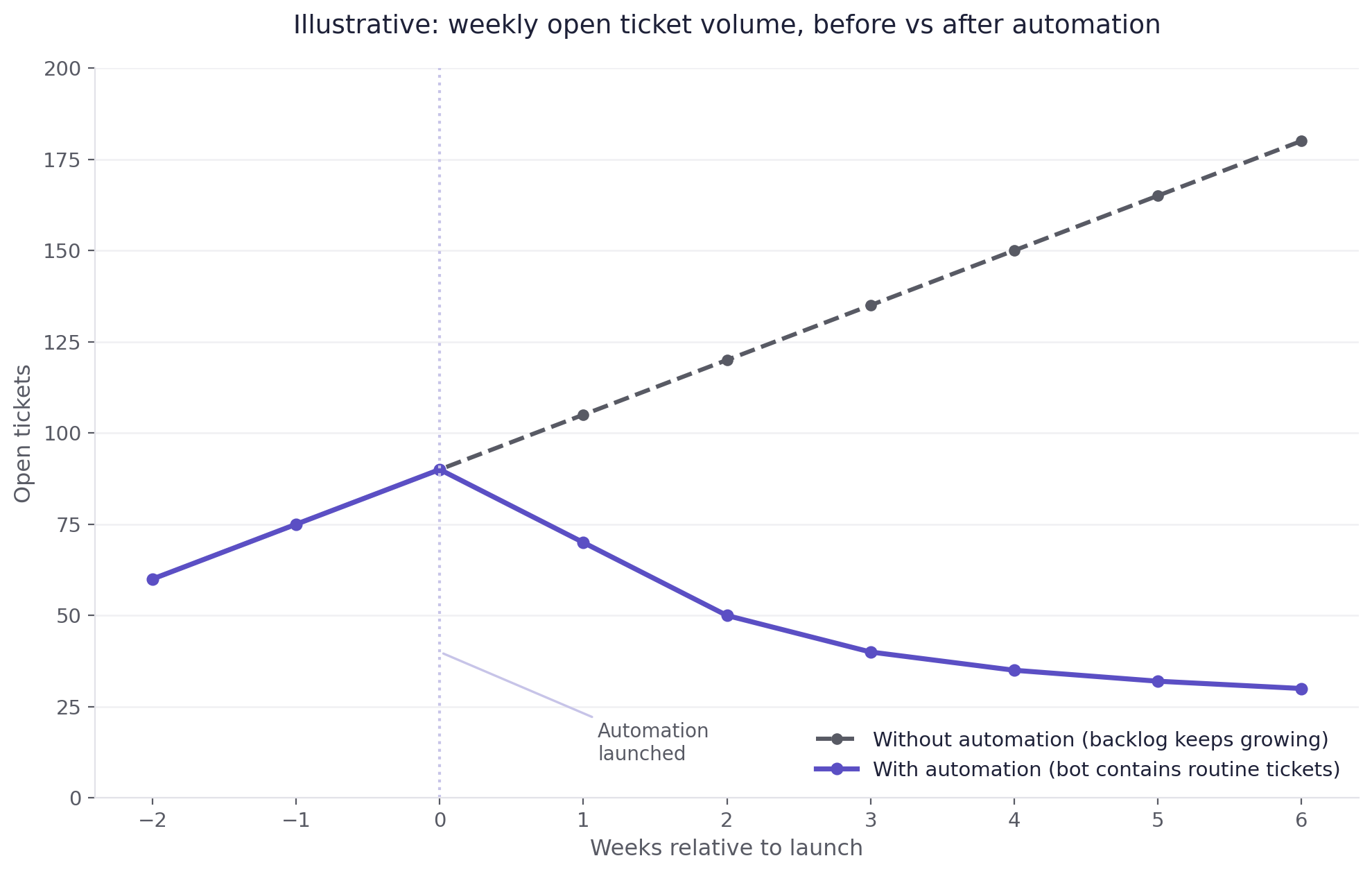
This audit-first method is exactly what Mando used to tackle a growing support backlog. They exported recent messages, grouped them by category to identify the most repetitive questions, then trained an AI agent on approved responses. Mando self-reports a 60% reduction in their support backlog within six weeks. As Capacity's automation guide notes, the audit-first approach is the foundation of any implementation that works in production.
This step requires no analytics platform, no developer, and no IT resource. Once your top ticket categories are mapped, you have everything you need to move forward.
Ready to stop triaging the same questions every day?
arsuno.ai builds custom AI automation systems for small and mid-sized teams, designed around your actual workflow, not a generic template.Let's talk about your support setup
Step 2: Build your knowledge base before you configure any automation
Automation without a structured knowledge layer produces wrong or incomplete answers. A bot that confidently gives incorrect information damages customer trust faster than a slow human response ever would. This is a content problem, and it has to be solved before any chatbot or routing rule goes live.
A practical starting point is 20–30 approved answers covering the top ticket categories you identified in Step 1. Each answer should be written by the person who actually knows the correct response, not drafted by AI and left unreviewed. The knowledge base is only as accurate as the humans who built it.
The writing method is straightforward: take your top 10 ticket categories from the audit, write one approved answer per category, and review each for accuracy and tone. Then expand to 20–30 before going live. This is a one-time investment that pays forward every automated interaction from that point on.
For tooling, a simple Notion page, Google Doc, or built-in help desk knowledge base such as Helpjuice or Zendesk Guide is sufficient. No custom CMS or developer required. Freshworks' automation guidance makes the same point: the quality of your automation output is directly tied to the quality of your source content.
One practical note on tone: write each answer the way your best team member would say it out loud to a customer. Conversational, specific answers feel warm even when a bot delivers them.
Step 3: Design your escalation rules before you launch
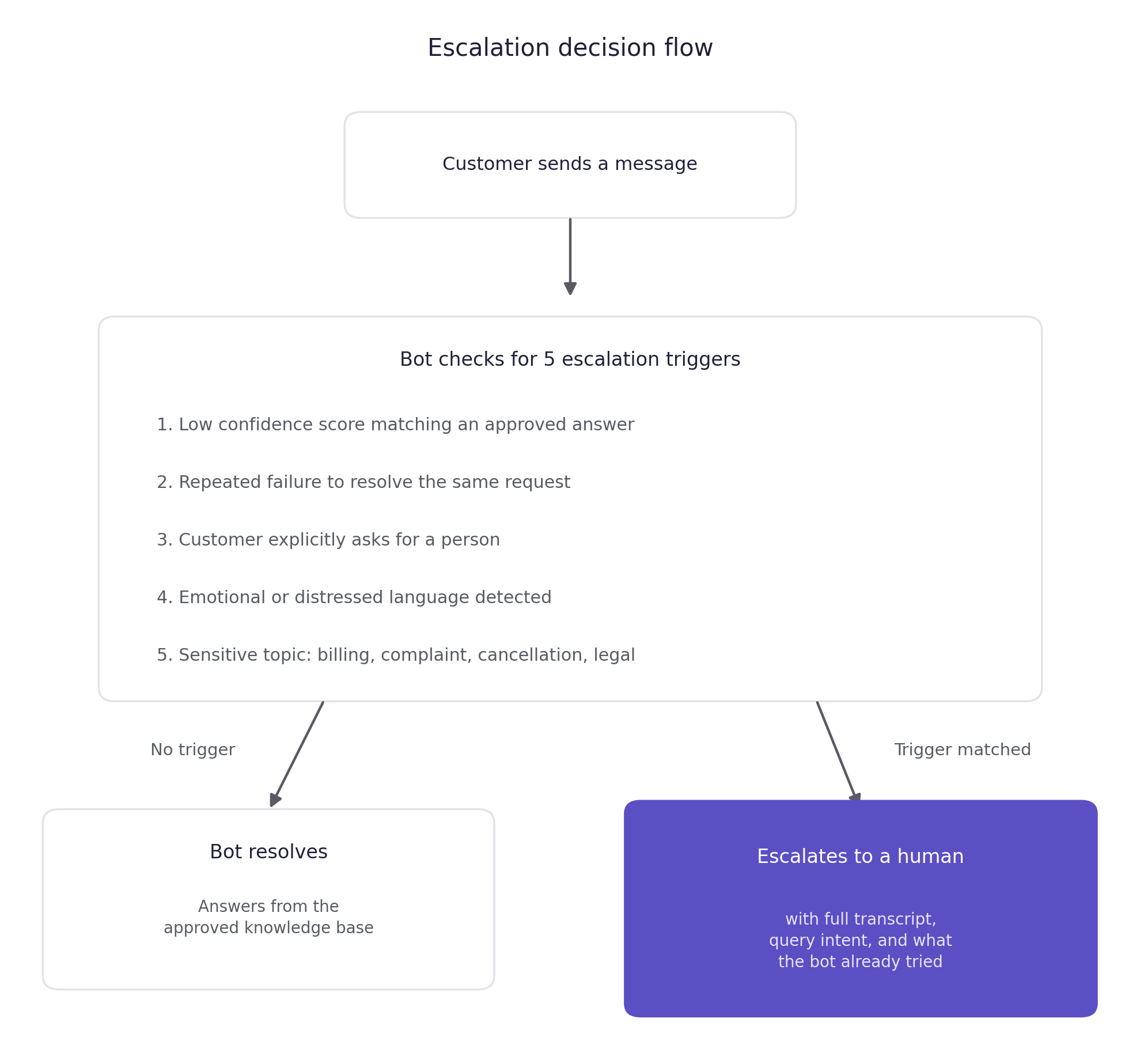
Most automation failures are escalation design failures. A bot that cannot answer a question keeps trying, the customer gets frustrated, and there is no clear path to a person. Defining when to hand off to a human is the core trust mechanism of your support automation workflow.
Configure five trigger categories before you go live:
- Low confidence score: the bot cannot match the query to an approved answer in your knowledge base.
- Repeated failure: the bot has attempted to resolve the same request twice without success.
- Explicit human request: the customer types "speak to a person" or any equivalent phrasing.
- Emotional or distressed language: frustration, urgency, or distress signals in the message.
- Sensitive topic flags: billing disputes, complaints, cancellations, refunds, and any legally or clinically sensitive content.
When escalation triggers, the customer should see something like: "I'm connecting you with a member of our team now. They'll have the full context of our conversation so you won't need to repeat yourself."
Context preservation is non-negotiable. The human agent must receive the full chat transcript, the original query intent, and a note on what the bot already attempted. Without this, the customer repeats themselves. Repetition is one of the most common complaints about automated support. LiveChat's escalation guidance confirms that handoff quality, not chatbot capability, separates automation that builds trust from automation that destroys it.
Confidence thresholds, sentiment detection, and topic flagging work differently across platforms. Verify which triggers your specific tool supports before launch.
Step 4: Configure, test, and launch narrow
With your knowledge base built and escalation rules defined, setup follows a clear sequence. Connect your knowledge base to your chatbot or help desk routing layer, configure the five escalation triggers from Step 3, and run 10–15 internal test scenarios across your top ticket categories. Then go live on one channel only—website chat or email, not both at once.
You need three layers. A help desk such as Zendesk or Freshdesk handles ticket routing and agent assignment. An AI chatbot such as Intercom or Tidio handles first-line conversation. A knowledge base tool such as Notion or Helpjuice stores your approved answers.
Both Intercom and Tidio offer no-code chatbot configuration. Zendesk and Freshdesk have built-in automation rules that require no developer. A non-technical founder or ops manager can complete this setup in a day. As HubSpot's automation guide notes, the most common mistake at this stage is launching too broadly before the workflow is stable.
One compliance note: if your setup collects customer data through automated channels, confirm it meets applicable privacy requirements. For European customers, that means GDPR compliance. Review your tool's privacy policy and data processing agreement before going live.
Pylon's start-narrow advice applies here too: prove one use case before expanding scope. For workflows more complex than a standard help desk supports, a custom-built AI system can be configured to fit niche processes, compliance requirements, and multi-system integrations from day one.
If your team is spending hours on tasks AI could handle, let's change that.
arsuno.ai designs and deploys custom AI automation systems for small and mid-sized businesses, with no developer required on your side.Start the conversation
Step 5: Measure, refine, and expand your automation safely
Once your support automation workflow is live, track three metrics from day one. These are containment rate (how many conversations the bot resolves without escalation), re-contact rate (how many customers follow up on the same issue within 24–72 hours), and CSAT on automated interactions. All three are available in basic help desk reporting without a BI tool.
If your help desk does not show containment rate directly, count how many tickets the bot closes without human follow-up this week versus last week. That ratio is your manual containment proxy and takes five minutes to calculate.
Expand in phases. Start with FAQs in weeks one through four. Add appointment booking or order status queries in month two. Move to proactive notifications in month three and beyond. Atlassian's automation performance guidance recommends defining your success threshold for each phase before you start it, not after. Each phase should be stable and measured before the next begins.
If re-contact rate rises or CSAT drops, pause expansion and review your knowledge base answers and escalation trigger settings. Expanding a broken workflow makes it harder to diagnose.
One arsuno.ai recruitment client reported significantly faster project delivery and a measurable increase in client satisfaction after deploying custom AI automation. That result reflects what happens when automation is built around a real workflow rather than a generic template.
What good automation looks like six months in
The goal of this entire process is not a chatbot that deflects tickets. It is a support operation where your team spends most of their time on work that actually requires a person. Customers get fast, accurate answers to routine questions without waiting for a human to be free.
Six months after a well-configured launch, the pattern is consistent. Containment rate stabilizes above 60%. Re-contact rate drops because the bot's answers are accurate and complete. CSAT on automated interactions is comparable to human-handled tickets for routine queries. Speed and accuracy matter more than the delivery mechanism for low-stakes requests.
The human touch is not lost. It is concentrated where it matters. Your team handles the complaints, the edge cases, the customers who need empathy and judgment. The bot handles the hours, the pricing, the order status, and the password resets. That division of labor is not a compromise. It is the point.
If you are building toward a more complex operation—with multiple channels, custom integrations, or industry-specific compliance requirements—a custom-built system will outperform any off-the-shelf configuration. The audit, knowledge base, and escalation logic you build in this process are the same inputs a custom system uses. You are not starting over. You are ready to scale.
Curious what this would look like for your business?
arsuno.ai builds custom AI automation systems tailored to your workflows, your tools, and your team. No generic templates, no developer required on your side.Get a free consultation
Frequently Asked Questions
How do you automate customer support without losing the human touch?
Automate only routine, low-risk requests first: FAQs, order status, booking links, and factual policy questions. Design a clear escalation path to a human for anything complex, emotional, or sensitive, and make sure the handoff includes full conversation context so the customer does not have to repeat themselves. Write your knowledge base answers the way your best team member would say them out loud, so tone stays warm even when a bot delivers them. The human touch is preserved not by limiting automation, but by designing it so humans appear exactly when they are needed.
What should you automate first in customer support?
Start with your highest-volume, lowest-complexity requests: the questions your team answers the same way every time. Typical first candidates include business hours, pricing, return policies, order status, and booking links. Keep anything requiring judgment, negotiation, empathy, or context-specific knowledge as human-led. As Pylon's automation guide puts it, starting narrow with one proven use case is more effective than launching a broad automation layer that breaks in multiple places at once.
When should a chatbot escalate to a human agent?
A chatbot should escalate when it cannot confidently match a query to an approved answer, when it has failed to resolve the same request twice, or when the customer explicitly asks for a person. Emotional or distressed language, and any topic involving billing, complaints, cancellations, or legally sensitive content, should also trigger an immediate handoff. The customer should always receive a clear message confirming that a team member is taking over. LiveChat's escalation framework confirms that setting these triggers before launch is what prevents bot loops.
What customer support tasks should never be automated?
Billing disputes, refund negotiations, complaints, cancellations, and any interaction requiring genuine empathy or judgment should stay human. The same applies to policy exceptions, legally sensitive questions, and any topic where a wrong answer carries real consequences for the customer or your business. If you are in healthcare or financial services, add clinical questions and regulated advice to that list. Treating automation as a risk-free default for high-stakes interactions is the fastest way to damage a reputation your business has spent years building.
Chatbot vs human support: which one should handle what?
Bots are best for triage, repetitive factual questions, data collection, and first-line responses where speed matters more than nuance. Humans are best for complex, sensitive, consultative, or exceptional cases where the customer needs to feel genuinely heard. The goal is not to replace one with the other but to design a clear division of labor so each handles what it does well. For a full decision framework on this, see [chatbot vs human support](INTERNAL: Supporting: Chatbot vs Human Support: Where Each One Wins).
What are the best practices for automated customer service?
Audit your tickets before building any workflow, build your knowledge base before configuring any automation, and define your escalation rules before going live. Test with 10–15 internal scenarios before launch, start on one channel only, and measure containment rate and re-contact rate from week one. As Atlassian's customer service automation guidance recommends, define what success looks like for each phase before you start it, and pause expansion if your metrics show the current phase is not stable.
How do you preserve context when handing off from bot to human?
Pass the full chat transcript, the customer's original query intent, and a note on what the bot already attempted to the human agent before they respond. Show the customer a short message confirming the handoff and letting them know the agent has full context. Never ask the customer to repeat information the bot already collected. This single design decision is what separates a handoff that builds trust from one that frustrates the customer and undermines the entire automation investment.