

Key takeaways
- Enterprise workflow automation fails most teams not at the task level, but at the handoff: diagnose your specific failure modes before selecting any platform.
- Four failure modes drain throughput: approval queue aging, ownership ambiguity, status-visibility void, and cross-system data drop.
- Prioritize automation candidates by scoring three criteria: frequency, idle-time cost, and cross-system dependency.
- Board-ready metrics are cycle time reduction, SLA adherence, queue aging, and FTE hours recovered.
- De-risk your first commitment with a Proof of Value phase before full deployment.
Why large teams lose time at the handoff, not the task
An approval request lands in a queue on Monday morning. No SLA governs it. No alert fires when it ages past 24 hours. By Thursday, the requestor is chasing it across Slack and email, and the downstream team is stalled waiting for a green light that should have taken 20 minutes. Nobody performed poorly. The process just has no owner between steps.
This is the core enterprise throughput problem, and it is structural, not personal. Individual contributors can be fast, accurate, and diligent while the process between them idles for days. Task speed and handoff speed are two different measurements, and most organizations only track the first one.
The fix belongs to a specific category: cross-functional orchestration. As Grid Dynamics defines it, this approach coordinates tasks, people, and systems across structured decision points, spanning ERP, HRIS, ITSM, and CRM. That is a materially different scope than automating a single repetitive action. It means the automation must own the seams between departments, not just the work inside them.
More departments mean more handoff points, and more handoff points mean more places where work sits invisibly between steps. A five-person team might have three handoffs in a given process. A 200-person organization running the same process across three departments might have twelve, each one a potential idle gap that accumulates until SLAs start breaking.
The operational cost is real even when it is invisible. If a procurement approval sits idle for 48 hours per cycle and runs 20 times a year, that is 960 hours of downstream waiting time on a single process. Multiply that across several approval chains and the throughput loss becomes significant. The teams are not the bottleneck. The gaps between them are.
Recognizing this distinction changes how you approach automation. You are not trying to make people faster. You are trying to close the gaps where work stops moving.
Four handoff failure modes and the automation pattern for each
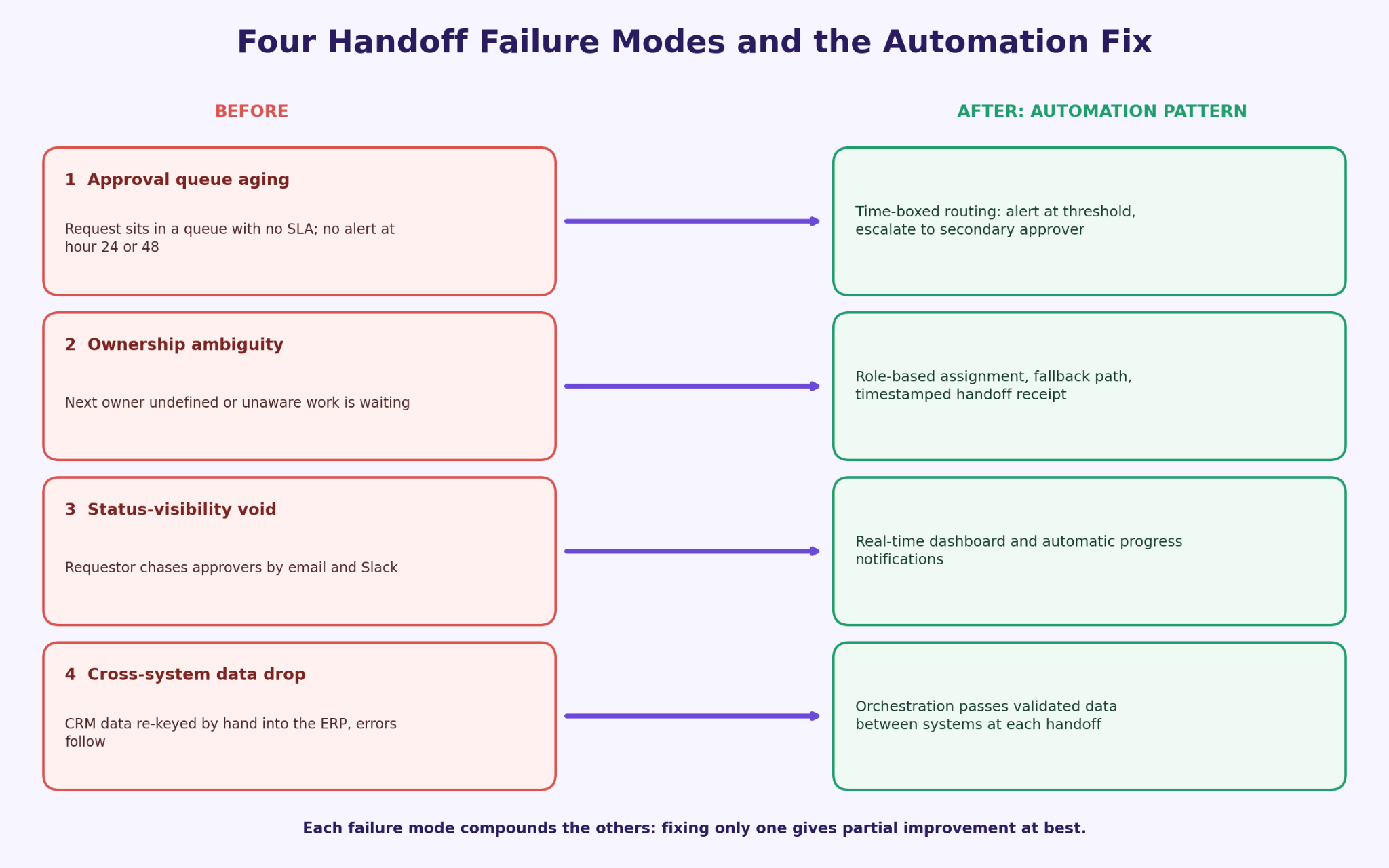
Every broken handoff traces back to one of four structural failure modes. Naming them precisely matters because each requires a different automation pattern. Workflow automation for approvals and routing is the most commonly deployed fix, but it only addresses one of the four.
1. Approval queue aging
A request enters a queue with no SLA attached. It ages silently while the downstream team waits, and no alert fires at hour 24 or 48.
The fix is time-boxed routing with escalation triggers. Set a maximum queue age, notify at the threshold, and escalate to a secondary approver if the primary does not act within the defined window.
2. Ownership ambiguity
A task completes in one department, but the next owner is undefined or unaware the work is waiting. The handoff exists in someone's head, not in a system.
Role-based assignment rules with fallback logic solve this. The system assigns the next step to a defined role, not a named individual, and records a timestamped handoff receipt. If that role is unavailable, a fallback path routes the work rather than letting it stall.
3. Status-visibility void
No one can see where a request is without manually asking. The requestor emails the approver, who checks with their team, who pulls up a spreadsheet. This chasing consumes FTE hours that add zero value.
Real-time dashboards and automated progress notifications stop this. When workflow state changes trigger alerts to relevant stakeholders, everyone sees the current position of every request without asking.
4. Cross-system data drop
Data entered in one system does not propagate to the next. A CRM record does not update the ERP. Someone re-enters it manually, introducing errors and delay. As Flowable describes, this is the distinction between task automation and genuine process orchestration: orchestration passes validated data between systems at each handoff point rather than treating each system as an island.
Each failure mode compounds the others. An approval that ages generates status-chasing, and when it finally moves, manual data re-entry introduces errors requiring rework. Fixing one without addressing the others produces partial improvement at best.
How to prioritize which workflows to automate first
Before you select a platform or scope a project, answer one question: which processes will deliver the fastest measurable return? Score each candidate on three criteria. High scores across all three identify your first target.
1. Frequency
How often does this process run per week or month? A process that runs twice a year is a poor candidate regardless of how painful it is. One that runs 20 times a month compounds every wasted hour across every cycle. Frequency multiplies the value of any improvement you make.
2. Idle-time cost
How long does a task sit waiting at each handoff? Measure this in hours, not effort. A process where each handoff idles for 24 to 48 hours before someone acts is costing you real throughput, even if the actual work takes 15 minutes. Find the gaps between tasks, not just the tasks themselves.
3. Cross-system dependency
How many systems must a human touch to move the process forward? If one step requires opening the CRM, updating the ERP, and sending a confirmation email, that is three manual touchpoints automation can collapse into one. Higher dependency means higher error risk and higher time cost per cycle.
A weekly procurement approval that touches ERP, email, and a spreadsheet, idles for 48 hours per cycle, and runs frequently scores high on all three. That is your first candidate.
If your top candidate turns out to be a single repetitive UI task rather than a cross-functional process, the RPA vs BPM distinction is worth reviewing before you commit to an orchestration platform. Understanding where task automation ends and process orchestration begins will sharpen your vendor conversations considerably.
What enterprise-grade automation requires in production
The gap between a compelling demo and a system that works in production is almost always found in two places: integration depth and exception handling. Teams burned by past implementations were burned here, not in the workflow design.
Integration requirements
Enterprise automation must connect with ERP, HRIS, ITSM, and CRM at a data level, not just trigger emails. As OnRamp's 2026 guide outlines, a production workflow moves through trigger, rules, execution, exception handling, and logging as a connected sequence. Each step must pass validated data to the next system rather than relying on a human to re-enter it.
Exception routing
No rule set fully anticipates every edge case. An approver is on leave. A data field fails validation. A request falls outside defined thresholds. Production-grade automation routes these exceptions to a human queue rather than silently stalling. The exception path is a core design requirement, not an afterthought.
Human-in-the-loop review
Not every decision should be fully automated. Human-in-the-loop review preserves judgment at high-stakes points: clinical assessments, high-value procurement approvals, compliance sign-offs. The automation handles surrounding coordination while a qualified person makes the call that carries real accountability.
Audit trails and governance
Every routing event, approval decision, and exception must be logged with a timestamp and actor record. As Moveworks notes, governance and compliance design are structural requirements for any enterprise deployment. Arsuno.ai builds with security and data-protection architecture designed for regulated industries, which matters most for healthcare and financial services clients.
Realistic deployment timelines
Arsuno.ai's onboarding runs 1 to 2 weeks. Full deployment ranges from 1 to 6 months depending on integration complexity, data readiness, and scope. [⚑ HUMAN REVIEW: Verify these timelines against current Arsuno.ai implementation documentation.] Teams that rush past integration and exception-handling design are the ones with a system that works in the demo and breaks in week three.
The ROI metrics your CFO will actually ask for
"Improves efficiency" does not pass a CFO review. You need a specific metric vocabulary tied to measurable operational outcomes. These are the four numbers your leadership team will ask for.
The metric vocabulary
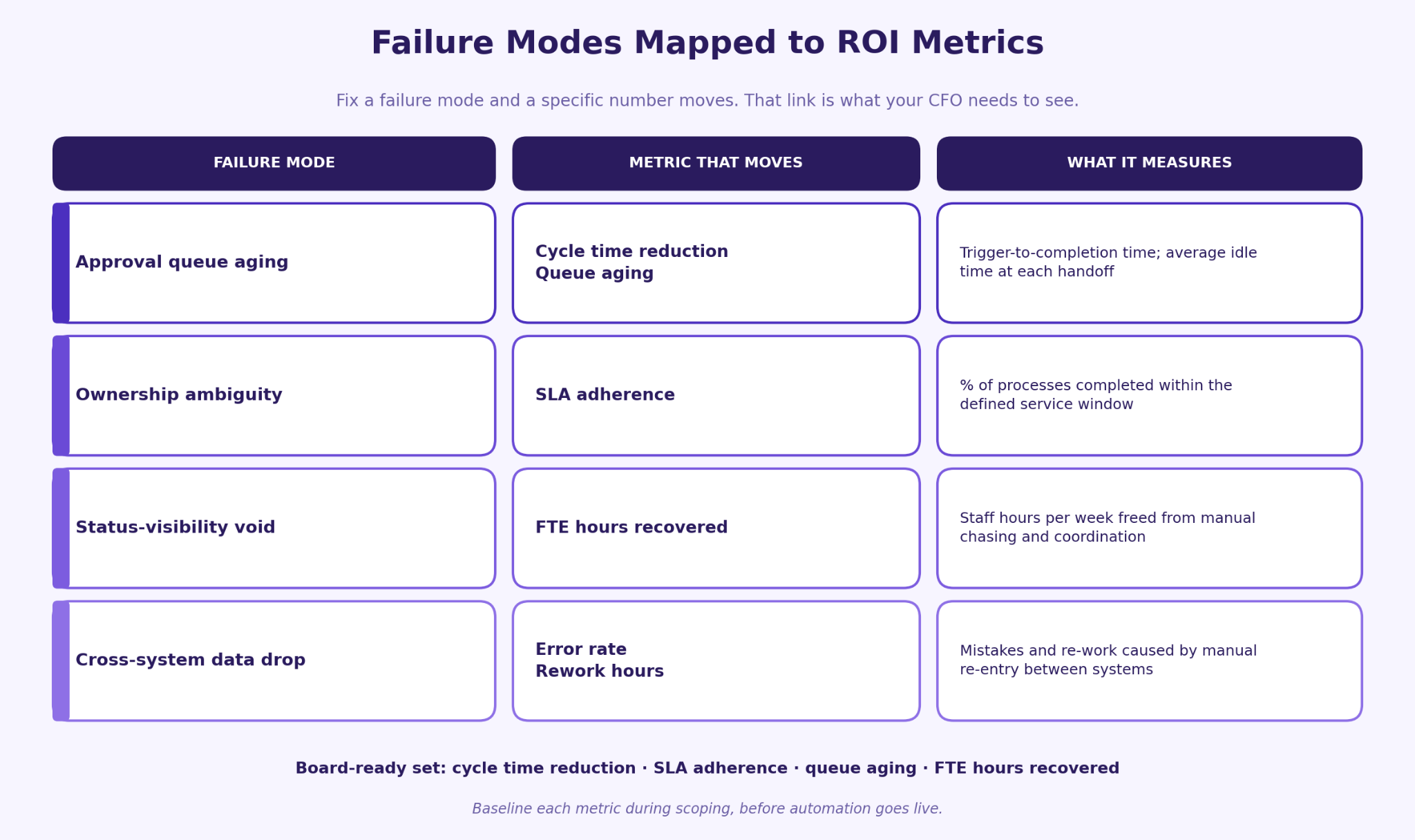
Cycle time reduction measures elapsed time from process trigger to completion. SLA adherence measures the percentage of processes completed within the defined service window. Queue aging tracks average idle time at each handoff point: the direct measure of the failure modes described earlier. FTE hours recovered counts staff hours freed from manual coordination and re-entry per week.
Mapping failure modes to metrics
Each failure mode maps to one or more of these metrics. Approval queue aging drives cycle time and queue aging measurements. Ownership ambiguity shows up in SLA adherence rates. The status-visibility void is measured by FTE hours recovered from manual chasing. Cross-system data drop appears in error rate and rework hours. When you fix a failure mode, you move a specific metric. That connection is what your CFO needs to see.
Arsuno.ai reports measurable client outcomes including significant reductions in operational overhead, faster project delivery, and improved client satisfaction across engagements in healthcare and recruitment. These are Arsuno.ai-reported figures from specific client engagements.
For the full metric framework and how to baseline each number before you start, see how Kinetic Data frames orchestration as a measurable discipline rather than a technology category.
How to de-risk your first automation commitment
The fear most ops leaders carry into an automation project is not that the technology will fail. It is that they will own a failed board-recommended investment. That fear is rational, and it is why the first commitment structure matters as much as the platform choice.
The standard answer to implementation risk is a Proof of Value phase: a working proof of concept built against your actual data and workflows before full budget is committed. This is not a vendor demo. It is a functional system running on your processes that produces measurable results you can show your leadership team before approving full deployment.
Arsuno.ai structures every engagement this way. The first phase produces a working system on a single high-priority workflow, measured against the baseline metrics established during scoping. If the numbers do not move, you have not committed to a six-month rollout. If they do, you have a board-ready case for expanding scope.
The Blue Prism enterprise automation guide makes a useful point here: the organizations that see consistent ROI from automation treat the first deployment as a learning system, not a finished product. They instrument it, measure it, and iterate before scaling. That discipline starts with a scoped, measurable first phase rather than a full-organization rollout.
The Proof of Value model also changes the internal conversation. Instead of defending a large technology investment on projected returns, you are presenting measured results from a live system. That is a materially different kind of board presentation, and it is the one that gets expansion approved.
Frequently Asked Questions
What is enterprise workflow automation?
Enterprise workflow automation is the end-to-end coordination of tasks, people, and systems across a structured business process, spanning multiple departments and decision points. It goes beyond automating a single repetitive action: it manages routing, approvals, exceptions, and data movement across systems like ERP, HRIS, ITSM, and CRM. Human judgment still plays a role at high-stakes decision points, while the surrounding coordination work runs automatically. The result is a process that moves without manual chasing or idle gaps between steps.
How does enterprise workflow automation work?
A workflow automation system follows a defined sequence: a trigger starts the process, rules determine routing and assignments, execution moves work to the next step, exceptions are routed to human queues when rules cannot resolve them, and every action is logged. According to OnRamp's 2026 guide, this sequence coordinates work across systems rather than within a single application. Human-in-the-loop review sits at defined decision points where accountability requires a person to act. The system handles everything between those points automatically.
What is the difference between workflow automation and business process automation?
Workflow automation typically refers to the execution layer: routing tasks, triggering notifications, and moving work between steps according to defined rules. Business process automation is a broader discipline that includes process design, governance, monitoring, and continuous improvement across the full lifecycle of a process. In practice, the terms overlap significantly, and many platforms address both layers. The practical distinction is that workflow automation focuses on moving work, while business process automation includes the management and optimization of how that work is designed and measured.
What is the difference between RPA and BPM?
RPA (Robotic Process Automation) automates repetitive, rules-based tasks at the UI level, typically mimicking what a human does in a software interface. BPM (Business Process Management) orchestrates multi-step, cross-functional workflows with governance, routing, and approval logic. As Hyland explains, RPA suits isolated, repetitive tasks while BPM suits processes that span departments, involve approvals, and require audit trails. Many enterprise deployments use both in combination.
How do you automate approvals across departments?
Start by defining the routing logic: which department, role, or threshold determines who approves a given request. Build in escalation paths for when an approver does not act within the defined SLA window, and fallback assignments for when the primary approver is unavailable. Connect the approval workflow to the core systems that hold the relevant data, such as ERP for procurement or HRIS for headcount requests, so approvers have the context they need without manual lookups. Log every decision with a timestamp and actor record so the audit trail is complete from the moment the request is submitted.
What does enterprise workflow automation look like in production?
In production, this type of automation connects to your existing systems rather than replacing them, passing validated data between ERP, HRIS, ITSM, and CRM at each handoff point. As Moveworks describes, production-grade systems include exception routing, real-time status visibility, and governance controls that satisfy compliance requirements. Staff see process status without asking, and exceptions reach a human queue rather than stalling silently. The difference between a demo and a production system is almost always found in how exceptions and integrations are handled.
What systems should enterprise workflow automation integrate with?
The core integration targets are ERP, HRIS, ITSM, and CRM, as these are the systems where the data needed to route, approve, and complete most enterprise processes lives. As Grid Dynamics notes, connecting these systems reduces duplicate data entry, eliminates status drift between platforms, and ensures that routing rules stay accurate as organizational data changes. Finance systems, document management platforms, and communication tools are common secondary integrations depending on the process. The integration scope directly affects both governance quality and the scalability of the automation over time.
What should enterprise workflow automation include for audit trails and governance?
Every decision, routing event, and exception handling action should be logged with a timestamp, the identity of the actor or system that triggered it, and the outcome. Access controls should restrict who can view, modify, or override workflow rules, and approval traceability must allow you to reconstruct the full history of any request from submission to completion. Exception handling records should capture why a request was routed outside the standard path and who resolved it. Frame these as design requirements rather than compliance guarantees: the architecture must support auditability, but specific regulatory compliance depends on the full system context and applicable law.