

Key takeaways
- Small business automation pays off fastest when you start with the highest-frequency, rules-based workflow, not the most impressive-looking one.
- For 10–300 person service businesses, the three fastest wins are lead follow-up, appointment reminders, and invoice chasing.
- If a process happens fewer than three times per week or touches no revenue, it is not your first automation.
- Automation removes repetitive work; human judgment stays in place for complaints, regulated decisions, and relationship-defining moments.
Why most SMBs automate the wrong things first
Most business owners pick their first automation based on what looks modern, not what actually recovers time. Social media scheduling and internal Slack notification automations are the two most common wrong first moves. They feel productive, but for a team of 10 or more people, they rarely free meaningful hours. Neither ranks high on frequency, revenue proximity, or implementation payback.
The sequencing mistake happens because owners reach for visible, impressive-looking workflows instead of the boring, high-frequency processes that actually protect revenue and free staff hours. Automating your Instagram queue while your team manually chases overdue invoices is the operational equivalent of painting the reception area while the roof leaks.
The Automation Atlas guide frames this clearly: prioritization should follow a four-factor logic. Rank candidate processes by frequency, time cost per occurrence, implementation ease, and revenue proximity. Apply those four filters and the ranked list below writes itself.
Here is the one-sentence diagnostic: if the process happens fewer than three times per week or touches no revenue, it is not your first automation.
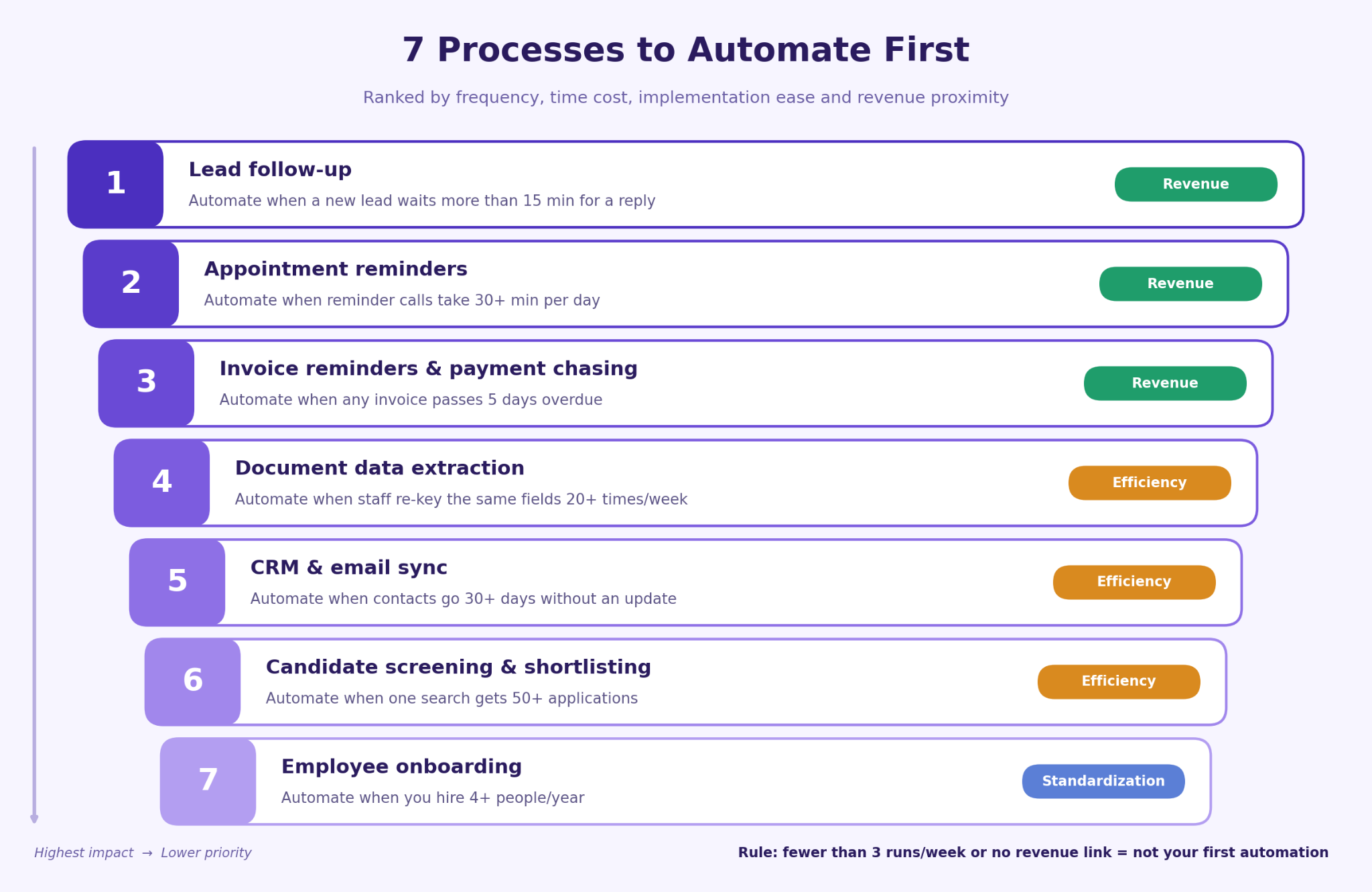
The 7 processes to automate first, ranked by impact
Every item below covers why it ranks here, what it replaces, the tool category, and a decision rule so you can self-select your entry point.
1. Lead follow-up: stop losing warm leads to slow response
Every hour of delay reduces conversion probability. Manual CRM entry and first-contact emails are the most common culprits. As Automathing's ROI-ranked examples show, high-frequency revenue-adjacent workflows deliver the fastest payback of any automation category. A CRM with workflow triggers, such as HubSpot, handles the acknowledgment and routing automatically. Automate this when a new lead waits more than 15 minutes for a response.
2. Appointment reminders: eliminate no-shows before they cost you
No-shows are a direct, quantifiable revenue loss. US Tech Automations reports that one home inspection company dropped its no-show rate from 14% to under 3% by automating a booking confirmation, a 48-hour reminder, and a 2-hour SMS (metrics self-reported by the vendor). A scheduling platform with SMS integration handles the full sequence without staff involvement. Automate this when your team spends more than 30 minutes per day on reminder calls.
3. Invoice reminders and payment chasing: protect cash flow automatically
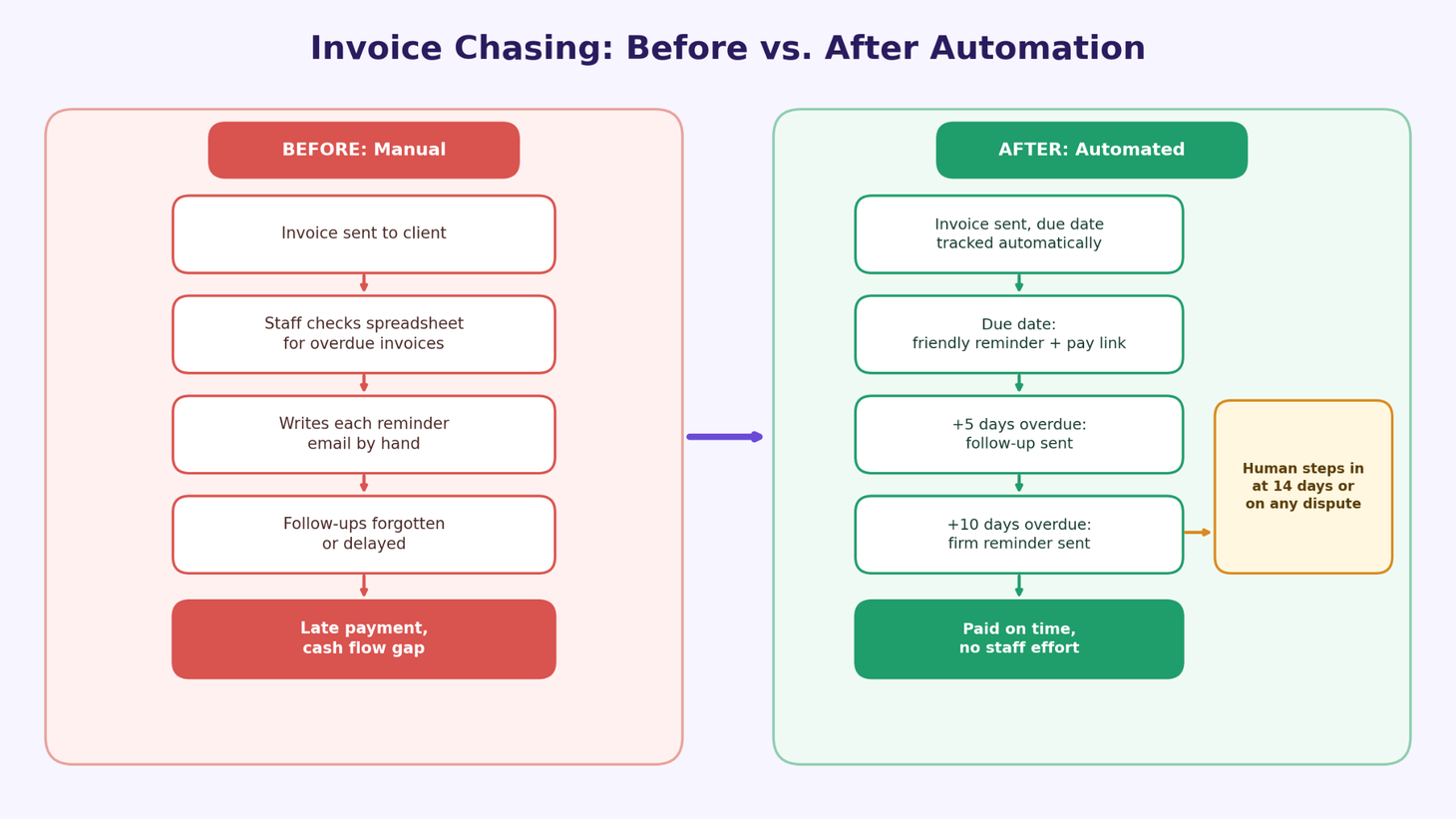
A trigger-based sequence firing at the due date, five days overdue, and ten days overdue keeps cash moving without anyone tracking it manually. Keap's SMB automation library lists payment follow-up as one of the most universally applicable automations for service businesses of any size. The tool category is any invoice platform with conditional triggers or a CRM with billing integration. Automate this when any invoice passes five days overdue without a follow-up.
4. Document data extraction: end manual re-keying of intake forms and contracts
This automation replaces transcription entirely using an OCR-enabled AI tool. AWS Smart Business identifies document processing as one of the highest-readiness automation targets for SMBs. Arsuno.ai achieved a 70% reduction in manual work and 3.5x automation efficiency at a psychiatry clinic in Switzerland using AI-powered document automation. Note: healthcare and legal workflows should include a human review step for GDPR and HIPAA compliance where applicable. Automate this when staff re-key the same fields more than 20 times per week.
5. CRM and email sync: keep records current without manual updates
Stale CRM data breaks every downstream workflow. This automation replaces manual copy-paste between forms, email, and CRM using a workflow orchestration platform such as n8n or Zapier. As Sinqra's 2026 workflow guide notes, CRM sync is one of the first integrations SMBs should standardize because it unlocks every subsequent automation that depends on accurate contact records. Automate this when contacts go 30 or more days without an update due to manual lag.
6. Candidate screening and shortlisting: deliver shortlists faster than competitors
Manual CV review consumes hours of senior consultant time per search with no strategic value. Arsuno.ai reports 2x faster project delivery and a 50% improvement in client satisfaction at a US recruitment agency using AI-powered shortlisting (client-reported figures). Candidate data handling must comply with applicable privacy regulations, including GDPR where EU/EEA residents are involved. Automate this when a single search receives more than 50 applications and initial screening takes more than four hours.
7. Employee onboarding: standardize the first 30 days without repeating yourself
When onboarding is manual, it is inconsistent and dependent on whoever is available. This automation replaces document distribution, system access provisioning, and checklist follow-up using an HR or workflow automation platform. Rippling's SMB automation guide highlights onboarding as a high-value standardization target once hiring reaches a repeatable cadence. Automate this when your team hires more than four people per year and onboarding takes more than one full day of a manager's time per hire.
How to sequence your first automation project
Reading the list is the easy part. Choosing your entry point is where most owners stall. Use these three steps to identify your personal starting point without re-reading the whole article.
The three criteria to apply in order are frequency, pain cost, and data readiness. Frequency comes first: count how many times the task happens per week. Anything under three occurrences is not your first project. High-frequency tasks justify the build time; low-frequency ones do not.
Pain cost is second: estimate the time or revenue lost when the process is slow or missed. Lead follow-up and invoice reminders score highest here because the cost of delay is immediate and measurable. As James Ross Jr.'s workflow guide explains, frequency, effort, and payback are the three criteria that consistently separate high-ROI first builds from expensive experiments.
Data readiness is third: check whether the inputs already exist in a digital format. A process that starts on paper needs one extra step before automation is viable. If two processes score equally on all three criteria, start with the one closest to revenue.
Where human oversight must stay
Automation removes the frustrating, repetitive work. It does not remove the human judgment that makes a service business worth hiring.
Customer support triage. Automation classifies and routes tickets effectively. A human must handle any ticket involving a complaint, a refund request, a clinical concern, or emotional distress. The rule is simple: if the message carries emotional weight or financial risk, a person responds.
Regulated workflows. Any process touching patient records, legal documents, or financial decisions in healthcare, legal, or financial services should include a human review step. GDPR and HIPAA compliance requirements, where applicable, are not optional layers you add later. Build the human checkpoint into the workflow from day one, not as an afterthought.
High-value client communications. First contact with a qualified lead, a contract negotiation, and a complaint escalation should always involve a person. Automation handles the routine acknowledgment and routing; the relationship-defining moments belong to your team. A prospect who receives only automated responses during a high-stakes decision will notice.
The practical test: if getting it wrong would cost you a client, a compliance fine, or a clinical outcome, a human stays in the loop.
Start with the process that costs you the most right now
The best first automation is not the most sophisticated one. It is the one currently bleeding the most time or revenue every week. You already know which process that is. It is the one your team mentions in every ops meeting, the one that causes the most follow-up, the one you have been meaning to fix for six months.
Acting this week carries less risk than waiting. A well-sequenced first automation builds confidence, frees hours, and creates the data foundation for the next one. The wrong first automation wastes budget and makes the next project harder to justify internally.
Thirty-plus AI systems built across 20-plus businesses means the sequencing decisions are already mapped for your industry (figures self-reported by Arsuno.ai). If you want to see which workflow delivers the fastest return for your specific operation, arsuno.ai's Proof of Value model shows you a working system in one to two weeks before you commit full budget.
Frequently Asked Questions
What should small businesses automate first?
Start with the most frequent, rules-based, time-consuming workflow in your operation. Favor tasks where delays create obvious cost: missed follow-ups, no-shows, or overdue invoices. For most service businesses with 10–300 employees, the three most common first wins are lead follow-up, appointment reminders, and invoice chasing. These three share the same profile: they happen daily, the cost of not doing them is immediate, and they are straightforward to build.
Which automation processes deliver the fastest ROI for SMBs?
The fastest ROI comes from workflows with high frequency and low complexity, particularly repetitive handoffs between systems. Form-to-CRM routing, invoice-to-reminder sequences, and booking-to-confirmation triggers all qualify. The three ROI levers to measure are time saved per week, error reduction in downstream data, and cash-flow impact from faster payment cycles. As Automathing's ranked examples show, revenue-adjacent processes consistently outperform internal productivity automations on payback speed.
What tasks should small businesses avoid automating first?
Avoid tasks that depend heavily on human judgment, exception handling, or emotional context. Avoid low-frequency processes before you have addressed the obvious daily time sinks. Social media scheduling and internal notification automations are the two most common wrong first moves: they look modern but rarely recover meaningful staff time for a team of 10 or more. The test is simple: if the task happens fewer than three times per week or requires judgment to handle exceptions, it is not your first build.
How do I automate lead follow-up?
Set a trigger from the most common lead entry points in your business: form submission, missed call, ad lead, or referral intake. Route the lead to your CRM automatically and send an immediate acknowledgment message so the prospect knows their inquiry was received. Add a human handoff rule that flags qualified opportunities for a personal response within a defined window, typically 15–30 minutes during business hours. Test the trigger with a real submission before scaling it across all lead sources.
How do I automate invoice chasing?
Trigger reminders from invoice due dates or overdue status flags in your accounting platform. A standard sequence fires at the due date, again at five days overdue, and again at ten days overdue, with each message maintaining a professional tone. Escalate to a human after a defined threshold, such as 14 days overdue or when a client replies with a dispute or question. Keep the automated messages short, factual, and easy to act on with a direct payment link included.
How do I automate appointment reminders?
Use confirmation and reminder triggers at three points: immediately at booking, 48 hours before the appointment, and 2 hours before. Include a reschedule link or reply option in each message so clients can self-serve without calling your office. US Tech Automations reports that a home inspection company using this exact three-touch sequence dropped its no-show rate from 14% to under 3% and eliminated a 90-minute daily call block (metrics self-reported by the vendor). Preserve human support for edge cases such as same-day emergencies or clients who need to discuss changes.
How do I automate customer support triage?
Classify incoming tickets by intent, urgency, or topic using a rule-based or AI-assisted routing layer. Route simple, repetitive requests to self-serve answers or templated responses so your team handles only the tickets that genuinely need them. Escalate sensitive, complex, or emotionally charged issues to a person immediately, without delay. For a full guide on designing escalation triggers that keep the human touch intact, see the Arsuno.ai article on support triage design.
How do I automate CRM and email sync?
Map your intake form fields directly to the corresponding contact, deal, or ticket fields in your CRM so every submission creates or updates a record without manual copy-paste. Add assignment and notification rules so the right team member is alerted when a new record arrives. Before scaling, test the field mapping with a handful of real submissions to catch duplicates, missing required fields, and error-handling gaps. A workflow orchestration platform such as n8n or Zapier handles the connection between your form tool, CRM, and email system without custom code.