

Key takeaways
- Map your integration tier before buying any connector: the tier determines the tool.
- Check native connectors first; if two tools already sync directly, Zapier and Make add cost without value.
- Choose Zapier for linear flows under five steps; choose Make when branching logic or data transformation is in play.
- If neither platform can express your logic cleanly, that signals a custom build conversation, not another platform trial.
(IMAGE: saas-int
Why most SaaS stacks break before automation even starts
Your data is living in three disconnected tools, and your team is manually copying it between them. That's not a Zapier problem or a Make problem. It's a sequencing problem, and it's the most common reason automation rollouts fail before they produce a single result.
Most ops teams skip the audit step entirely. They identify a workflow that feels slow, buy a connector, and start building. Six months later, they're maintaining a fragile automation their team doesn't trust, and they're blaming the platform. The real issue was never the platform. It was that nobody identified which integration tier the workflow actually sat at before choosing a tool.
The native-first rule is the most important principle in this article. If a workflow lives inside one SaaS product, or between two products that already publish a direct connector, you don't need Zapier or Make. You need to read the documentation. Buying an external automation platform before exhausting native options adds recurring cost and maintenance overhead without adding capability. As Unito's comparison notes, the decision framework for automation tools only becomes relevant once you've confirmed that native integrations can't cover the workflow.
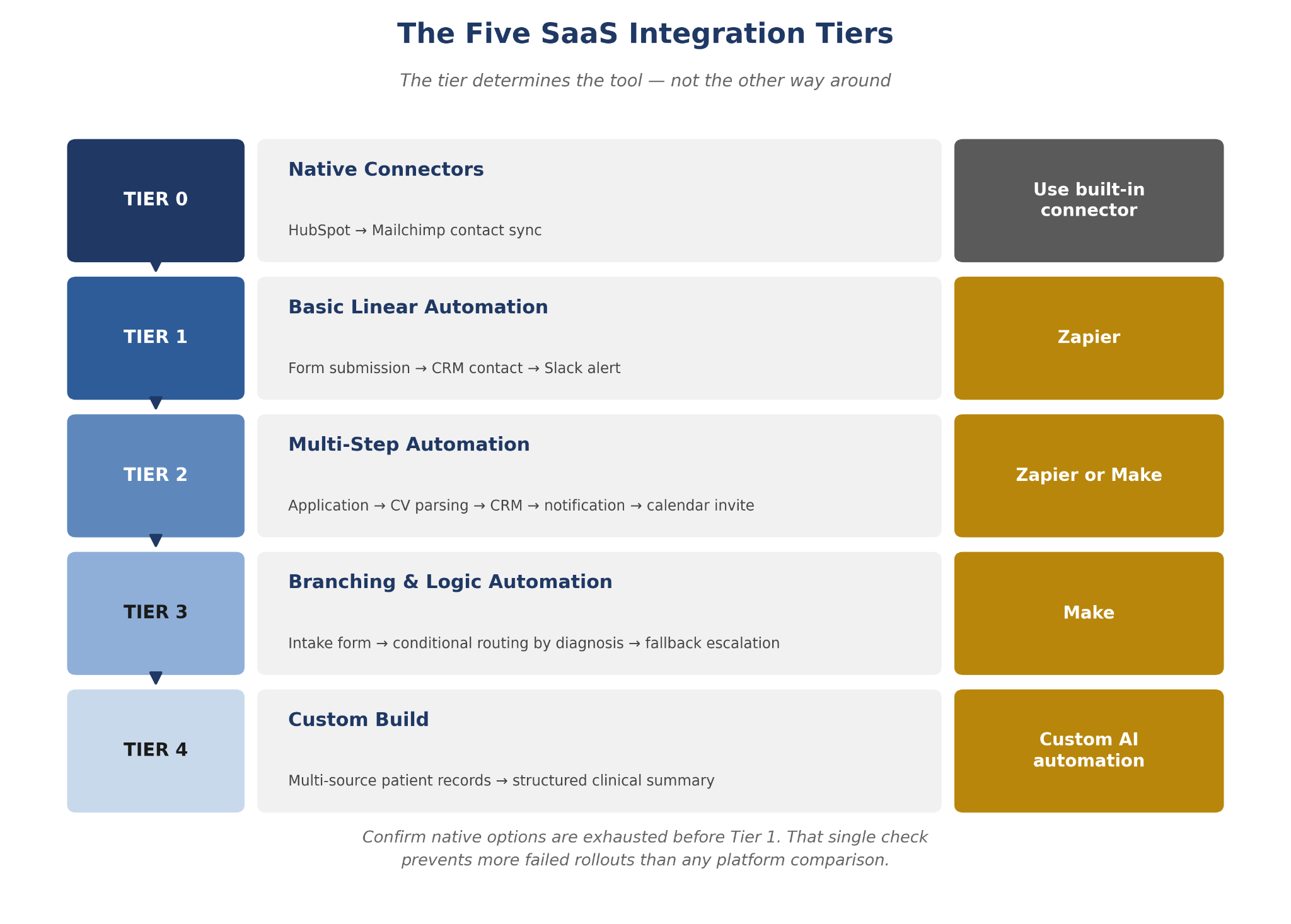
Workflow automation tools are most effective when they sit on top of a clear tier map, not underneath a pile of guesswork. The five-tier framework below gives you a structured way to locate your current situation before you commit to any platform. By the time you finish this section, you'll be able to point to a tier and match it to a tool recommendation with a defensible rationale you can take upstairs.
The framework runs from Tier 0 (native connectors, no external platform needed) through Tier 4 (custom AI builds for proprietary data models and regulated pipelines). Each tier has a named workflow example drawn from B2B service operations, not a generic webhook tutorial. The goal is to give you a decision you can make, not a comparison you have to interpret.
One more thing before the tiers: the most commonly skipped evaluation step is the boundary between Tier 0 and Tier 1. Teams jump from "we have a workflow" to "we need Zapier" without asking whether the two tools involved already talk to each other. That single check, done before any platform purchase, saves more failed rollouts than any comparison article.
arsuno.ai: custom automation for operations teams
If you're at the stage of mapping your integration tiers and need a second opinion, arsuno.ai builds custom AI automation for B2B service teams, no generic SaaS subscription required. Let's talk about your stack
The five integration tiers every ops team should know
Before you evaluate any SaaS integration platforms, locate your workflow on this map. The tier determines the tool, not the other way around.
0. Native connectors
Tier 0 covers workflows that live inside one SaaS product or between two products with a published direct integration. No external platform is needed. A practical example: HubSpot CRM syncing contacts to Mailchimp natively. If your workflow fits here, stop. You don't need Zapier, Make, or anything else. Use the built-in connector, test it, and move on.
1. Basic linear automation
Tier 1 covers two or three apps, a single trigger-action structure, and no conditional logic. A new form submission creates a CRM contact and sends a Slack alert. That's it. The workflow is predictable, the steps are few, and the logic is flat. Zapier is the natural fit here. It deploys fast, requires minimal maintenance, and handles this tier cleanly.
2. Multi-step automation
Tier 2 introduces four or more apps and sequential steps with light filtering. A candidate application triggers CV parsing, a CRM update, a recruiter notification, and a calendar invite. Tools for multi-step workflow automation enter here, and both Zapier and Make can handle this tier, though Make's visual builder starts to show its value when the step count climbs.
3. Branching and logic automation
Tier 3 is where the platforms diverge. Conditional paths, loops, data transformation, and error-handling all live here. An intake form that routes to different clinical teams based on diagnosis flags, with a fallback escalation if no team accepts within two hours, is a Tier 3 workflow. G2 Learn's comparison confirms that Make's visual builder and branching logic architecture are the right answer at this tier, while Zapier's linear model starts to show its limits.
4. Custom build
Tier 4 is where no-code platforms stop being the right answer. Proprietary data models, regulated data pipelines, and logic that can't be expressed cleanly in a visual builder all belong here. A psychiatry clinic synthesizing multi-source patient records into a structured clinical summary is a Tier 4 workflow. This tier signals a custom AI automation conversation, not another platform trial.
The Tier 0-to-Tier 1 boundary is the most commonly skipped evaluation step in any ops team's decision process. Confirm native options are exhausted before buying anything. Once you've located your tier, the next section gives you explicit verdicts for Tiers 1 through 3.
Zapier vs Make: which connector fits which tier
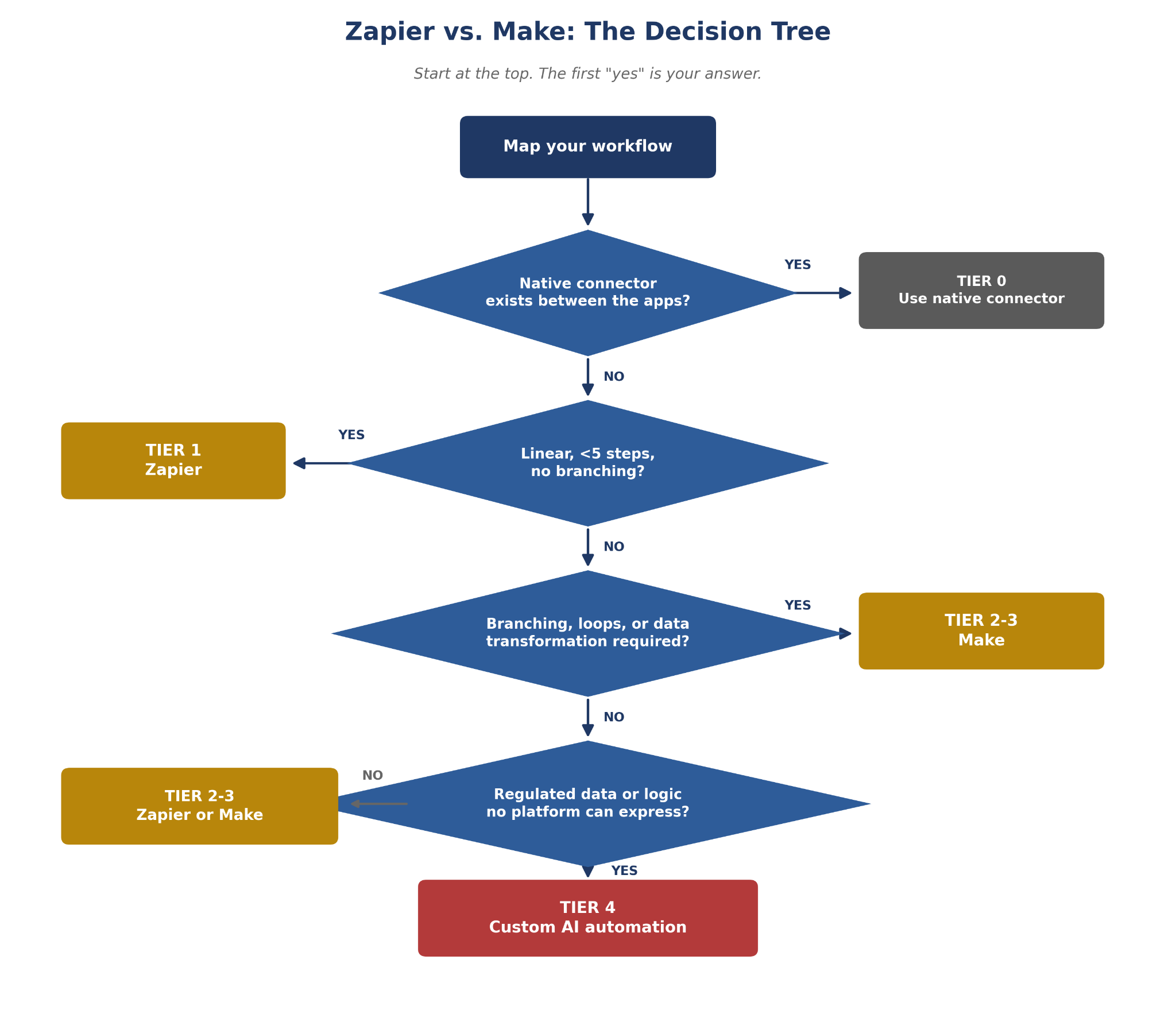
The Zapier vs Make decision is about workflow architecture, not experience level. Zapier gives you speed and breadth. Make gives you logic depth and control. The right choice depends on which of those properties your workflow actually needs.
(IMAGE: zapier-vs-make-decision-tree)
<!DOCTYPE html>
<html lang="en">
<head>
<meta charset="UTF-8">
<meta name="viewport" content="width=device-width, initial-scale=1.0">
<title>Zapier vs Make Comparison Table</title>
<style>
body {
font-family: Arial, Helvetica, sans-serif;
background: #ffffff;
margin: 0;
padding: 40px 20px;
}
.table-wrap {
max-width: 900px;
margin: 0 auto;
overflow-x: auto;
}
table {
width: 100%;
border-collapse: collapse;
font-size: 15px;
box-shadow: 0 1px 4px rgba(0,0,0,0.08);
}
caption {
text-align: left;
font-size: 20px;
font-weight: bold;
color: #1F3864;
margin-bottom: 12px;
}
thead th {
background-color: #1F3864;
color: #ffffff;
text-align: left;
padding: 14px 18px;
font-weight: bold;
}
tbody td {
padding: 14px 18px;
border-bottom: 1px solid #E0E0E0;
vertical-align: top;
line-height: 1.5;
}
tbody tr:nth-child(even) {
background-color: #F1F5FB;
}
tbody td:first-child {
font-weight: bold;
color: #1F3864;
white-space: nowrap;
}
tbody tr:last-child td {
border-bottom: none;
}
@media (max-width: 600px) {
table { font-size: 13px; }
thead th, tbody td { padding: 10px 12px; }
}
</style>
</head>
<body>
<div class="table-wrap">
<table>
<caption>Zapier vs. Make: Feature Comparison</caption>
<thead>
<tr>
<th>Dimension</th>
<th>Zapier</th>
<th>Make</th>
</tr>
</thead>
<tbody>
<tr>
<td>Best for</td>
<td>Linear, trigger-action workflows with few steps</td>
<td>Branching, multi-path workflows with conditional logic</td>
</tr>
<tr>
<td>Pricing model</td>
<td>Task-based: each action counts toward your plan limit</td>
<td>Operation/credit-based: each module run counts, often more cost-efficient at volume</td>
</tr>
<tr>
<td>Visual builder</td>
<td>No: step list format</td>
<td>Yes: canvas-based visual editor</td>
</tr>
<tr>
<td>Branching logic</td>
<td>Limited: filters only</td>
<td>Full: routers, iterators, error handlers, conditional paths</td>
</tr>
<tr>
<td>Maintenance skill required</td>
<td>Low: non-technical ops teams can maintain</td>
<td>Moderate: technically capable ops team needed for complex scenarios</td>
</tr>
</tbody>
</table>
</div>
</body>
</html>
Choose Zapier when the workflow is linear, the step count is under five, no branching logic is present, and the team needs fast deployment with low ongoing maintenance. Zapier's comparison page positions the platform around speed, connector breadth, and ease of use for exactly this scenario. If your ops team is non-technical and needs something running this week, Zapier is the right first buy.
Choose Make when branching logic, loops, data transformation, or iterators are required, or when the team can invest setup time for greater long-term control. Make's comparison page frames the platform around its visual builder and the ability to handle complex, multi-path scenarios that Zapier's linear model can't express cleanly. The tradeoff is real: Make's power comes with a responsibility. Someone on your team needs to own and maintain the scenarios.
Quick conditional verdict: under five steps with no branching goes to Zapier; five or more steps with branching or transformation goes to Make. High-volume repetitive workflows warrant evaluating Make's operation-based pricing, which Softr's comparison confirms can be more cost-efficient at scale than Zapier's task-based approach.
One honest limit: if your workflow involves regulated data or governance requirements neither platform can enforce, the answer isn't a third no-code tool. The next section covers what that escalation looks like in practice.
The five must-have integration patterns for B2B service teams
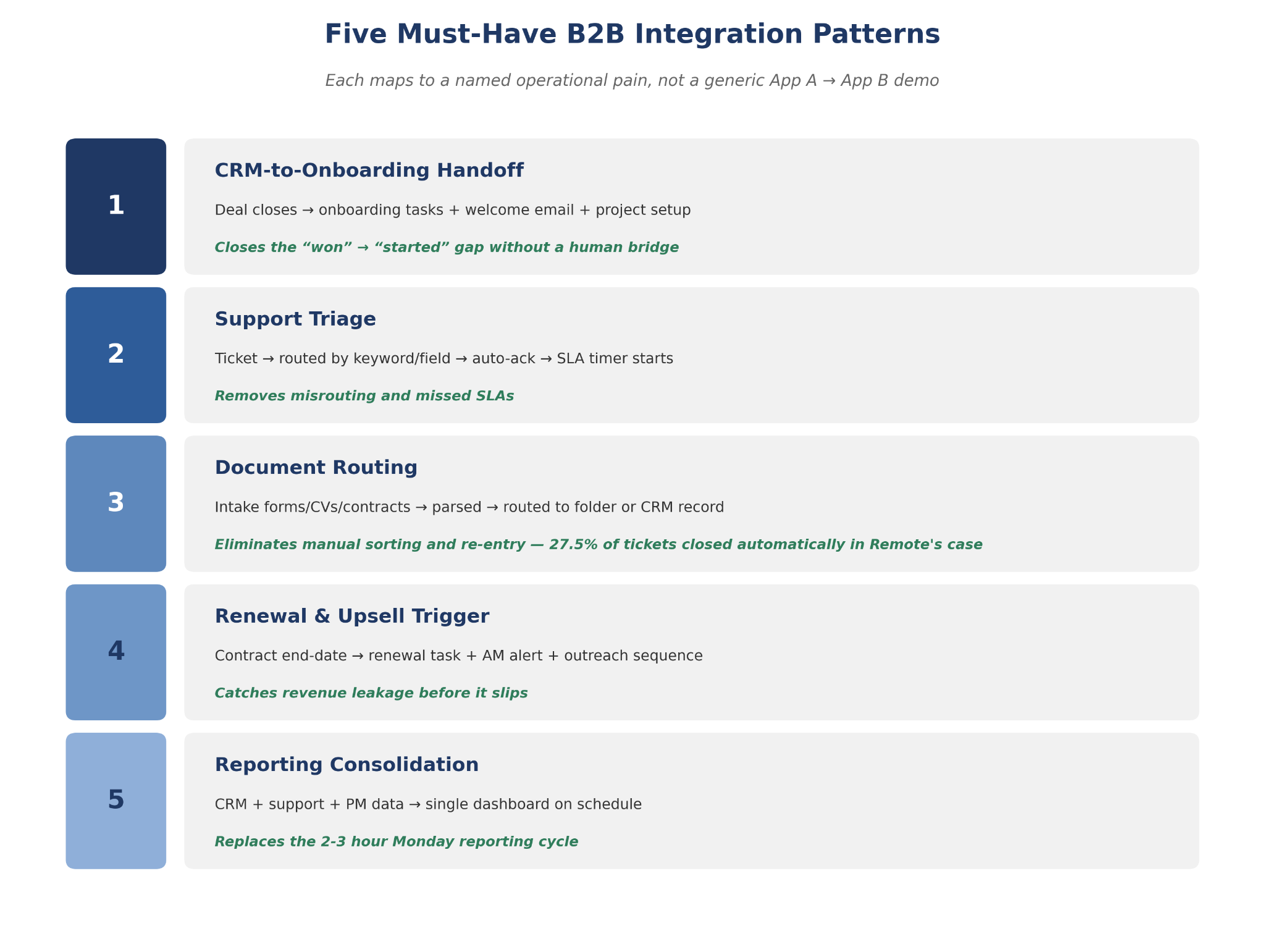
These are the integrations ops leaders at 50-300-person B2B service firms should prioritize. Each maps to a named operational pain, not a generic "connect App A to App B" demo.
1. CRM-to-onboarding handoff
A deal closes in the CRM. That trigger should automatically create an onboarding task sequence, send a welcome email, and set up the project in your delivery tool. This is the most common manual handoff failure point in professional services, and the one most likely to cause a poor first impression. A properly configured CRM-to-onboarding automation removes the gap between "won" and "started" without requiring a human to bridge it manually.
2. Support triage
Incoming support requests routed by keyword or form field to the correct team queue, with an auto-acknowledgment sent and an SLA timer started. Manual triage is where tickets get misrouted and SLAs get missed. A properly configured triage automation removes both failure modes without requiring a human to read every incoming message.
3. Document routing
Intake forms, CVs, and contracts parsed and routed to the correct folder, CRM record, or team member automatically. This eliminates manual file sorting and data re-entry, two of the highest-volume, lowest-value tasks in any service operation.
Real-world proof: Remote built an AI-powered automation workflow spanning Slack, email, and chatbot channels. According to Zapier's customer story, it closes 27.5% of help desk tickets automatically, saves 616 hours per month, and avoided an estimated $500K in IT hiring costs.
4. Renewal and upsell trigger
A CRM contract end-date field triggers a renewal task, an account manager notification, and a templated outreach sequence before expiry. Revenue leakage from missed renewals is one of the most preventable problems in professional services. This pattern costs almost nothing to build and pays for itself the first time it catches a renewal that would have slipped.
5. Reporting consolidation
Data from your CRM, support tool, and project management platform pulled into a single dashboard on a scheduled trigger. This replaces the manual multi-system reporting cycle that eats two to three hours every Monday morning. It's a high-visibility win that's easy to demonstrate to leadership and simple to maintain once configured.
(IMAGE: b2b-saas-integration-patterns)
arsuno.ai: automation built for your specific stack
If your team is spending hours on the workflows above and no-code tools aren't cutting it, arsuno.ai designs and builds custom automation systems around your actual operations. Start the conversation
When you have outgrown both Zapier and Make
The signal isn't frustration with the interface. It's when the platform's limitations, not your team's skill, are blocking workflow design. That distinction matters, because the wrong diagnosis leads to the wrong solution.
Four conditions reliably indicate you're past no-code territory. First, your workflow involves proprietary data models no visual builder can represent accurately. Second, you're handling regulated data under GDPR or HIPAA, and your specific governance requirements exceed what either platform's standard compliance architecture supports on most plan tiers. Third, your logic requires domain-specific model training or multi-source data synthesis beyond what connectors can express. Fourth, you need error-handling and audit trails at a level no-code platforms don't consistently support.
n8n is worth naming as an open-source escalation option, but with a clear qualification: its primary open-source distribution is self-hosted and requires DevOps capability to deploy and maintain, though a cloud-hosted version is also available. It's not a simple next step for a non-technical ops team. Parseur's comparison covers n8n and Power Automate as adjacent options for teams with the technical infrastructure to support them. Power Automate is worth evaluating if your stack is already Microsoft-heavy.
Custom AI automation is the right answer when the workflow requires domain-specific model training, multi-source data synthesis, or governance controls that no-code platforms can't enforce. That's not a failure of Zapier or Make. It's simply a different tier of problem. If you're weighing that decision, the automation services guide covers how to evaluate custom builds against off-the-shelf platforms before committing either way.
The tier framework in this article exists precisely to make that escalation legible. If you've worked through Tiers 0 to 3 and the workflow still can't be expressed cleanly, you're at Tier 4. That's a useful answer, not a dead end.
Frequently Asked Questions
What is the main difference between Make and Zapier?
Zapier is built around linear, trigger-action automation: one event triggers one or more sequential steps with no branching.
Make uses a visual canvas where you build scenarios with conditional paths, loops, iterators, and error handlers.
The difference isn't about experience level; it's about workflow architecture.
If your process is predictable and flat, Zapier fits.
Which is better for complex workflows, Zapier or Make?
Make is the stronger fit when your workflow includes branching logic, loops, data transformation, or multi-path routing.
Zapier handles complexity through filters and multi-step sequences, but it can't express conditional branching cleanly.
If you need a workflow to behave differently depending on the data it receives, Make is the right tool.
For straightforward, predictable linear flows, Zapier remains the faster and lower-maintenance option.
When should an ops team choose Zapier over Make for workflow automation?
Choose Zapier when the workflow is linear, the step count is under five, and no branching logic is required.
It's the right call for non-technical teams that need fast deployment and low ongoing maintenance.
Zapier's connector breadth means it covers most common SaaS tools without custom configuration.
If your team needs something running this week and the workflow is predictable, Zapier is the safer first buy.
When is Make worth the added complexity compared with Zapier?
Make earns its complexity when branching logic, loops, or iterators are genuinely required by the workflow.
The visual builder makes it easier to debug and modify multi-path scenarios than Zapier's step-list format.
The tradeoff is real: someone on your team needs to own and maintain the scenarios, which requires moderate technical capability.
Frame Make's power as a responsibility, not just a feature, before committing to it.
Which tool is easier to use, Zapier or Make?
Zapier is faster and more intuitive to start, particularly for non-technical ops teams building their first automations.
Make requires more setup time and a steeper learning curve, but gives significantly more control over complex scenarios.
As Softr's comparison notes, "easy" depends entirely on whether your workflow is linear or branching.
For a linear workflow, Zapier is easier.
How do Zapier and Make compare on pricing, scaling, and task limits?
Zapier uses a task-based pricing model: each action your automation performs counts against your plan limit.
Make uses an operation-based model: each module run counts, which can be more cost-efficient for high-volume workflows with many steps.
Neither is universally cheaper.
The right answer depends on your workflow's step count and monthly volume.
When should a team use native integrations instead of Zapier or Make?
Use native integrations when the workflow lives inside one SaaS product or between two products with a published direct connector.
Buying an external automation platform before exhausting native options adds cost and maintenance overhead without adding capability.
The check takes five minutes: look for a built-in integration in both tools' settings before opening a Zapier account.
If a direct connector exists and covers your use case, that's your answer.
What should ops teams consider when they outgrow Zapier and Make?
The first question is whether platform limitations or team skill are the actual blocker.
If it's skill, more training is the answer.
If the workflow requires proprietary data models, regulated data handling, or logic no-code platforms can't express, escalation is warranted.
n8n is an open-source option, but it requires self-hosting and DevOps capability: it's not a simple next step for non-technical teams.
Hard gate report (non-strict)
Hard gates failed:
- [keywordfirst100] Primary keyword "SaaS integrations workflow" must appear exactly once in the first 100 body words (found 0).