

Key takeaways
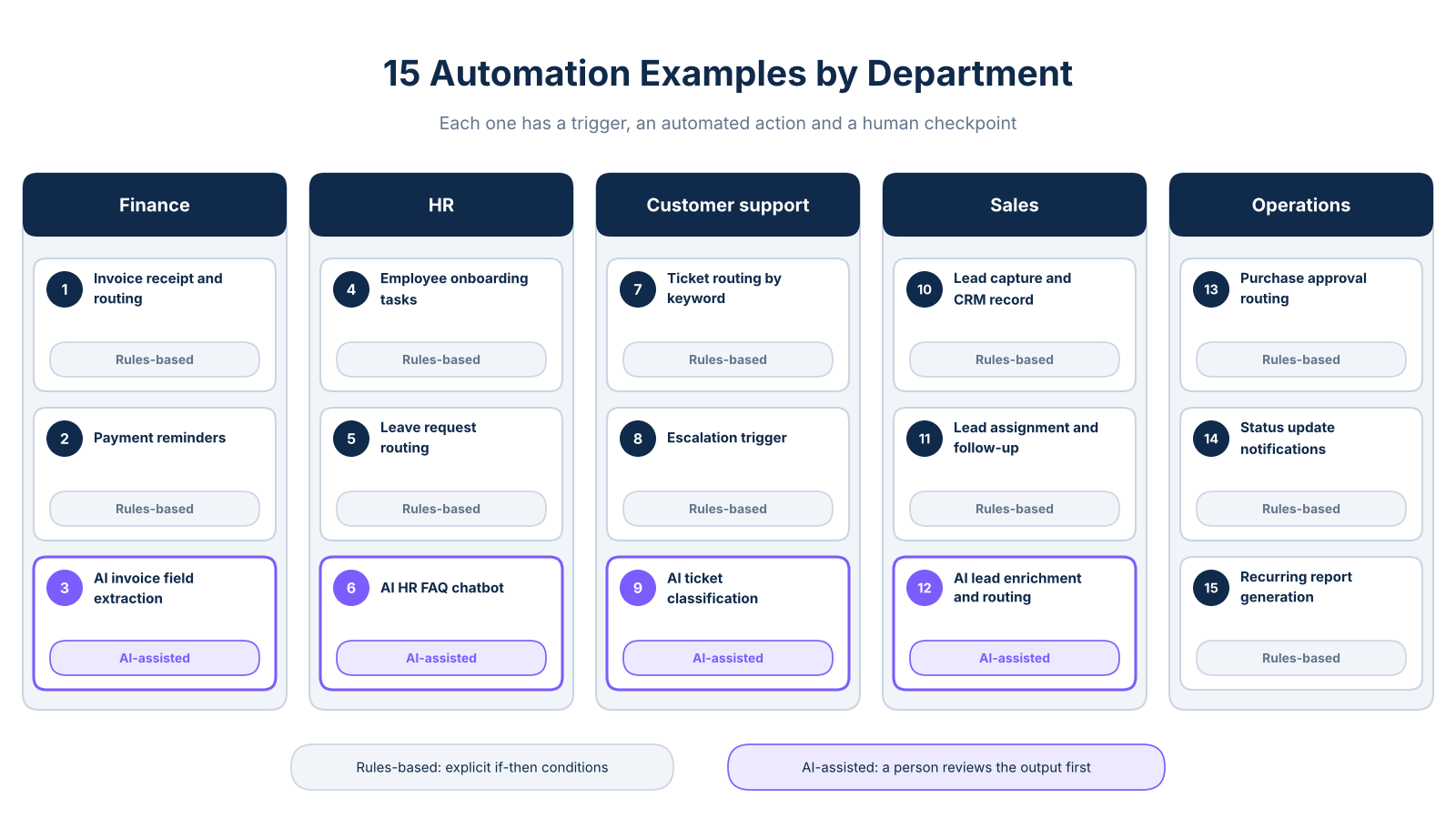
- These 15 software automation examples are grouped by department so you can spot the workflow your team handles manually today and decide whether it is worth automating first.
- Every example includes the trigger, automated action, human checkpoint, and a time-saved formula you can apply to your own numbers.
- Three examples are AI-assisted; a person reviews the output before anything is sent or approved.
- A four-factor scoring method at the end helps you choose your single best first automation.
How to read these examples (and what makes them useful)
Most automation guides tell you what is possible. This one tells you exactly when each workflow starts, what the system does, where you stay in the loop, and how to calculate the time your team recovers. That structure is consistent across all 15 examples so you can compare them directly against your own operations.
Two labels appear throughout. Rules-based means the system follows explicit if-then conditions with no judgment required. AI-assisted means the system classifies, extracts, or drafts when inputs vary, and a person reviews the output before it is used. AI handles one narrow task in each of those examples, not the full workflow.
Use the table below to scan all 15 examples and jump to the department most relevant to your team.
Finance automation: 3 workflows that cut admin time
Finance is where manual work repeats most visibly. Chasing invoices, entering figures twice, and sending reminders by hand consume hours every month without adding strategic value. According to Xero's business automation guide, repeatable rule-based processes like data entry and invoice handling are among the highest-impact starting points for small businesses.
Example 1 (rules-based): Invoice receipt and routing. Trigger: an invoice email arrives in the shared inbox. Automated action: the system tags the email, creates a record in your accounting software, and routes it to the correct approver based on amount. Human checkpoint: the approver reviews and clicks approve or flag. Time saved: if your team spends 10 minutes per invoice across 40 invoices a month, that recovers 6.7 hours monthly: (10 × 40) / 60. Use your own figures to calculate your baseline.
Example 2 (rules-based): Automated payment reminders. Trigger: an invoice reaches its due date with no payment recorded. Automated action: the system sends sequenced reminders at intervals you configure, on the due date, seven days after, and fourteen days after. Human checkpoint: a team member reviews replies or disputes before responding. Time saved: apply the same formula using your monthly invoice count and current minutes spent on manual follow-up.
Example 3 (AI-assisted): AI invoice field extraction. Trigger: a scanned or emailed invoice is received. Automated action: AI reads the document, extracts vendor name, amount, due date, and line items, then populates the accounting record. Human checkpoint: a finance employee reviews flagged fields before approving. It works best with accounting software that supports native document capture or API connections. The guide on how AI extracts data explains the mechanics in plain terms.
HR automation: 3 workflows that reduce onboarding drag
Onboarding involves more handoffs than most owners realize until something falls through the cracks. Equipment is not ready, accounts are not set up, and the new hire spends their first week waiting. According to OneAdvanced's process automation guide, onboarding task assignment is one of the most consistent wins for businesses that automate HR workflows.
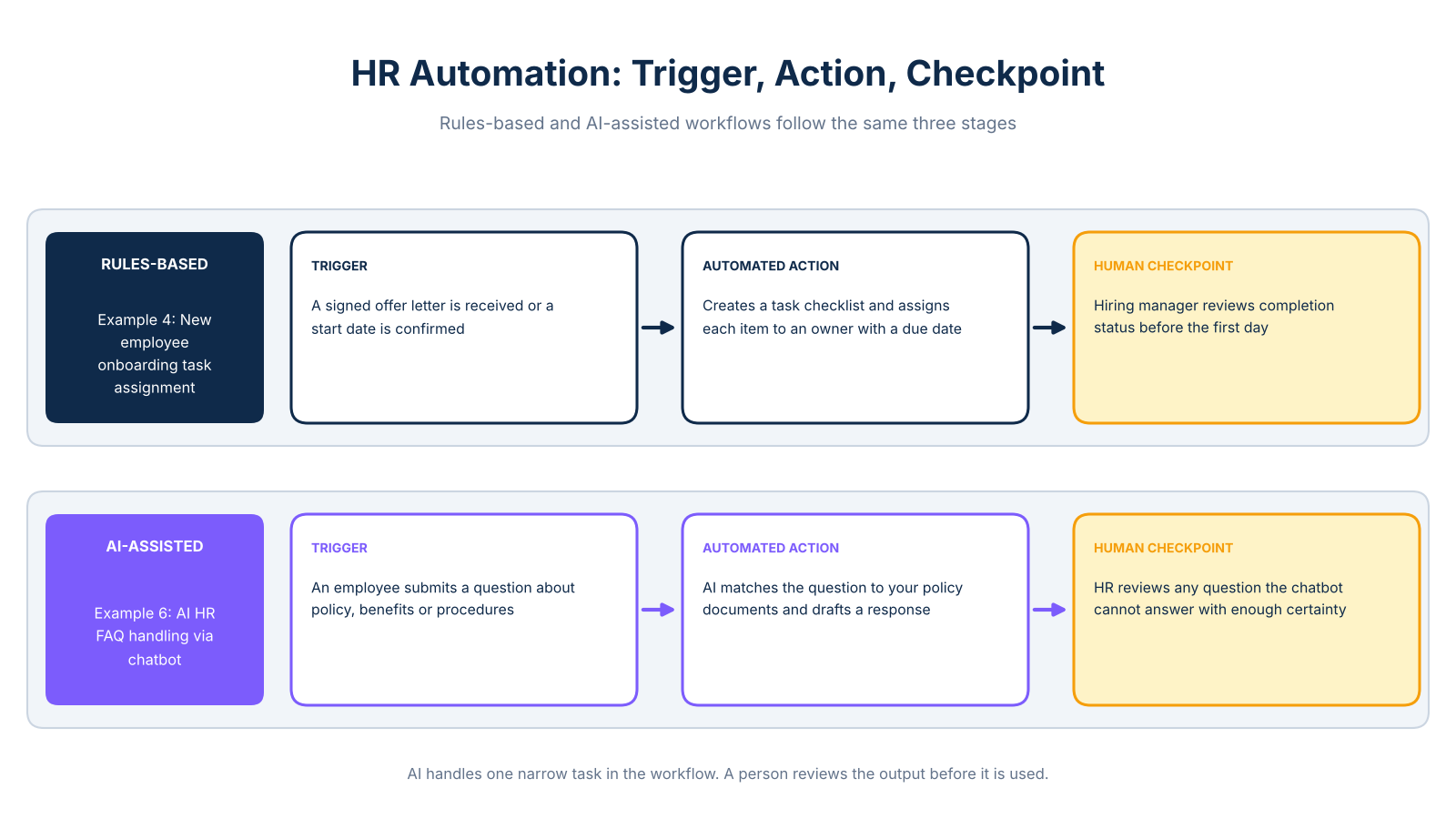
Example 4 (rules-based): New employee onboarding task assignment. Trigger: a signed offer letter is received or a start date is confirmed in your HR system or shared calendar. Automated action: the system creates a task checklist covering document collection, equipment requests, account setup, and first-week calendar invites, then assigns each item to the relevant owner with a due date. Human checkpoint: the hiring manager reviews completion status before the employee's first day. Time saved: calculate using your average monthly new hires and the minutes currently spent coordinating each one manually.
Example 5 (rules-based): Leave request and approval routing. Trigger: an employee submits a leave request via a form or HR tool. Automated action: the system checks the leave balance, routes the request to the line manager, and sends a confirmation or decline to the employee. Human checkpoint: the manager approves or declines. This workflow is supported by many HR tools and shared calendar setups, making it one of the more accessible starting points for a small team.
Example 6 (AI-assisted): AI HR FAQ handling via chatbot. Trigger: an employee submits a question about policy, benefits, or procedures. Automated action: the AI chatbot matches the question to your policy documents and drafts a response. Human checkpoint: an HR team member reviews any question the chatbot cannot answer with sufficient certainty before sending. For a closer look at how these systems work, the article on HR chatbots covers setup and common use cases.
Customer support automation: 3 workflows for small teams
Support is often the first place a small team feels the strain of growth. Ticket volumes rise, response times slip, and one or two people end up triaging everything manually. Understanding what is software automation in this context helps clarify which support tasks follow fixed rules and which genuinely need human judgment. According to GoDaddy's AI workflow guide, ticket classification and escalation are among the most practical starting points for small teams.
Example 7 (rules-based): Ticket routing by keyword. Trigger: a customer submits a support request via email or web form. Automated action: the system scans the message for keywords, assigns it to the correct queue (billing, technical, general), and sends an acknowledgment. Human checkpoint: the assigned team member reads and responds. Time saved: calculate using your average daily ticket volume and minutes currently spent on manual triage.
Example 8 (rules-based): Escalation trigger for unresolved tickets. Trigger: a ticket remains open past a set time limit, for example, 24 hours without a response. Automated action: the system alerts a senior team member, raises the priority to urgent, and logs the escalation. Human checkpoint: the senior team member intervenes or reassigns. Most small-business help desk platforms include configurable SLA rules as a standard feature.
Example 9 (AI-assisted): AI ticket classification and draft response. Trigger: a new support ticket arrives. Automated action: the AI classifies the ticket by topic and sentiment, assigns a priority score, and drafts a suggested response based on past resolved tickets. Human checkpoint: a team member reviews and edits the draft before sending. Note: verify your platform supports classification, sentiment scoring, and draft generation before building this workflow, capabilities vary by subscription tier.
Sales automation: 3 workflows that protect revenue
Every inbound lead that goes unassigned or unfollowed is potential revenue lost. The problem is rarely intention; it is process. Salesforce MuleSoft notes that lead routing and CRM updates are among the most commonly automated tasks in small sales teams. For a broader view of where to start, the guide on 7 processes to automate first covers the highest-frequency manual tasks across a typical small business.
Example 10 (rules-based): Lead capture and CRM record creation. Trigger: a prospect submits a contact form, books a demo, or downloads a resource. Automated action: the system creates a CRM record, tags the lead source, and logs the interaction. Human checkpoint: the sales owner confirms the lead is qualified before progressing it. Time saved: calculate using your monthly inbound lead volume and the minutes currently spent on manual data entry after each inquiry.
Example 11 (rules-based): Lead assignment and follow-up task scheduling. Trigger: a new lead is created in the CRM or a deal moves to a new stage. Automated action: the system assigns the lead to the correct salesperson based on territory or product interest, creates a follow-up task, and sets a due date. Human checkpoint: the salesperson makes the first contact and updates the CRM record. This workflow runs on most CRM platforms without additional tools.
Example 12 (AI-assisted): AI lead enrichment and routing. Trigger: a new lead record is created. Automated action: AI pulls data from permitted sources to enrich the record with company size, industry, and role, then scores the lead and routes high-score prospects to a senior salesperson. Human checkpoint: the sales owner reviews the enriched record and overrides the routing if needed. Note: data use must comply with applicable privacy regulations, including GDPR and CCPA, and the enrichment provider's terms of service. This example also requires an enrichment tool or API connection, so confirm your stack supports it before building.
Operations automation: 3 workflows for day-to-day consistency
Operations is where repetitive work hides in plain sight. Purchase requests pile up in inboxes, status updates are chased by message, and weekly reports are assembled manually from multiple spreadsheets. These three workflows address the most common patterns. Tracking the return on each one is straightforward; the guide on automation ROI explains how to measure savings before and after implementation.
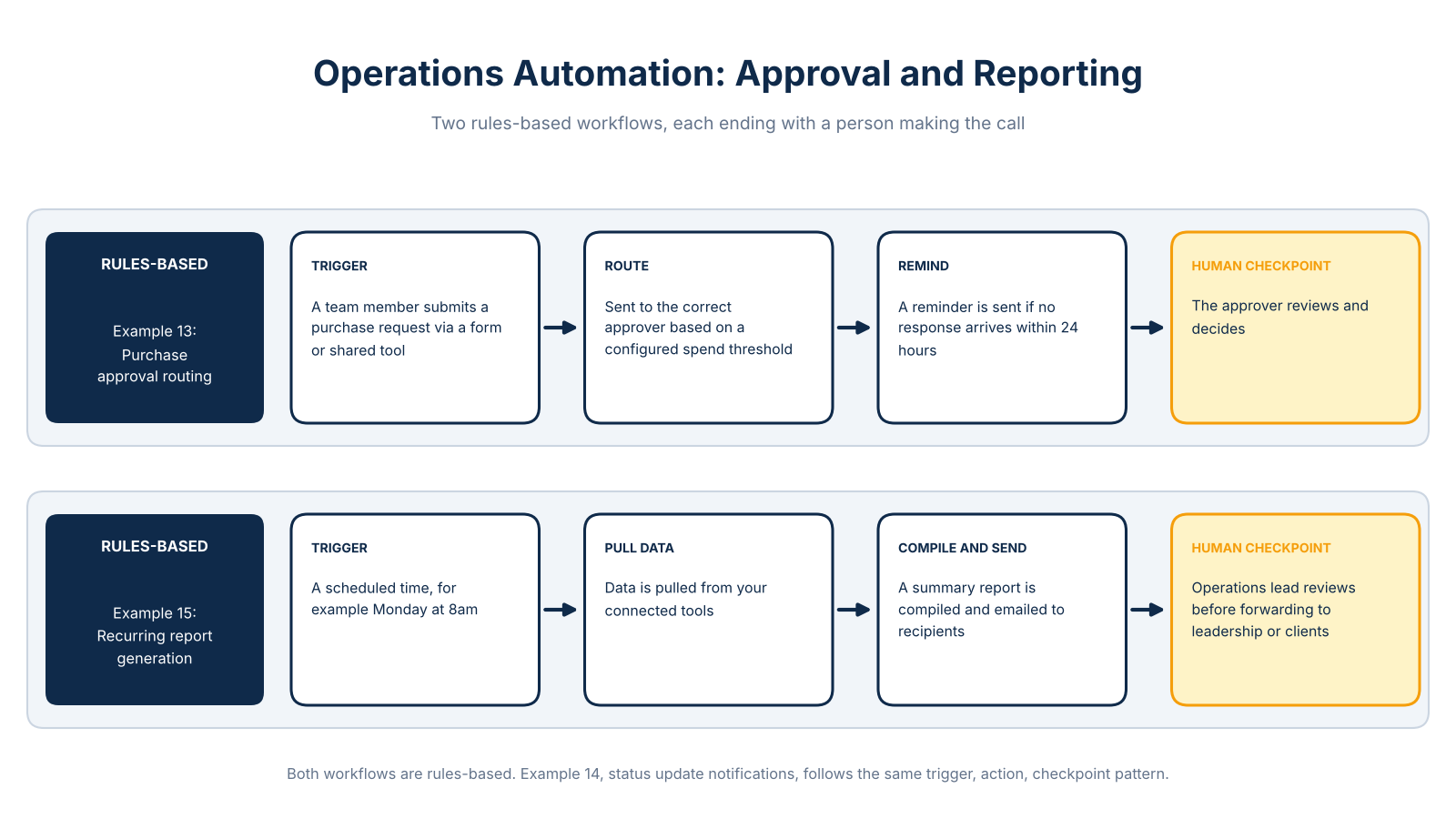
Example 13 (rules-based): Purchase approval routing. Trigger: a team member submits a purchase request via a form or shared tool. Automated action: the system routes the request to the correct approver based on a configured spend threshold, then sends a reminder if no response arrives within 24 hours. Human checkpoint: the approver reviews and decides. Time saved: calculate using your monthly purchase request volume and the minutes currently spent on email follow-up and manual logging.
Example 14 (rules-based): Automated status update notifications. Trigger: a task status changes in your project management tool. Automated action: the system notifies the relevant stakeholder and updates a shared project log. Human checkpoint: the project lead reviews any blocked or overdue items and decides how to proceed. This workflow is available natively in most project management platforms and requires no additional integration for most small teams.
Example 15 (rules-based): Recurring report generation and distribution. Trigger: a scheduled time, for example Monday at 8am. Automated action: the system pulls data from your connected tools, compiles a summary report, and emails it to the relevant recipients. Human checkpoint: the operations lead reviews the report before forwarding it to leadership or clients. Time saved: calculate using your current report preparation time multiplied by the number of reports produced each month.
How to decide which automation to build first
Process automation for small teams works best when the first project is chosen carefully, not just urgently. Score each candidate workflow on four factors before committing.
Frequency: How often does this task occur? Daily tasks recover more time than monthly ones. Manual minutes per occurrence: Estimate monthly savings with this formula: (minutes per occurrence × monthly occurrences) / 60. A task taking 8 minutes across 60 monthly occurrences saves 8 hours if automated. Error or compliance risk: Repetitive tasks with high error rates or regulatory consequences deserve priority, invoicing, data entry, and approvals are prime examples. Tool availability: Does your team already use software that supports this workflow? The easiest first automation connects tools you already pay for.
For most small teams, invoice processing, lead capture, or onboarding task assignment score highest across all four factors. Each is frequent, measurable, low-risk to automate, and supported by common business software. Many workflows can be configured with no-code or low-code tools, though integrations and exception handling may require some technical setup.
When you are ready to move from the list to a plan, get in touch with a team that has built these systems for businesses your size.
Frequently Asked Questions
What are examples of software automation?
Software automation examples include invoice routing, payment reminders, employee onboarding task assignment, support ticket escalation, lead capture and CRM record creation, and recurring report generation. Each example follows a consistent structure: a trigger event starts the workflow, the system takes a defined action, and a person reviews the output at a specified checkpoint.
What tasks can a small business automate without a technical team?
A small business can automate repetitive, rule-based tasks with clear inputs and outputs, including invoice reminders, leave request routing, support ticket assignment, lead follow-up scheduling, and weekly report distribution. Many of these workflows run on software the business already uses, such as accounting tools, CRM platforms, and help desks, without requiring custom code.
What are the best business processes to automate first?
The best starting point is a process that happens frequently, takes a predictable number of minutes each time, carries some error or delay risk, and can be connected using tools you already have. Invoice processing, inbound lead capture, and new employee onboarding consistently score well on all four factors for small teams.
How do you automate invoice processing for a small business?
Invoice automation typically starts when an invoice arrives by email or upload. The system captures the document, extracts key fields such as vendor name, amount, and due date, routes the record to the correct approver, and sends reminder emails if payment is not received by the due date. A finance team member reviews any fields the system flags as uncertain before approving.
How can automation route and prioritize customer support tickets?
When a customer submits a support request, the system scans the message for keywords, assigns it to the correct queue, and sends an acknowledgment. If the ticket remains unresolved past a configured time limit, the system escalates it to a senior team member and changes the priority.
How can automation improve lead follow-up?
When a prospect submits a form or books a call, the system creates a CRM record, tags the lead source, assigns the lead to the correct salesperson, and schedules a follow-up task with a due date. This means no inbound lead sits unassigned because it arrived after hours or during a busy period.
What is the difference between rules-based automation and AI automation?
Rules-based automation follows explicit if-then conditions: if an invoice arrives, route it to the approver; if a ticket is open for 24 hours, escalate it. These workflows are predictable and require no judgment from the system. AI-assisted automation handles tasks where inputs vary, such as extracting fields from documents in different formats, classifying support tickets by topic and sentiment, or scoring leads based on enriched data.