Key takeaways
- An hr chatbot only reduces ticket volume when it's trained on your actual policy documents and connected to your HRIS: not a generic knowledge base.
- Generic, untrained bots trigger escalations, sending employees straight to HR and increasing the load the bot was supposed to reduce.
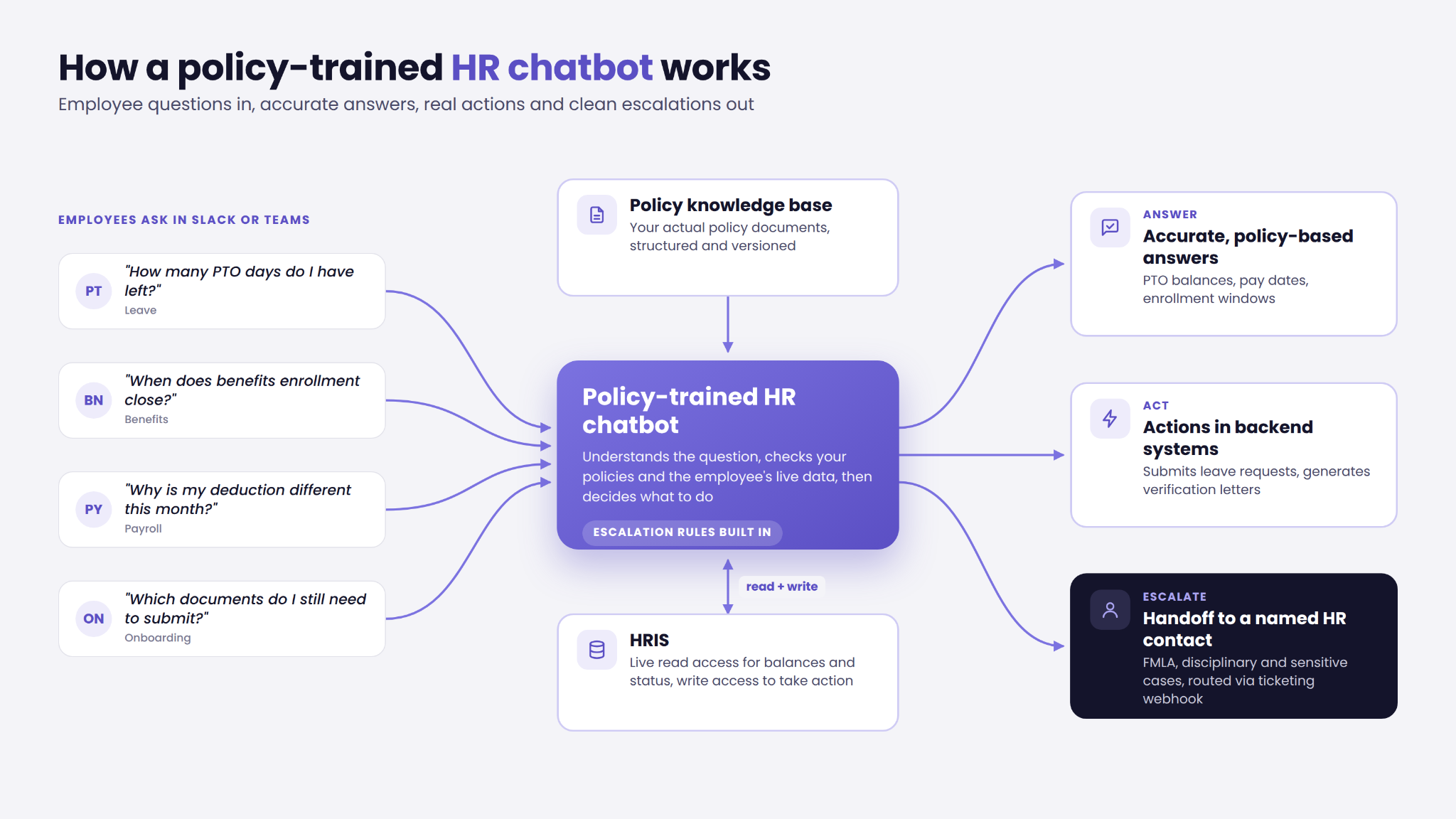
- Map five non-negotiable dependencies before any vendor evaluation: HRIS access, structured policy knowledge base, ticketing webhook, escalation routing rules, and Slack or Teams embedding.
- Ask every vendor whether the system can act in backend systems, not just answer from a knowledge base.
Why most HR chatbots create more tickets than they close
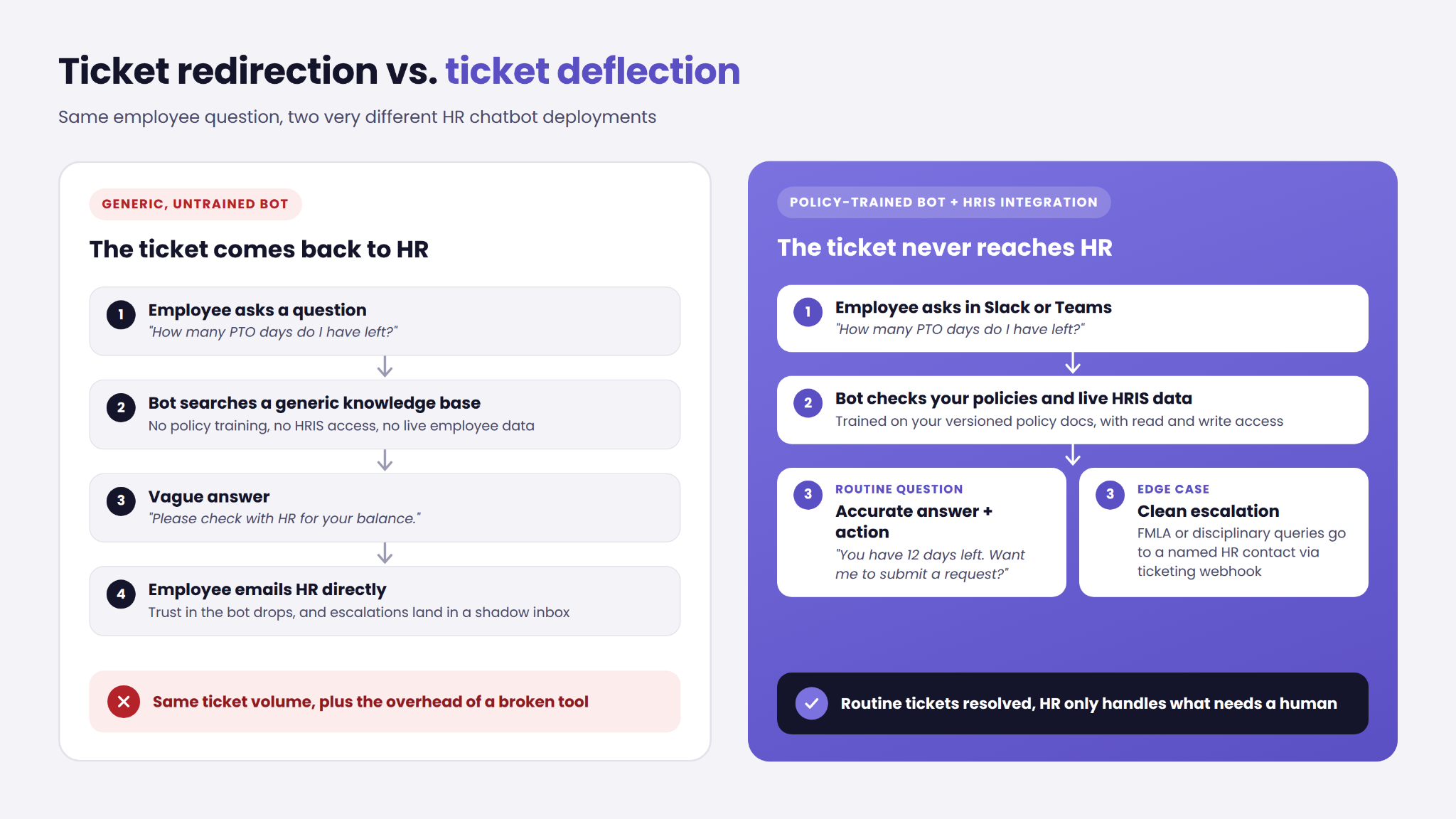
Most conversational HR tools fail not because the technology is wrong, but because the deployment is incomplete. A bot pulling from a shallow, generic knowledge base returns vague or contradictory answers. Employees stop trusting it within days and route directly to HR instead, meaning the team now handles the same ticket volume plus the overhead of managing a broken tool.
The failure mechanism is specific. Incomplete policy training combined with shallow HRIS integration produces ticket redirection, not ticket deflection. The bot tells an employee to "check with HR" for the exact question it was supposed to answer. According to Workato's integration analysis, the primary factor determining whether a conversational HR tool actually reduces volume is how deeply it connects to the systems holding real, current employee data. Before committing to a platform, it's worth reviewing how to choose a chatbot platform to avoid the most common selection mistakes.
There's also a taxonomy problem. Many off-the-shelf HR tools are keyword-matching or decision-tree systems, not NLP or LLM-based. They pattern-match against a fixed script rather than understanding a question in context. When buyers conflate these with conversational AI, they set expectations the tool cannot meet.
The distinction matters for your evaluation. A scripted bot handles a narrow, predictable question set reliably. A conversational AI system handles variation, follow-up questions, and multi-turn exchanges, but only if it's trained on your actual documents and connected to live data. The tool category you choose determines what "trained on your policies" means in practice.
What an HR chatbot actually does across the employee lifecycle
A well-deployed automated HR assistant handles high-volume, low-complexity questions that repeat across every stage of the employee lifecycle. According to Chatbot.com's lifecycle overview, the strongest use cases cluster around onboarding, benefits, PTO, and payroll, where question patterns are consistent and answers are policy-driven.
During onboarding, the bot answers first-day policy questions, routes document submissions, and guides new hires through benefits enrollment. Without access to the onboarding workflow and a policy knowledge base, it can answer general questions but cannot confirm what a specific employee still needs to complete.
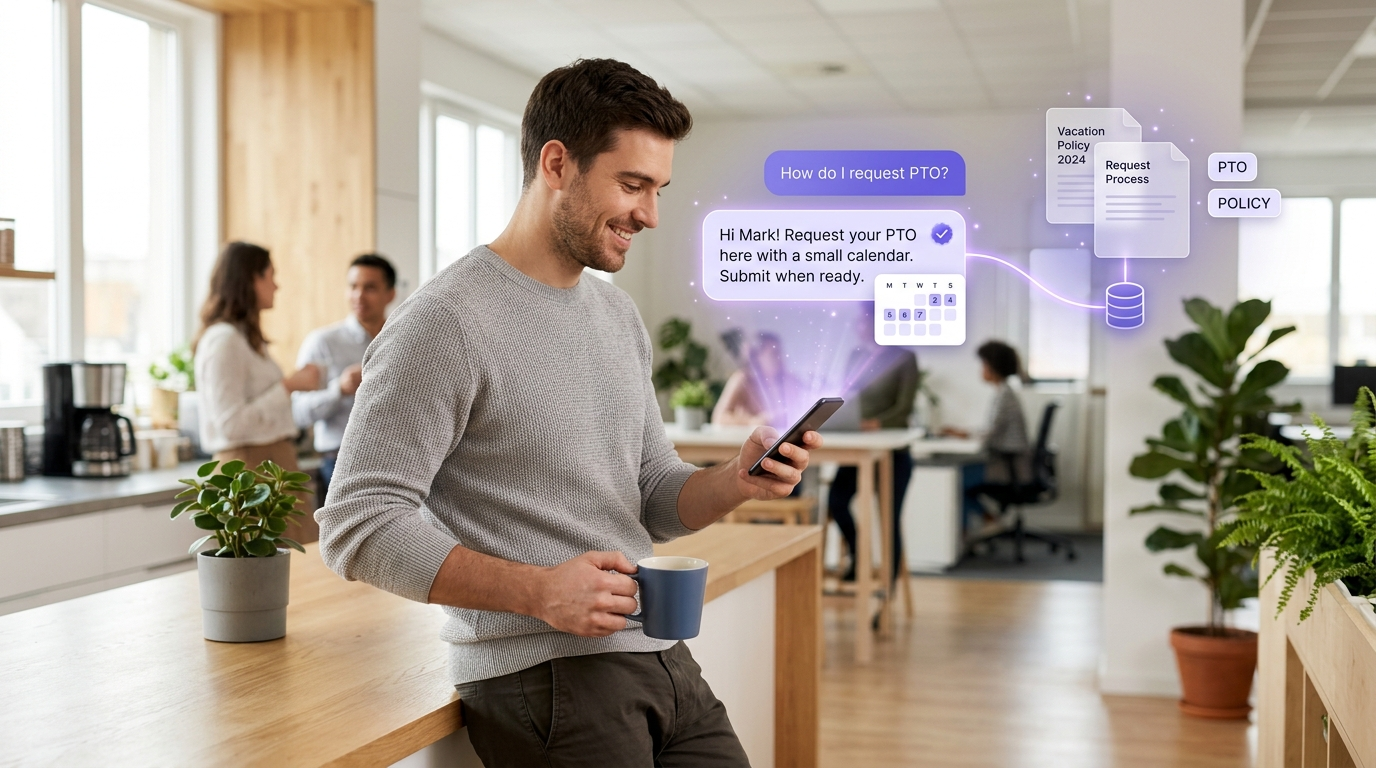
For PTO and leave, a connected bot can answer policy questions and, with HRIS write access, submit requests directly. Without that integration, it can only explain policy, not act on it. Edge cases like FMLA or extended medical leave should always escalate to a human.
On payroll, the bot handles pay-date questions, deduction explanations, and payslip access guidance. It cannot handle disputes or corrections without human review, and it shouldn't try.
Benefits and offboarding are strong deflection candidates. Explaining plan options, surfacing enrollment windows, and confirming termination checklists are exactly the kind of structured, repeatable queries a trained bot handles well. Volume is high, complexity is low, and answers are consistent.
Each stage works only to the extent the bot has access to the right systems. The lifecycle framing helps identify where to start, but integration requirements determine whether each stage actually deflects tickets or just redirects them.
The integration requirements that determine whether it works
Before evaluating any vendor, map the five dependencies that determine whether a deployment actually works. These aren't optional features, they're the difference between a bot that reduces your team's workload and one that creates a parallel support queue.
Five non-negotiable requirements:
- HRIS read and write access. Without live read access, the bot cannot give accurate PTO balances or employment status. Write access or API triggers are required for actions like submitting transfers or generating verification letters.
- A structured, versioned policy knowledge base. The bot must be trained on your actual documents, not generic templates. Unstructured files produce inconsistent outputs.
- A ticketing system webhook. Unresolved queries must route automatically to your existing helpdesk, ServiceNow, Jira, or Zendesk. Without this, escalations land in email and create a shadow queue.
- Defined escalation routing rules. The system needs logic for what triggers a handoff: ambiguous queries, multi-policy edge cases, disciplinary matters. Without rules, the bot loops or drops the conversation.
- Chat channel embedding. Deploying inside Slack or Microsoft Teams drives adoption. A separate portal typically sees lower usage regardless of training quality.
The virtual assistant distinction from Leena AI clarifies where a basic bot ends and a more capable HR assistant begins in terms of action capability, worth understanding when scoping your deployment. Reviewing chatbot cost differences between SaaS and custom builds also helps you match integration depth to budget before entering vendor conversations.
Where HR chatbots still need a human
Good escalation design is what makes the rest of the bot trustworthy. A bot with no defined escalation rules isn't a simpler system, it's a more dangerous one, because it will attempt to answer questions it has no business answering.
Disciplinary matters must always route to a named HR contact. Performance improvement plans, termination conversations, and grievance filings carry legal, emotional, and confidentiality implications that no automated response can handle. The moment a query touches any of these areas, the bot's job is to hand off cleanly.
Complex benefits edge cases are another firm boundary. FMLA, ADA accommodations, and medical leave overlapping with PTO accrual require judgment across multiple policy documents and often employment law. A bot trained on individual policy pages cannot reliably synthesize them, and getting this wrong creates real liability.
Anything touching sensitive personal circumstances falls into the same category: immigration status questions, pay equity concerns, harassment reports. These are not deflection candidates under any deployment model. Treating them as automatable is a compliance risk, not an efficiency gain.
The right framing is design intent, not limitation. A bot that knows its boundaries and escalates correctly earns employee trust faster than one that attempts everything and gets things wrong. The guide on automating support well covers escalation design principles that apply directly to these deployments.
How to evaluate an HR chatbot before you commit budget
Start with your baseline before you talk to a single vendor. Pull your current ticket volume by category: benefits, PTO, payroll, onboarding. Calculate your average HR response time per ticket type. Check whether your policy documents are structured, versioned, and accessible via API. These three inputs tell you what deflection is realistically possible and give you a number to measure against after deployment.
Next, map every system the bot must connect to. This becomes your technical scope and the primary driver of cost and timeline. The more systems required, the more the deployment resembles a custom integration project rather than a SaaS configuration. Scope it accurately before you commit. According to People Managing People's buyer research, ops leaders who skip this step most often report failed or underperforming deployments.
IBM's AskHR deployment is the clearest large-scale proof that the right model works. IBM consolidated HR support for 21,000 first-line managers worldwide, extended the system to handle employee transfers and employment verification letters, and shut down its global HR phone line and email address entirely. The IBM AskHR case study is worth reading before your vendor conversations, specifically for how IBM scoped backend action capability from the start.
The business case has three inputs: current HR time cost on repetitive queries, projected deflection rate based on policy coverage and integration depth, and implementation plus maintenance cost. A PoC-first model lets mid-market buyers see a working system before committing full budget, removing the largest adoption risk and giving you real deflection data to take to the CFO.
The deployment decision that determines your ROI
A well-deployed, policy-trained bot with real HRIS integration is a fundamentally different tool from a generic SaaS option. The label is the same. The outcome is not. One reduces the pressure on your HR team by handling the volume they shouldn't be spending time on. The other redirects that volume back to them with an extra layer of friction in between.
Your next concrete action is simple: baseline your current ticket volume by category this week, then use that number as the filter for every vendor conversation you have. Any vendor who cannot show you how their system will move that number, based on your specific policy coverage and integration depth, is selling you a demo, not a deployment.
Frequently Asked Questions
What is an HR chatbot?
An HR chatbot is a conversational tool that answers routine employee questions about HR policies, benefits, payroll, and leave. It sits on top of HR systems and policy content rather than replacing them. It's distinct from a broader employee self-service portal, which is an outcome model, and from a human HR support function.
How much does an HR chatbot cost?
HR chatbot pricing typically follows one of three models: subscription-based, usage-based, or custom enterprise pricing. The range varies significantly based on integrations, customization depth, and support tier. A lightweight SaaS configuration costs far less than a custom-built system with HRIS write access and multi-system integration, but the latter typically delivers meaningfully higher deflection rates.
What systems should an HR chatbot integrate with?
A fully functional HR chatbot needs connections to your HRIS, internal policy knowledge base, payroll system, benefits platform, ticketing system, and chat channels like Slack or Microsoft Teams. The distinction between read-only access and workflow action access matters: a bot with only read access can answer questions but cannot submit requests or generate documents.
How is an HR chatbot different from a virtual assistant?
An HR chatbot primarily operates as a Q&A layer, answering questions from a policy knowledge base or connected HR systems. An HR virtual assistant goes further, taking actions in backend systems such as submitting requests, generating letters, or updating records. Some platforms use both terms interchangeably, which creates confusion at the buying stage.
What can an HR chatbot do for employees?
An HR chatbot handles the high-volume, repetitive questions employees ask most often: onboarding guidance, policy lookups, benefits explanations, PTO status, and payroll questions. For action-taking, such as submitting a leave request or generating an employment verification letter, the bot needs system access beyond a knowledge base.
Can an HR chatbot answer questions in Slack or Teams?
Yes, HR chatbots are commonly embedded directly in Slack or Microsoft Teams so employees can ask questions without leaving their daily tools. Channel presence alone does not equal deep workflow integration, though: a bot in Slack that lacks HRIS access still can't give accurate PTO balances or submit requests.
Can an HR chatbot help with onboarding?
Onboarding is one of the strongest early use cases for an HR chatbot for onboarding because the question volume is high, the questions are predictable, and new hires need fast answers during their first days. The bot can handle policy questions, document routing, and benefits enrollment guidance, but only if it's trained on your actual onboarding materials.
.webp)