
.webp)
Key takeaways
The benefits of intelligent document processing go beyond speed: they include validated structured data, fewer downstream errors, and a scalable workflow that grows with document volume. Before you deploy, audit your document mix for handwriting, low-contrast scans, and non-standard layouts. Plan a human review queue from day one. Anchor your ROI to your own baseline, not vendor averages. Start with high-volume structured documents in weeks one through four.
What intelligent document processing actually does
Most document automation conversations start with OCR, and that's where the confusion begins. OCR converts a document image into machine-readable text. That's it. You get a string of characters. What you do with them is still your problem.
Intelligent document processing is a different category entirely. As AWS describes, IDP combines OCR with machine learning, natural language processing, document classification, and field-level extraction to turn unstructured documents into structured, actionable data. OCR is one component inside IDP, not a synonym for it.
The operational difference matters. Take a scanned invoice. An OCR tool returns a block of text. An IDP system returns vendor name, invoice number, line items, unit prices, totals, and payment terms as discrete, validated fields ready to write into your ERP. That's the before-and-after worth holding onto as you evaluate whether IDP fits your workflow.
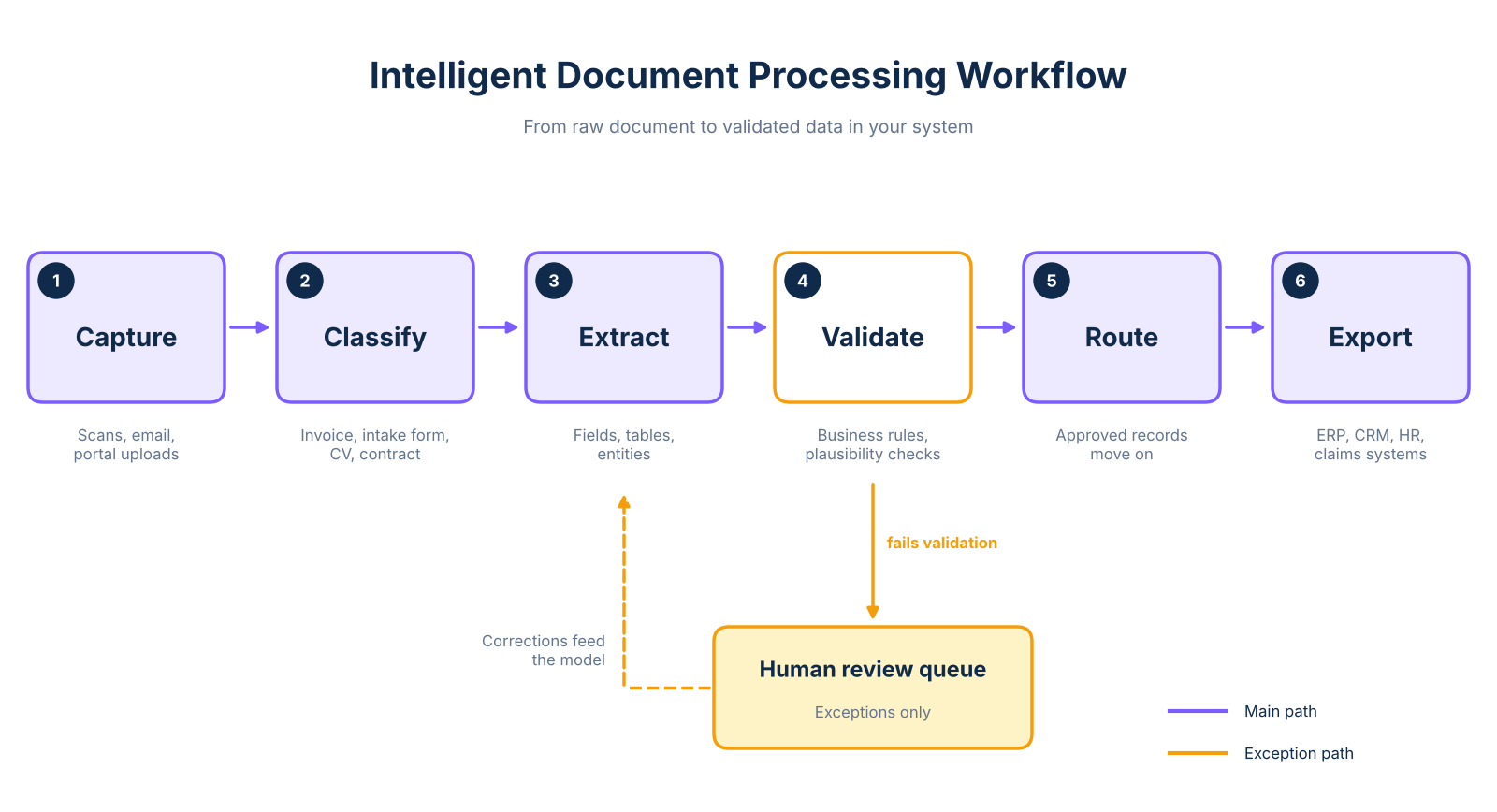
The full process runs in sequence. Documents arrive through capture: scanned uploads, email attachments, portal submissions, or direct integrations. The system classifies each document, identifying whether it's an invoice, a patient intake form, a CV, or a contract. Classification determines which extraction model applies. Extraction follows, pulling field values, table rows, and entities from the classified document.
A validation step then checks whether values are plausible, required fields are populated, and business rules are met. An invoice total that doesn't match its line items fails validation and routes to an exception queue for human review, not into your downstream system.
After validation, approved documents export their structured fields into the target system, whether that's an ERP, CRM, HR platform, or claims system. Reviewer corrections and confidence scores can feed back into the model to improve accuracy over time, depending on the platform and retraining configuration. The automated document processing guide covers the technical mechanics in more detail.
If your team currently copies field values manually from a scanned form into a spreadsheet, OCR is where you are today. IDP closes that gap. The system handles field identification, extraction, validation, and the downstream write. Your team handles the exceptions the system flags. Plan that exception queue from the start, and you'll have a system that performs as expected in production.
The concrete benefits for operations teams
The case for IDP in an operations context comes down to five measurable changes in how document-heavy workflows perform. Each one addresses a specific cost or constraint that manual processing creates.
Reduced manual data entry is the most direct benefit. IDP eliminates keystroke-by-keystroke transcription of structured fields. Staff who currently open a document, read a value, switch to a second system, and type it into a form no longer do that work for routine documents. arsuno.ai reports a 60% reduction in operational overhead and a 40% cost reduction across projects, though outcomes vary by document mix, volume, and workflow complexity.
Faster cycle times follow directly. Documents that took hours to route manually move through classification and extraction in seconds. As ABBYY notes, common use cases include invoices, onboarding documents, and claims, where processing speed directly affects payment cycles and customer response times. A patient intake form that previously sat in an admin queue for two hours can route to the clinical record within minutes of submission.
Lower rework and better data quality come from the validation layer. When a human transcribes a field manually, errors propagate silently into ERP and CRM records until someone notices a discrepancy. IDP's validation rules catch format mismatches, missing required fields, and implausible values at the point of extraction, before they reach the downstream system. Fewer correction cycles mean fewer SLA breaches.
Scalability without proportional headcount growth matters most when document volume increases. If your business processes 500 invoices per month today and expects 2,000 in 18 months, manual processing requires proportional staffing growth. IDP handles that volume increase without proportional growth in processing staff, including AI document extraction for unstructured documents that defeat template-based tools.
Downstream data availability is the benefit most often overlooked. Structured, validated fields extracted by IDP are immediately available for reporting, compliance review, and decision support. For operations leaders who spend hours assembling manual reports, this is a concrete time recovery.
These five benefits compound. Faster processing with fewer errors and better data availability means the decisions that depend on document data, approvals, payments, clinical actions, and candidate shortlists, are made faster and with higher confidence.
Where IDP degrades: accuracy limits by document type
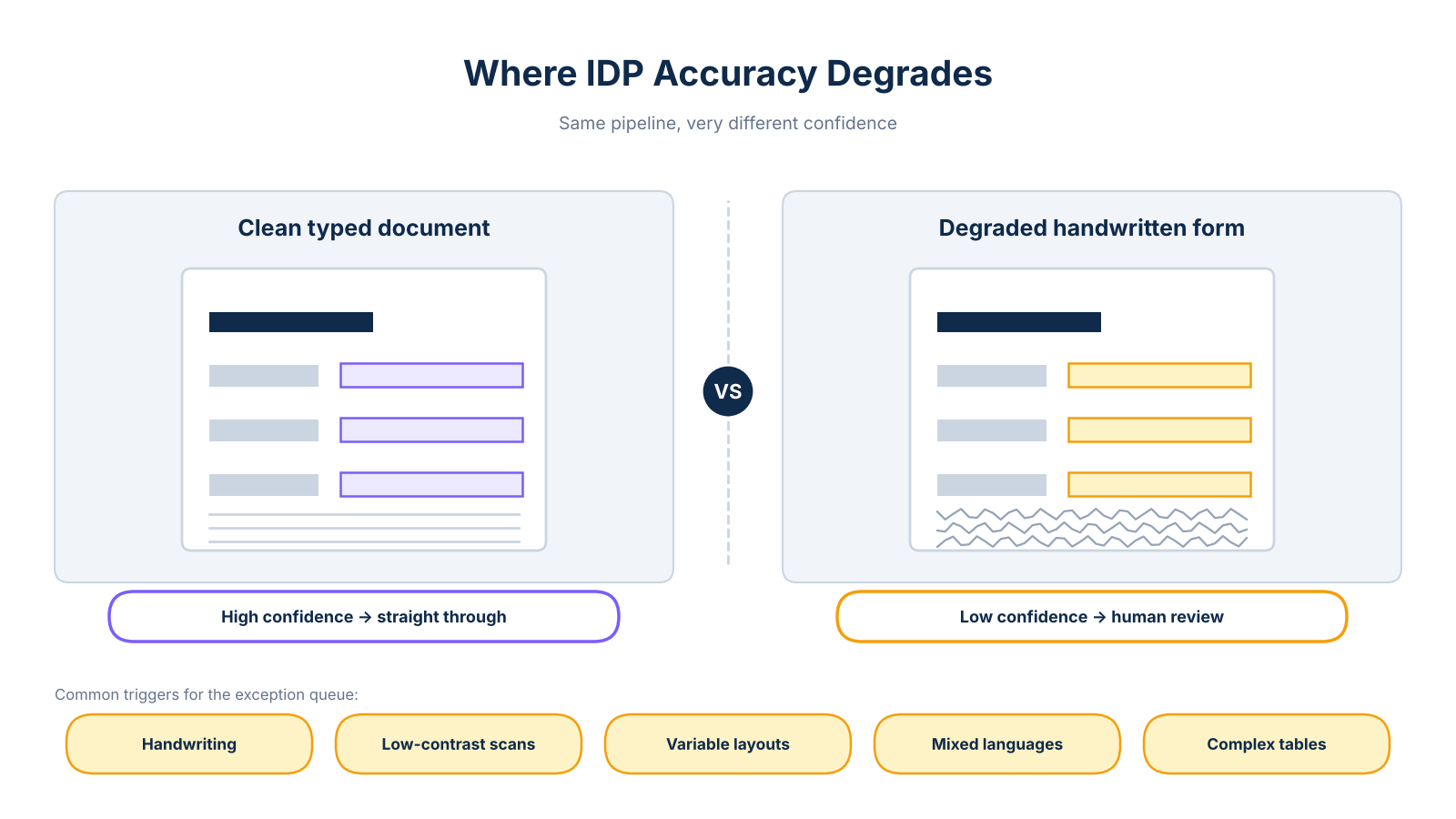
IDP performs well on clean, consistently formatted documents. It performs significantly worse on several categories that appear in almost every real-world document mix. Knowing where accuracy drops before you deploy is the difference between a controlled rollout and a production surprise.
1. Handwritten forms
Handwriting recognition depends on legibility, image resolution, and whether the model has been trained on domain-specific scripts. As Docsumo documents, handwriting variability is among the most common OCR failure conditions. Irregular letter forms, corrections, and inconsistent spacing create ambiguous character sequences the model cannot resolve confidently. Clear, standardized handwriting processes with reasonable accuracy; irregular entries should route to human review by default.
2. Low-contrast or degraded scans
Faded ink, skewed pages, compression artifacts, and poor scanner resolution reduce the signal available to the extraction model. If your document set includes legacy paper records, faxed submissions, or low-quality scans, plan for a higher exception rate in those categories than in digitally originated files.
3. Non-standard or variable layouts
Template-trained models struggle when document structure changes across vendors or form versions. An invoice format from one supplier places fields in different positions than another supplier's format. This failure mode is particularly common in accounts payable workflows where supplier diversity is high.
4. Mixed-language documents
A document containing two or more languages requires explicit multi-language model support. Without it, one language section may degrade, depending on the model's language support and training data. This is a real concern for businesses processing documents across European markets. A single form may contain German and French sections, or a contract may mix English terms with local-language clauses.
5. Complex tables and nested structures
Multi-row tables with merged cells, sub-totals, and footnotes require structural parsing beyond field-level extraction. A document can appear clearly readable to a person while still producing misaligned structured data when the table structure is non-standard.
For each failure mode, the design response is the same: set a confidence threshold below which the document routes to the exception queue, and build the human review workflow before you go live. Human review is a design requirement, not a workaround.
ROI evidence and how to build your own business case
The strongest ROI evidence for IDP comes from named deployments with described processes, not vendor-level averages. Here's what arsuno.ai's published project data shows, with the context that makes each figure meaningful.
For a Swiss psychiatry practice, arsuno.ai built an AI-powered document automation workflow covering the clinic's intake-to-EHR process. The published project reports a 70% reduction in manual work and 3.5x automation efficiency, reflecting the specific document types and volume of that practice. These are not typical results for all IDP implementations.
For a US recruitment company, arsuno.ai reports 2x faster project delivery, achieved by accelerating candidate document processing and vetting. Across projects, arsuno.ai also publishes a 40% cost reduction and 60% operational overhead reduction as directional figures from project metrics, not universal benchmarks.
For comparison, Microsoft reports manual document processing costs of approximately 6-8 per document. This reflects their platform context and specific assumptions about document type, labor rates, and geography. It is not an industry-wide standard.
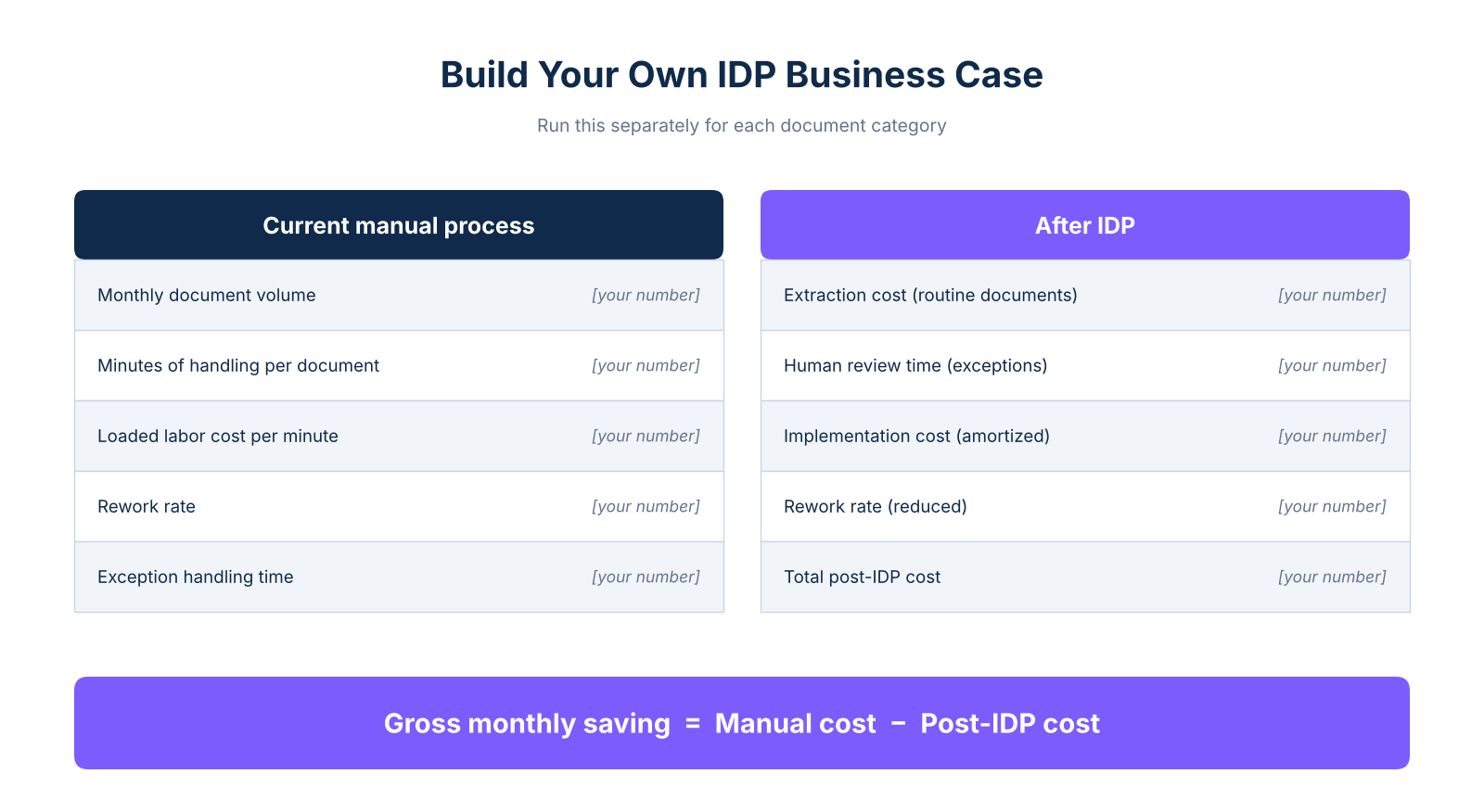
To build your own business case, start with a baseline. Multiply your monthly document volume by average minutes of manual handling per document, then multiply by your loaded labor cost per minute. Add your rework rate and exception handling time for documents requiring escalation or manual review. Post-automation, your cost is extraction time for routine documents plus human review time for exceptions, plus implementation costs amortized over the deployment period.
The difference between those two states is your gross monthly saving. Measuring intelligent document processing ROI this way ties the number to your actual workflow, not a vendor average. Run the calculation separately for each document category in your mix. The exception rate is higher for handwritten or non-standard documents, and review time per exception depends on the complexity of the human judgment call. That breakdown gives you a more defensible figure for a CFO or board presentation than any published benchmark can provide.
Integration, compliance, and how IDP fits your stack
IDP creates value only when validated data reaches the system where the operational action happens. As ServiceNow describes, IDP functions as a workflow layer connecting to ERP, CRM, and HR systems, not a standalone tool. The export step moves validated fields into downstream systems through APIs, webhooks, or direct connectors.
Integration failure risk concentrates at field mapping mismatches, validation rule conflicts, duplicate record handling, and failed handoff logging. These failures can be silent, corrupting downstream data without triggering an obvious error. Test both successful transactions and rejected records before go-live.
IBM's framing of IDP as a data-governance enabler is useful here. GDPR-aligned design typically includes risk-based controls such as encryption in transit and at rest, role-based access controls, audit trails for every extraction and correction event, and data residency controls. arsuno.ai's architecture meets these requirements and is HIPAA-aligned for healthcare deployments, though not HIPAA-certified. That distinction matters where certification is a procurement requirement.
For businesses handling customer-facing document intake, such as onboarding packets or application forms, AI chatbot tools can complement IDP by capturing initial inputs before the extraction workflow begins. The two layers work together: the chatbot collects and routes the document, and IDP extracts the structured data from it.
Security requirements for document processing pipelines go beyond the extraction layer itself. Role-based access controls determine who can view extracted fields, approve exceptions, or export records. Audit trails that log every extraction, correction, and approval event are essential for regulated industries. Data residency controls matter wherever cross-border transfers are restricted. Build these requirements into your vendor evaluation before you select a platform, not after go-live.
Frequently Asked Questions
What is the difference between OCR and intelligent document processing?
OCR converts a document image into machine-readable text, giving you a string of characters with no understanding of what those characters mean or where they belong. Intelligent document processing adds classification, field-level extraction, validation, and workflow routing on top of OCR, which it uses as one component. The operational difference is concrete OCR returns a text block from a scanned invoice while IDP returns vendor name invoice number and line.
Does intelligent document processing eliminate human review?
IDP reduces routine manual entry significantly, but it does not guarantee fully unattended processing for every document. Confidence thresholds, validation rules, and exception queues route low-confidence extractions, blank required fields, and failed validation checks to a human reviewer. Handwriting, poor scans, unusual layouts, and ambiguous values are the most common review triggers.
Can intelligent document processing process handwritten documents?
It can process clear, standardized handwriting with reasonable accuracy, but results depend heavily on legibility, consistency, image quality, and whether the model has been trained on domain-specific scripts. As Docsumo's analysis of OCR limitations shows, irregular letter forms, corrections, and overlapping marks create ambiguous character sequences that degrade extraction accuracy. Treat handwritten forms as a separate test category in your pilot dataset and plan.
How accurate is intelligent document processing?
There is no single universal accuracy figure for IDP because results vary by document quality, layout consistency, language, field type, and the quality of training data. Measuring accuracy as a single blended number across your entire document mix is misleading because easy and difficult documents cancel each other out. Measure field-level accuracy document-level completion rate exception rate and correction effort separately and report results by document category so you can.
What are the benefits of intelligent document processing?
The core operational benefits are reduced manual data entry, faster document cycle times, lower rework from downstream data errors, scalability without proportional headcount growth, and immediate availability of structured data for reporting and decision support. As ABBYY's IDP overview covers, these benefits apply across invoices, onboarding documents, claims, and other high-volume document types. Each benefit should be tied to a measurable baseline.
How does intelligent document processing work?
IDP follows a sequential workflow: documents are captured, classified by type, and then processed through field extraction and validation against business rules. Exceptions route to human reviewers while approved records export to the downstream system, with reviewer corrections feeding back into the model over time. The validation and exception-handling steps are what make extracted data trustworthy enough to write into an ERP or CRM without manual verification of every record.
Can intelligent document processing integrate with an ERP?
Yes, IDP exports validated structured data to ERP systems through APIs, webhooks, or direct connectors after the extraction and validation steps complete. The integration points where failure risk concentrates are field mapping mismatches between the IDP output schema and the ERP's expected input, validation rules that differ between systems, duplicate record handling, and failed handoff logging. Test both successful transactions and rejected records before go-live and confirm data retention access.