
.webp)
Key takeaways
- Automated document processing classifies, extracts, validates, and routes data with context-awareness that OCR alone cannot provide.
- OCR suits stable, structured documents with fixed layouts; semantic AI is required when layouts vary, fields shift, or content is handwritten.
- Map your document types to the extraction method they require before any vendor conversation: your document mix determines the capability tier you need.
- Build your business case on rework hours eliminated, error-rate reduction, throughput increase, and SLA performance improvement.
Why OCR alone is not automated document processing
OCR converts an image into text characters. That is the complete scope of what it does, and it does that job well. The problem is that converting pixels to characters is not the same as understanding what those characters mean. That distinction is the decision rule you need before you evaluate any vendor claiming to offer "AI-powered" automated document processing.
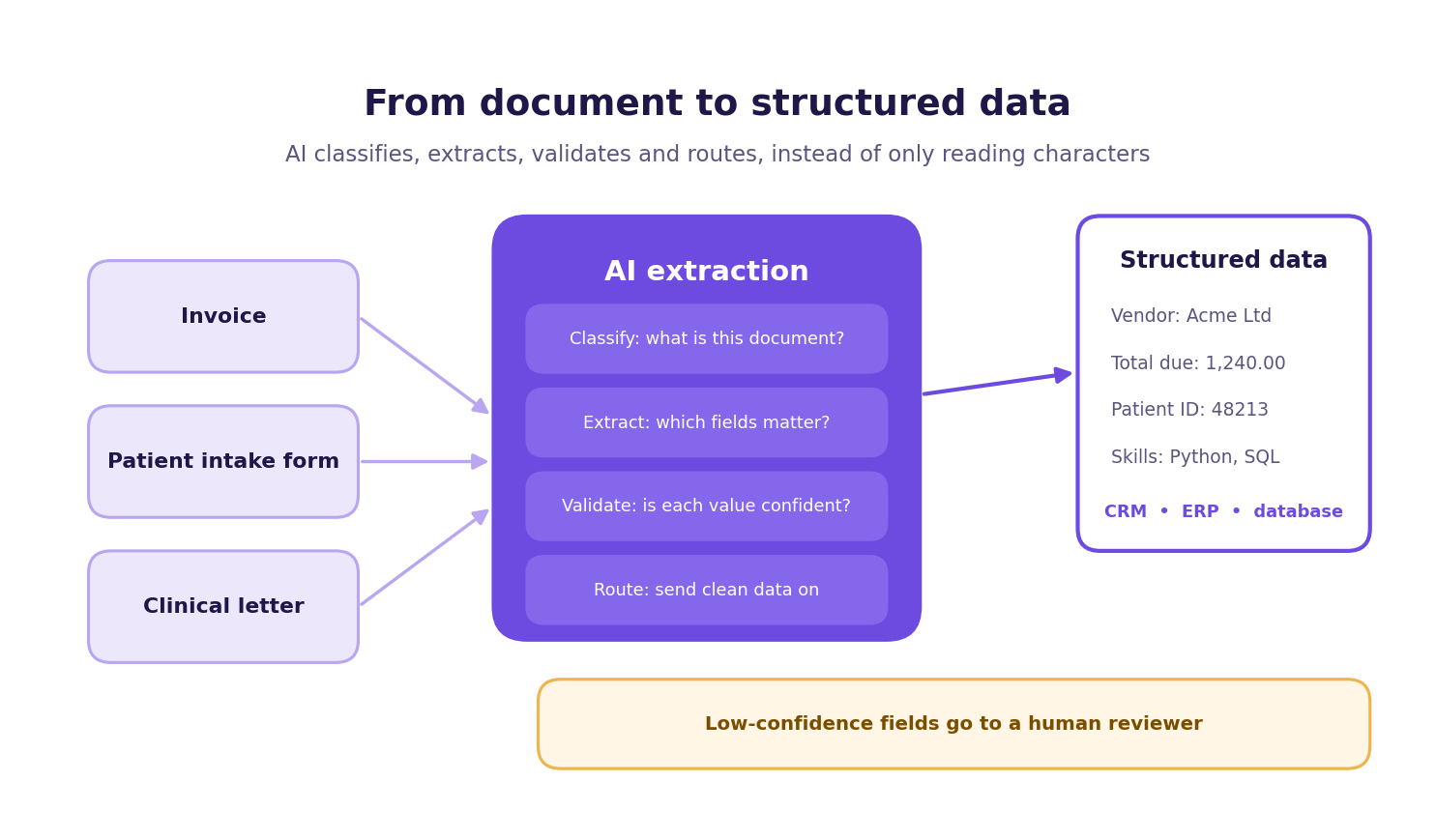
When a vendor describes their product as AI-powered, ask one question: at which layer? OCR operates at the input layer. It reads the image and outputs a string of text. What happens to that text next matters most. Whether the system understands that a number in the top-right corner of a page is an invoice total tied to a vendor relationship is the work of context-aware extraction. As Nutrient explains, OCR is one component layer inside a broader AI pipeline, not a synonym for it. Calling OCR "AI-powered" tells you nothing about whether the system can handle your actual document mix.
Context-aware extraction uses computer vision, NLP, and machine learning to identify field meaning, not just field content. A "Total Due" entry on an invoice is understood as a currency value associated with a specific vendor and payment cycle. A "Date of Birth" field on a patient intake form is understood as a demographic data point subject to specific handling rules. The system interprets text within the document's structure and the business context it operates in.
The practical failure point for OCR-only systems is document variability. OCR works reliably on structured documents with stable, predictable layouts: the same form template processed thousands of times, or a standard invoice format from a single supplier. It stalls when layouts vary between suppliers, when fields shift position across document versions, or when a portion of the document is handwritten. That variability is not an edge case for most operations teams.
It is the daily reality of processing invoices from dozens of vendors, patient intake forms completed by hand, or CVs formatted differently by every candidate. Operations teams that have tried to solve this with rules-based OCR alone typically find themselves maintaining an ever-growing library of templates and exception rules: a maintenance burden that grows faster than the efficiency gains it was meant to deliver.
Adlib's framing is useful here: the real production differentiator is not character accuracy, it is exception handling. A system that achieves high character accuracy but cannot flag the extractions it got wrong will silently pass errors into your downstream systems. It also cannot route those exceptions for human review. That is the "trust layer" problem in production: the system's ability to know what it does not know.
To be direct about the honest limit: OCR is not categorically inferior. For a stable, high-confidence, structured document processed at volume, OCR plus rules-based extraction is fast, cost-effective, and entirely appropriate. The distinction is about matching the capability to the document complexity. The sections that follow will give you the tools to make that match for your specific document mix.
How the document processing pipeline actually works
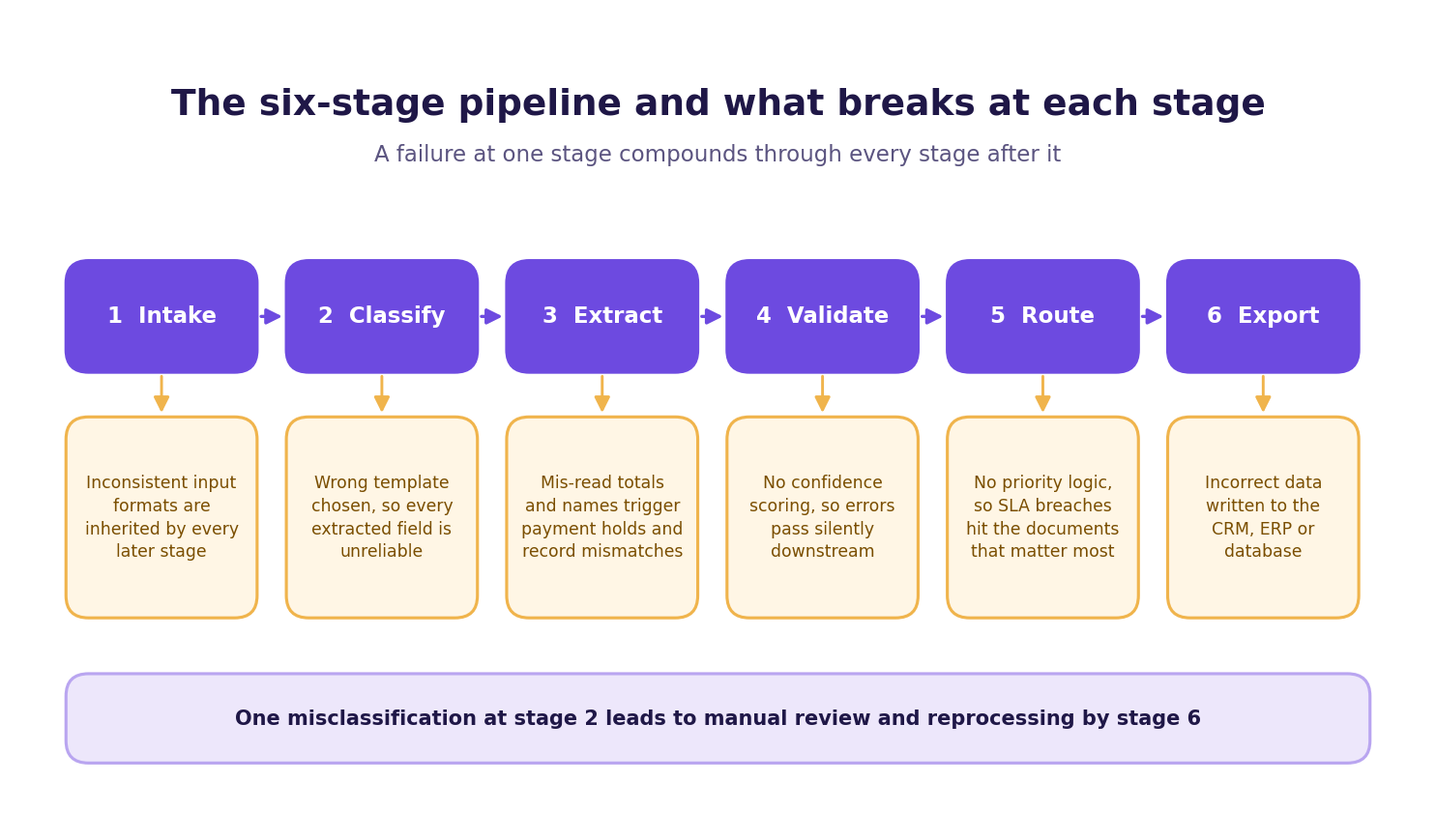
Understanding where your current workflow breaks requires knowing what a complete document processing pipeline looks like. It also requires knowing the operational consequence of failure at each stage. The pipeline has six stages. A failure at any one of them does not stay contained: it compounds downstream.
The pipeline begins the moment a document enters your system, whether via email attachment, scanner upload, web portal submission, or API call. Inconsistent ingestion across channels creates classification problems before the pipeline has even started.
1. Intake
Documents arrive from multiple sources: email, scanner, portal, or API. A production-ready system normalizes format and source at this stage. If intake is inconsistent, every stage that follows inherits that inconsistency. The Microsoft intelligent document processing framework treats intake normalization as a prerequisite, not an afterthought, because downstream classification accuracy depends on consistent input quality.
2. Classify
The system identifies the document type: invoice, patient intake form, CV, contract, delivery record. Misclassification sends the document to the wrong extraction template, making every field extraction that follows unreliable and typically requiring full manual review. ABBYY's intelligent document processing framework identifies classification as foundational precisely because downstream accuracy depends entirely on getting it right.
3. Extract
Field-level data capture happens here. The system pulls the specific values your business needs: invoice totals, patient names, candidate skills, contract dates. Extraction errors compound immediately: a mis-read invoice total triggers a payment hold. A mis-read patient name creates a record mismatch requiring manual reconciliation across multiple systems.
4. Validate
Confidence scoring compares extracted values against business rules. Without it, the system cannot flag low-certainty extractions for human review, and errors pass silently into downstream systems. You discover them when a payment fails or a patient record is flagged. Validation is the stage that separates a system you can trust from one you have to audit manually after the fact.
5. Route
Validated documents move to the next workflow step. Exceptions fall below the confidence threshold and go to a human review queue. Routing failure means exceptions pile up with no priority logic, creating SLA breaches on the documents that matter most. A well-designed routing layer assigns priority by document type and business impact, so the highest-risk exceptions reach a reviewer first rather than last.
6. Export
Structured data is written to your CRM, ERP, or database. The AWS document processing stack uses computer vision and NLP at this layer to ensure exported data matches the schema your downstream systems expect, not just the raw text the document contained.
A misclassification at stage 2 triggers a wrong extraction template at stage 3. Validation at stage 4 then compares the wrong values against the wrong rules. Routing at stage 5 sends the document to the wrong queue. Export at stage 6 writes incorrect data to your system of record. The document must then be manually reviewed and reprocessed. Affinda rebuilt the document processing pipeline on AWS using generative AI rather than OCR-centric extraction, reducing solution setup time significantly.
Matching document types to the right extraction method
Your document mix determines your capability requirement. The table below maps document category to structure level, extraction method, complexity rating, and the AI capability you need. Use it as a scoping tool before any vendor conversation.
The hardest rows are clinical correspondence and contracts. Both involve no fixed layout, mixed content types, and meaning that depends on context rather than position. A contract clause does not mean the same thing in every document: its interpretation depends on surrounding language and defined terms. OCR reads the words; it cannot understand what they mean in relation to each other. That requires semantic AI. Specifically, context-aware document extraction uses generative AI and NLP to build a representation of the document's meaning, not just its text.
Semi-structured documents like invoices and CVs sit in the middle. They have recognizable patterns, but those patterns vary enough across sources that OCR plus rules breaks down at scale. ML classification handles this variability by learning patterns rather than hard-coding them. As Docsumo's comparison of IDP, OCR, and document AI makes clear, the distinction between capability tiers is about which technology matches the variability of the documents you are actually processing.
The CV row deserves specific attention for recruitment teams. An arsuno.ai recruitment client applied AI-powered candidate document processing to their shortlisting workflow. They achieved significantly faster project delivery alongside a measurable increase in client satisfaction. That result came from matching ML classification and NLP extraction to CV variability, then routing clean structured data downstream rather than requiring consultants to parse each document manually.
If your document mix sits primarily in the low-complexity rows, OCR plus rules-based extraction is a defensible choice. If you are handling clinical correspondence, complex contracts, or high-volume CVs from diverse sources, you need semantic AI and the validation infrastructure to support it.
What production-ready document automation looks like
The gap between demo performance and production performance is where most document automation projects fail. A system that processes 50 clean, well-formatted invoices in a demo does not tell you how it handles 5,000 invoices from 200 different suppliers. Three of those suppliers may use handwritten annotations, and two may arrive as scanned PDFs with skewed alignment. Any vendor who cannot show you exception rates, confidence score distributions, and human-review escalation paths is showing you demo performance only.
Production readiness has three markers. First, the system's extraction method is matched to document complexity, not applied uniformly. arsuno.ai's Smart Document Handling covers typed documents, scanned PDFs, and handwritten notes using OCR enhancement where appropriate and semantic AI where the document requires it. The capability scales with the document. It does not force every document through the same extraction process regardless of structure.
Second, the system has a defined exception path. When a field extraction falls below the confidence threshold, the document does not silently pass into the downstream system. It is flagged, prioritized by document type and business impact, and routed to a human reviewer with the specific field in question highlighted. That is not a failure state: it is the system working correctly. A production-ready system has a measurable exception rate, and that rate should decrease over time as the model learns from reviewed exceptions. OpenText's enterprise IDP architecture uses exactly this feedback loop to improve extraction accuracy at scale across regulated industries.
Third, the system holds up at volume and over time. arsuno.ai has launched more than 30 AI systems and retained clients for two years or more across its active base. Long-term retention signals production durability, not just deployment count. A system that works at launch but requires constant vendor intervention six months later is not production-ready: it is a managed dependency.
On compliance: arsuno.ai's architecture is designed for GDPR compliance, with data encrypted in transit and at rest.
How to build the business case for document automation
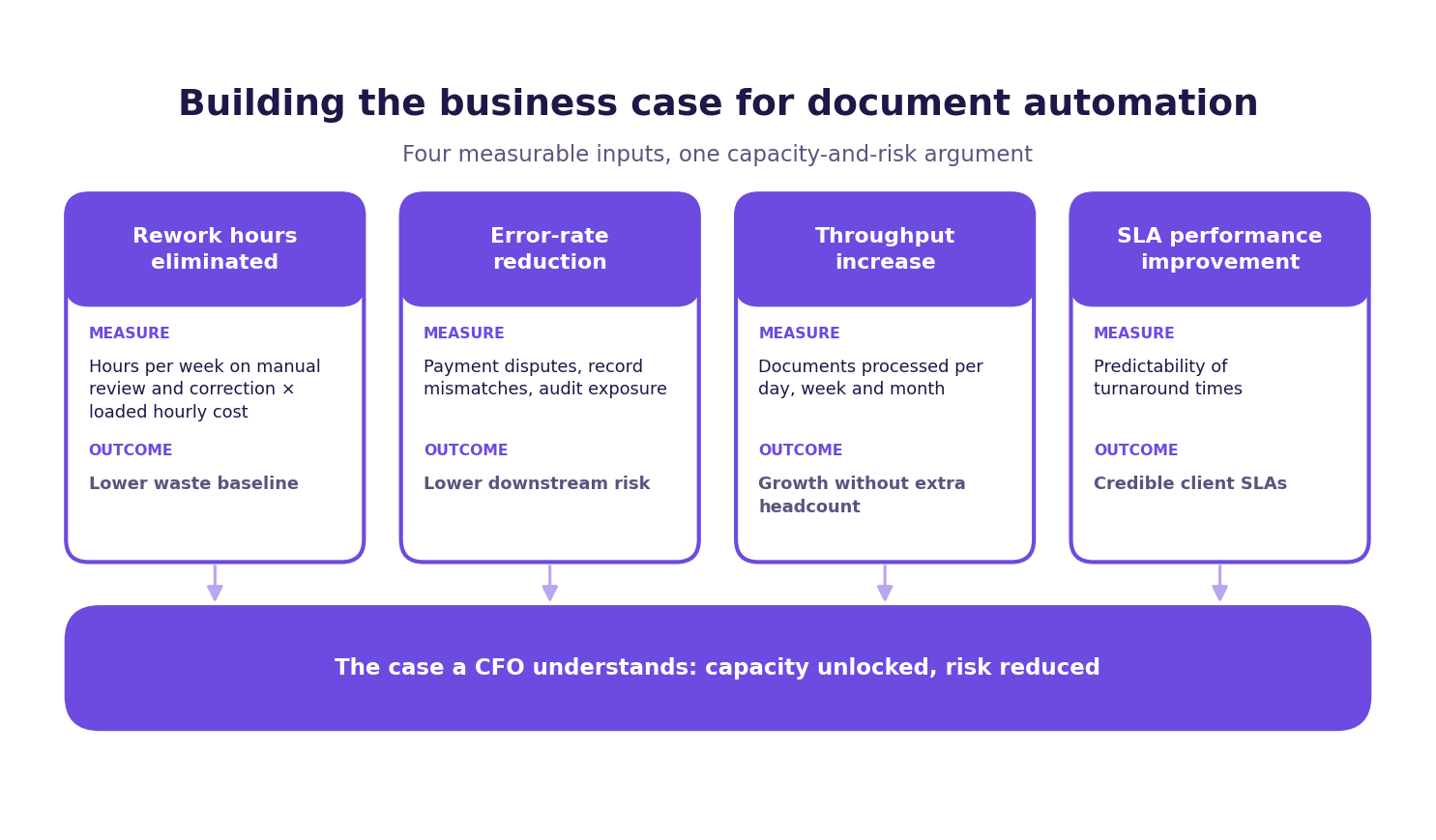
Most operations leaders already know document processing is a bottleneck. The challenge is translating that operational pain into a number the CFO will approve. The business case has four measurable inputs, and each one maps directly to a stage in the pipeline described above.
Rework hours eliminated is the most immediate input. Start by counting how many hours per week your team spends manually reviewing, correcting, and reprocessing documents that the current system got wrong. Multiply that by the fully-loaded hourly cost for the roles involved. That figure is your current waste baseline. A well-scoped automation system should reduce that number significantly in the first six months of full deployment.
Error-rate reduction is the second input, and it is the one most directly tied to downstream business risk. A mis-read contract date delays a renewal. A mis-read patient name creates a compliance exposure. A mis-read invoice total triggers a payment dispute. These errors have costs beyond the rework hours: they create audit trails, legal exposure, and client relationship damage that is difficult to quantify but easy to recognize after the fact.
Throughput increase is the third input. How many documents does your team currently process per day, per week, per month? What would a threefold or fivefold increase in throughput mean for your revenue capacity or your ability to take on new clients without adding headcount? arsuno.ai's work with a psychiatry clinic in Switzerland produced a substantial reduction in manual work and a significant increase in automation efficiency. That outcome was not a technology achievement: it was a capacity unlock that changed what the clinic could do with the same team.
SLA performance improvement is the fourth input, and it is the one that matters most for client-facing operations. If your current document processing creates unpredictable turnaround times, that unpredictability limits what SLAs you can offer and what clients you can retain. A system with defined routing, confidence-scored exceptions, and measurable throughput makes SLA commitments credible rather than aspirational.
When you present these four inputs together, you are not making a technology argument. You are making a capacity and risk argument: the language a CFO understands. The technology is the mechanism; the business case is about what the organization can do differently when the bottleneck is removed.
Building this case also requires honest scoping of what the first deployment will cover. A phased approach: starting with the highest-volume, most consistent document type in your mix and expanding from there: gives you a measurable baseline within the first quarter. That baseline becomes the evidence for the next phase of investment. Operations leaders who try to automate every document type simultaneously typically find the project scope becomes unmanageable before the first result is visible. Start narrow, measure clearly, and expand on evidence.
Five questions to ask any document automation vendor
The vendor evaluation stage is where most projects go wrong before they start. The questions below are designed to surface production capability, not demo performance. Ask them before you agree to a proof of concept, not after.
The questions cover the capabilities that separate a system that works in production from one that works in a controlled environment. Use them as a filter, not a checklist: a vendor who cannot answer them clearly has not thought through the operational reality of your document mix.
- What is your exception rate for documents similar to mine, and how does it change over the first 90 days? A vendor with production experience will have this number. A vendor without it will give you a theoretical accuracy figure instead.
- How does your system handle documents that fall below the confidence threshold? The answer should describe a specific routing path, a human review interface, and a feedback mechanism that improves future extractions. "It flags them for review" is not a complete answer.
- Can you show me extraction performance across the document types in my mix, not just the cleanest examples? Ask specifically for performance on your hardest document types: handwritten annotations, multi-page contracts, or correspondence with no fixed layout.
- How does the system integrate with my existing CRM, ERP, or case management platform? Integration depth determines whether the automation creates a new data silo or actually reduces the manual steps in your downstream workflow.
- What compliance documentation can you provide for GDPR or HIPAA, depending on my jurisdiction? For regulated industries, the answer should include data processing agreements, encryption standards, and audit trail capabilities: not a general statement about security.
These five questions will not close a deal, but they will eliminate vendors whose systems are not ready for your production environment. A vendor who can answer all five clearly, with evidence, is worth a deeper evaluation.
Frequently Asked Questions
How does AI document processing differ from traditional OCR?
OCR converts document images into raw text characters without interpreting their meaning. AI document processing adds classification, field extraction, validation, and routing on top of that text. The difference is context: AI understands that a number in a specific position is an invoice total, not just a string of digits. For variable or unstructured documents, that context layer is what makes automation reliable at scale.
What document types are hardest to automate, and why?
Unstructured documents with no fixed layout: clinical correspondence, complex contracts, and free-form correspondence: are the hardest to automate reliably. Their meaning depends on surrounding language and context, not field position, which rules out template-based OCR approaches. Semi-structured documents like invoices and CVs are manageable with ML classification but still require more than basic OCR. The document-type table in this article maps each category to the extraction method it requires.
What happens when a document automation system is not confident in an extraction?
A production-ready system assigns a confidence score to each field extraction it performs. Extractions above the threshold pass through to the downstream system automatically without human intervention. Extractions below the threshold are flagged and routed to a human reviewer with the specific uncertain field highlighted. This mechanism prevents silent errors from entering your CRM, ERP, or database undetected.
How do I know if my document mix needs AI or just better OCR?
If your documents follow a stable, repeating template and come from a consistent source, improved OCR with rules-based extraction is often sufficient. If layouts vary across suppliers or sources, fields shift position between versions, or documents include handwritten content, you need ML classification or semantic AI. The clearest signal is your current exception rate: if your team spends significant time correcting extractions, the extraction method is mismatched to the document complexity. Use the document-type table in this article to map your specific mix before evaluating vendors.
What integration requirements should I plan for before deploying document automation?
Identify every downstream system that will consume extracted data: CRM, ERP, case management, or database: before scoping the deployment. Confirm the vendor can write structured output that matches your existing data schema, not just raw extracted text. Plan for an API or connector layer that handles format normalization between the document pipeline and each receiving system. Integration gaps discovered after deployment are the most common cause of projects that work in testing but fail in production.
How do I build a business case for document automation investment?
Start with four inputs: rework hours currently spent on manual correction, error-rate costs from downstream mistakes, throughput capacity you could unlock, and SLA reliability you could offer clients. Multiply rework hours by the fully-loaded cost of the roles involved to establish a waste baseline, then add the cost of errors that create audit exposure or payment disputes. Present the combined figure as a capacity and risk argument rather than a technology argument: that framing resonates with finance stakeholders.
Is document automation suitable for regulated industries such as healthcare or financial services?
Yes, but compliance depends on how the system is architected and deployed, not just whether a vendor claims it is compliant. For healthcare, confirm the vendor will sign a business associate agreement and that audit trail capabilities meet your specific requirements. For financial services and any EU-based operation, confirm the vendor can provide a data processing agreement and that data is encrypted in transit and at rest. Request documentation rather than accepting general security statements, and verify it covers your specific jurisdiction and data types.
.webp)