

Key takeaways
An enterprise chatbot succeeds or fails based on its integration architecture and rollout sequence, not the quality of the underlying AI model. Rank use cases by volume, repetition, integration complexity, and wrong-answer risk before any pilot begins. Start read-only on one high-volume, low-risk use case before granting write permissions. Security risk lives primarily at the retrieval and write-action layer, not in the LLM provider's compliance certifications.
What makes enterprise chatbots different from standard chat tools
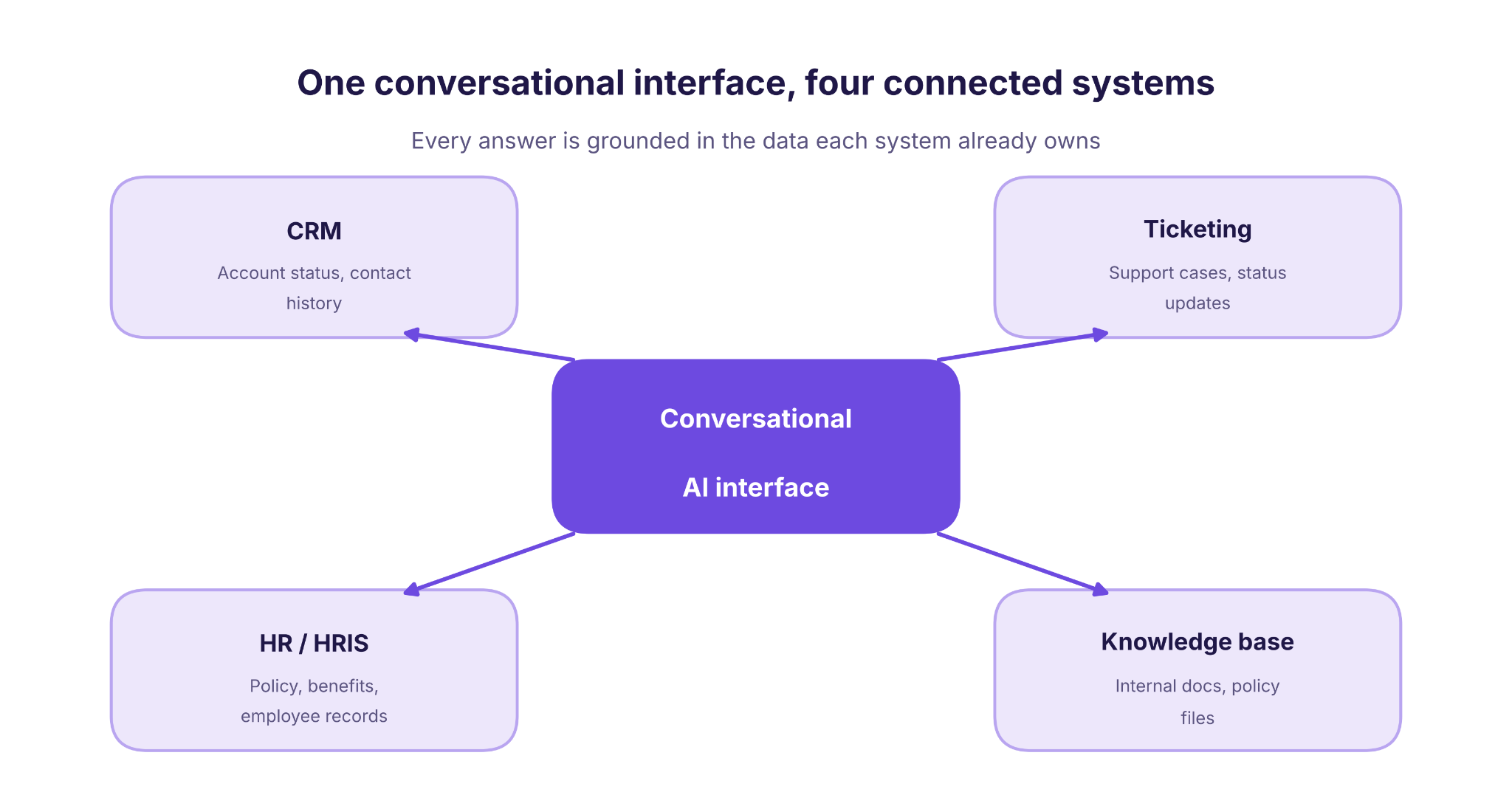
Basic chat widgets you can deploy in an afternoon share one fundamental limitation: they operate in isolation. They cannot read from your CRM, write to your ticketing system, or retrieve from your internal knowledge base. Every answer they give is disconnected from the authoritative data your business actually runs on. That isolation is fine for a basic FAQ widget on a marketing page. It is fatal for anything that needs to reflect real account status, live policy, or current employee records.
Enterprise-grade conversational systems are built on a different set of requirements. They need role-based access control so a support agent querying the system cannot retrieve documents only a manager can normally access. They need multi-turn session context that persists across channels, so a conversation started on your web widget can continue over SMS without losing the thread. And they need a defined escalation path to a human agent when the system's confidence is low or the topic is sensitive.
These are not features you can easily bolt onto a standard chat tool after the fact. They are architectural decisions made before the first line of integration code is written. As deployment guidance from Voiceflow makes clear, the distinction between a basic bot and a production-grade system comes down to how deeply it is wired into the organization's existing data and workflows.
There is also a boundary worth naming clearly. A chatbot follows defined conversation flows and retrieval logic: it answers questions, looks up records, and routes requests based on what it finds. An AI agent can take autonomous multi-step actions across systems. It makes decisions and triggers downstream processes without a human in the loop at each step. The chatbot vs AI agent comparison covers this distinction in detail and is worth reading before you scope a deployment.
The mid-market gap is real and specific. Companies with 50 to 300 employees face a situation neither generic SaaS tools nor large enterprise consultancies are built for. Off-the-shelf builders max out before they can handle proprietary data models, non-standard API structures, or geography-specific compliance requirements. Large consultancies spend three to six months in scoping alone and are priced for organizations with dedicated platform engineering teams.
The right deployment model for this gap is a custom-built system delivered by a partner who understands both the technical architecture and the operational context.
The practical question you should be asking is not "which platform has the best AI?" It is "what does this system need to connect to, what can it read versus write, and what happens when it gets something wrong?" Those three questions determine whether your deployment succeeds or becomes another integration project that impresses in a demo and breaks in production.
One more point matters for mid-market teams specifically. The systems you already use: HubSpot rather than Salesforce Enterprise, Zendesk rather than ServiceNow, BambooHR rather than Workday: are not limitations. They are the integration targets your conversational AI system needs to be built around. A well-designed deployment treats your existing stack as the source of truth. It builds the retrieval and action layers to match that stack, rather than asking you to restructure operations around a platform's native connectors.
The six-layer architecture behind a production deployment
Understanding this architecture at the layer level is the most useful thing you can do before evaluating a vendor proposal. Most proposals describe features. A layer-by-layer mental model lets you assess whether the proposed system will hold up when a user asks a question that requires reading from your CRM and writing to your ticketing system in the same turn. The Global Tech Council's integration guide documents how API-based reads and writes, webhooks, middleware, and source-level authorization work together as an architecture, not a feature list.
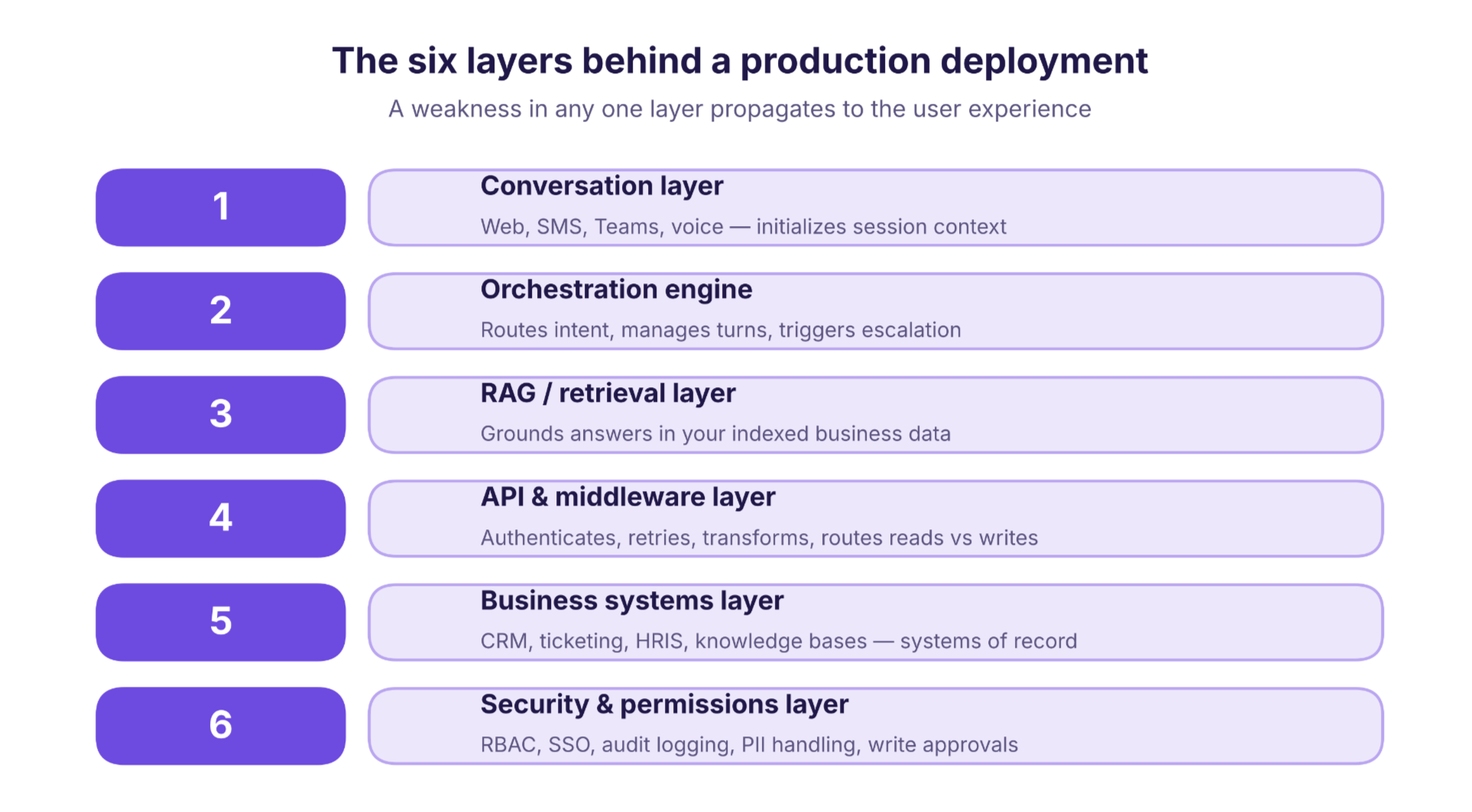
Here is how the six layers work in practice, and where each one typically fails.
1. Conversation layer
This is the interface: the web widget, SMS channel, Microsoft Teams integration, or voice endpoint where the user types or speaks. It initializes session context and passes input to the orchestration engine. Its primary failure mode is context loss on channel switch. If a user starts on the web widget and continues over SMS, a poorly designed conversation layer treats these as two separate sessions and loses everything already said.
2. Orchestration engine
The orchestration engine routes the user's intent to the correct retrieval or action handler, manages turn logic, and triggers escalation when confidence drops below a defined threshold. The failure mode is intent misclassification: the engine sends a request to the wrong handler and the user gets a response drawn from the wrong data source. This is frequently a training and evaluation problem, though orchestration logic, prompt design, and retrieval quality can each contribute.
3. RAG and retrieval layer
Retrieval-augmented generation grounds the system's responses in your actual business data rather than the model's training data. Your internal documents and policy files are chunked, embedded, and indexed. When a user asks a question, the retrieval layer finds the most relevant passages and passes them to the model as context. The failure mode is stale chunks or over-broad retrieval: the system returns outdated policy documents or pulls content from a department the user has no business accessing. Keeping the index current and scoping retrieval to the user's permission level are integration responsibilities, not model-layer ones.
4. API and middleware layer
This is where complexity concentrates. The middleware layer authenticates against your business systems, handles retries when an API call fails, transforms data formats between systems, and routes read versus write requests to the correct endpoint. The primary failure mode is authentication token expiry or API rate-limit breach breaking the session silently, with no error surfaced to the user.
Inspire's deployment illustrates why this layer matters more than the model. Inspire connected an AI assistant inside its employee portal to HR systems through APIs rather than running it as a standalone interface. According to IBM's published case study, the deployment produced a 15% reduction in employee time, a 15% boost in productivity, and a 15% decrease in costs. Those results are attributed to an integration architecture that connected the assistant directly to HR systems, rather than to a standalone deployment.
5. Business systems layer
This layer covers your actual systems of record: CRM tools like HubSpot, ticketing platforms like Zendesk, HRIS tools like BambooHR, and knowledge bases like Confluence or SharePoint. The conversational system does not own any of these. It reads from them, and where appropriate writes back to them, through the middleware layer. A well-built system is designed around your actual stack, not a generic connector library.
6. Security and permissions layer
This layer covers role-based retrieval gates, write-action approval controls, audit logging, PII handling rules, and SSO and identity federation. Its most consequential failure mode is a user retrieving documents their role should not access because permissions were not mapped at the retrieval layer. A provider's SOC 2 Type II report covers the controls within that audit's defined scope. GDPR is a legal compliance framework. Neither automatically governs which documents your system retrieves, which records it can write to, or how PII in retrieved chunks is handled before it reaches the user. As SiteGPT's enterprise security guidance notes, SSO, role-based access, data residency, and audit logging are integration-layer requirements that must be designed into the system, not assumed from the model provider's certifications.
The six layers work as a system. A weakness in any one of them propagates to the user experience. Evaluating a vendor on model quality alone is like evaluating a car on engine horsepower while ignoring the brakes and steering.
Use cases ranked by rollout risk and ROI speed
Before you choose a use case for your pilot, apply a four-axis framework. Rank each candidate by volume of requests, repetition of request type, integration complexity required, and risk if the answer is wrong. High volume plus high repetition plus low integration complexity plus low wrong-answer risk equals a Phase 1 safe use case. Move anything with high integration complexity or high wrong-answer risk to Phase 2 or Phase 3, regardless of how compelling the business case looks.
The Phase 1 use cases share a common trait: the cost of a wrong answer is recoverable. If the HR assistant gives a slightly outdated policy answer, a human can correct it. If the order-status lookup returns a wrong tracking number, the customer calls back. Neither outcome is ideal, but neither causes irreversible harm.
Phase 3 use cases are different. Clinical intake data synthesis involves writing to electronic health record systems. It may trigger HIPAA requirements where a covered entity or business associate handles ePHI. It can also trigger GDPR obligations where EU personal data is processed, and additional national health-data rules depending on jurisdiction. Financial account actions carry regulatory requirements depending on your market. Regulated-industry compliance under frameworks such as HIPAA, GDPR, or applicable financial-services regulations requires a compliance review before the write-action phase, not after.
For HR chatbot deployments specifically, the highest-value starting point is almost always a policy FAQ connected to your HRIS, not an autonomous action system. Get the read layer right first. The write layer earns its place after the read layer has proven reliable over weeks of real traffic.
The same logic applies to lead generation chatbots on your website. Starting with a read-only qualification flow that routes leads to your CRM: rather than one that autonomously books meetings and updates deal stages: gives you a safe baseline to measure against before expanding scope.
Start with the highest volume, lowest integration complexity, and lowest cost of a wrong answer. That sequencing is not conservative: it is how you build the internal credibility that funds Phase 2 and Phase 3.
Build, buy, or partner: a decision framework for mid-market teams
Most vendor comparison pages offer two options: buy a platform or build in-house. For mid-market organizations, there is almost always a third option that fits better: partner with a specialist who builds a custom system around your stack and hands it over with the integration architecture already in place.
Use this framework to find your path.
Build in-house makes sense when your team has dedicated ML and integration engineering capacity, your workflows are highly proprietary and unlikely to be covered by any platform's native connectors, and you have the operational bandwidth to own model evaluation, retrieval indexing, and connector maintenance long-term. This path is realistic for companies with a platform engineering team of three or more.
Buy a platform makes sense when your use cases align closely with what a major platform's native connectors already support, your compliance requirements are standard, and you have an internal owner who can configure and maintain the system without custom code. The risk is that platforms built for large enterprises often require significant configuration before they fit a mid-market stack. That configuration work can cost as much as a custom build.
Partner with a specialist makes sense when you need a working system faster than an in-house build allows, your stack is a mix of mid-market SaaS tools that platforms do not connect natively, and you want a system built to your exact permission model and escalation logic rather than a platform's defaults. arsuno.ai's approach includes a discovery and scoping phase, a read-only proof-of-value prototype, and a phased handover. Company-reported benchmarks indicate a 60% reduction in operational overhead and a 3x efficiency improvement across select client engagements. Human review of methodology and sample documentation is recommended before treating these as universal benchmarks.
The Alice Labs 2026 chatbot guide and Guideflow's platform evaluation criteria both identify integration depth, security model, and escalation quality as the differentiating factors in conversational AI platform selection: not raw AI capability. That framing reinforces the partner path for teams whose primary constraint is integration complexity, not model access.
If you are unsure which path fits your situation, contact arsuno.ai to walk through your stack and use cases before committing to a platform or a build.
The phased rollout sequence that reduces deployment risk
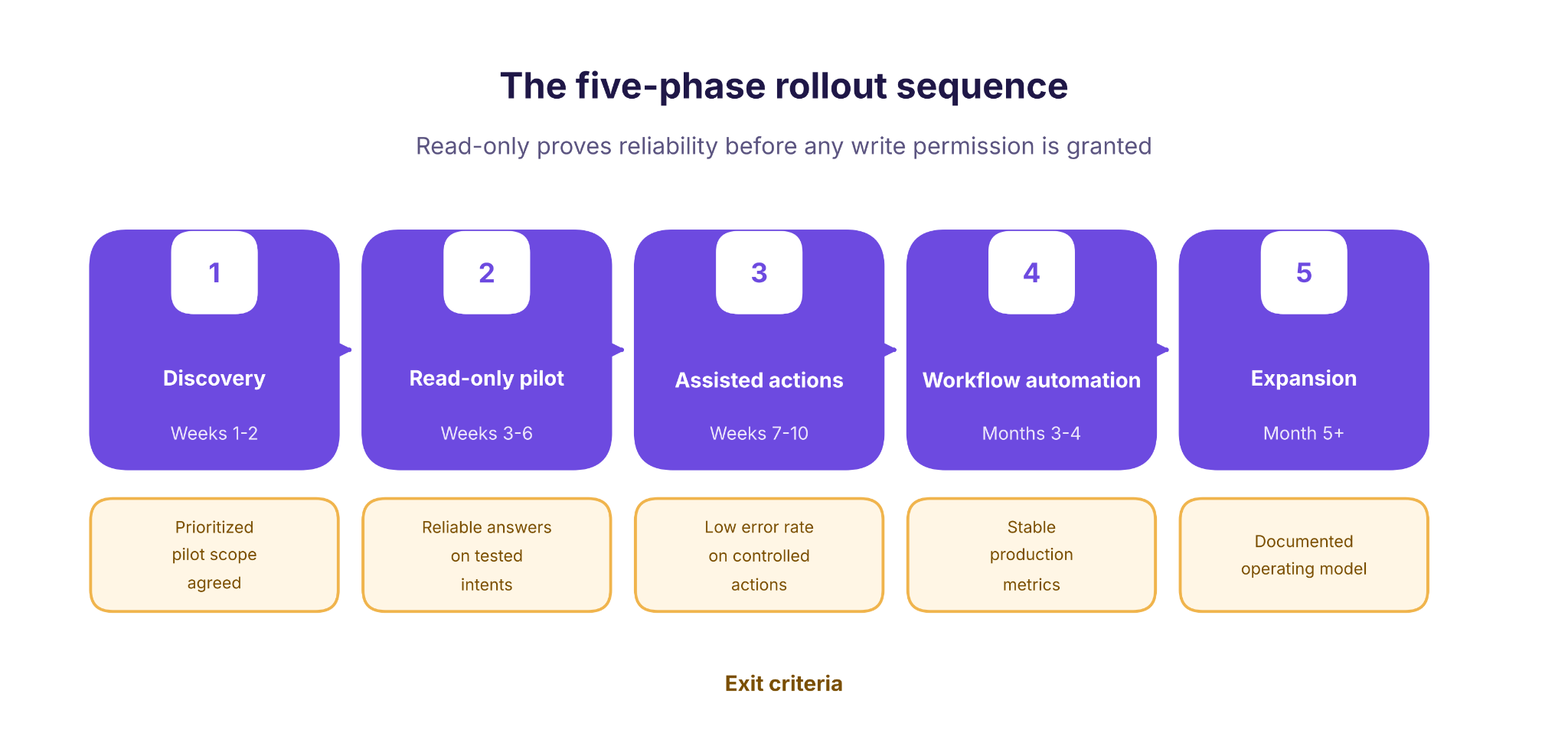
The single most common reason pilots stall is not a technology problem. It is a scoping problem. Teams try to automate too many use cases at once, or they move to write-action automation before the read layer has proven reliable. The phased sequence below is drawn from arsuno.ai's implementation model. Week ranges are indicative and will vary based on your stack complexity, data quality, and compliance review requirements.
Phase 2 deserves special attention. Read-only does not mean low risk in every dimension. A read-only system can still expose PII, confidential HR records, or regulated data if the retrieval layer does not enforce document-level permissions. The exit criteria for Phase 2 must include a permission audit, not just an accuracy check on a test set.
Moving to Phase 3 before those criteria are met is a leading reason deployments stall at the write-action phase. Write-action approval gates and audit logging are not optional safeguards for regulated use cases: they are the mechanism that lets you demonstrate control to stakeholders and compliance reviewers before the system operates autonomously.
The discovery phase in weeks 1-2 is where the scoping problem gets solved or gets worse. The output of discovery should be a prioritized list of use cases, a map of the integration targets each one requires, and a risk classification for each use case. It should also name a human owner for each data source the system will access. Without that output, the read-only pilot has no agreed scope and no way to define success.
Measurement should begin in Phase 2 and carry through every subsequent phase. Track containment rate: the percentage of conversations resolved without human escalation: intent accuracy, which measures the percentage of requests routed to the correct handler, and retrieval precision, which captures the percentage of retrieved passages that are relevant and correctly permissioned. These three metrics give you an honest picture of system health before you expand scope. Reviewing them weekly during the read-only pilot phase allows your team to catch retrieval gaps and permission mismatches before they compound into larger problems at the write-action stage. Establishing a baseline during Phase 2 also gives you the documented evidence stakeholders need to approve the move to Phase 3 with confidence.
Frequently Asked Questions
How do enterprise chatbots integrate with CRM and ITSM systems?
Integration with CRM and ITSM platforms works through an API and middleware layer that authenticates against each system, handles retries, and transforms data formats between tools. The middleware routes read requests: such as pulling a ticket status from Zendesk: separately from write requests, such as creating a new record in HubSpot. Permissions must be mapped at the retrieval layer so the system only accesses records the requesting user is authorized.
What security requirements should an enterprise chatbot have?
A production-grade conversational AI system requires role-based access control at the retrieval layer, SSO and identity federation, audit logging for every read and write action, and defined PII handling rules before any data reaches the user. Data residency requirements must be confirmed for each connected system, particularly where EU personal data is involved. A provider's compliance certifications cover their own infrastructure scope and do not automatically govern how your system.
How long does it take to deploy an enterprise chatbot?
Timelines vary based on stack complexity, data quality, and compliance review requirements. A phased deployment model typically runs discovery and scoping in weeks 1-2, a read-only pilot in weeks 3-6, assisted write actions in weeks 7-10, and workflow automation from month 3 onward. Regulated environments, complex identity federation, or non-standard API structures can extend each phase.
Should a company build, buy, or partner for an enterprise chatbot?
The right path depends on your internal engineering capacity, the complexity of your existing stack, and how closely your use cases match a platform's native connectors. Build in-house when you have dedicated ML and integration engineering resources and highly proprietary workflows. Buy a platform when your use cases are standard and you have an internal owner who can configure without custom code.
Which enterprise chatbot use cases deliver the fastest ROI?
The fastest return comes from high-volume, high-repetition use cases with low integration complexity and a low cost if the answer is wrong. HR policy FAQ, IT help desk triage, and customer order status lookups consistently meet those criteria and are well-suited to a Phase 1 read-only pilot. These use cases generate measurable containment rate improvements quickly because they replace a large number of simple, repetitive human interactions.
How does an enterprise chatbot hand off to a human?
Escalation to a human agent is triggered when the orchestration engine's confidence score drops below a defined threshold, when the user explicitly requests a person, or when the topic falls into a category flagged as requiring human review. A well-designed escalation path passes the full conversation context to the receiving agent so the user does not have to repeat themselves. Escalation logic should be defined during the discovery phase and.
.webp)