
Key takeaways
- Chatbots respond, virtual assistants complete tasks, AI agents execute multi-step plans across systems: three hard capability boundaries, not synonyms.
- Deploying the wrong tier means your team still closes the loop manually, or you pay agent-level build costs for a problem a chatbot could have solved.
- Start with the simplest tier that solves the actual job, then graduate only when the workflow demands it.
The three automation tiers: a capability ladder, not a synonym list
Vendor marketing has collapsed three architecturally distinct tools into interchangeable buzzwords. A sales deck will call the same product a "chatbot," a "virtual assistant," and an "AI agent" across three different slides, and none of those labels will be wrong enough to challenge. That conflation costs founders real money when they buy the wrong tier for their workflow.
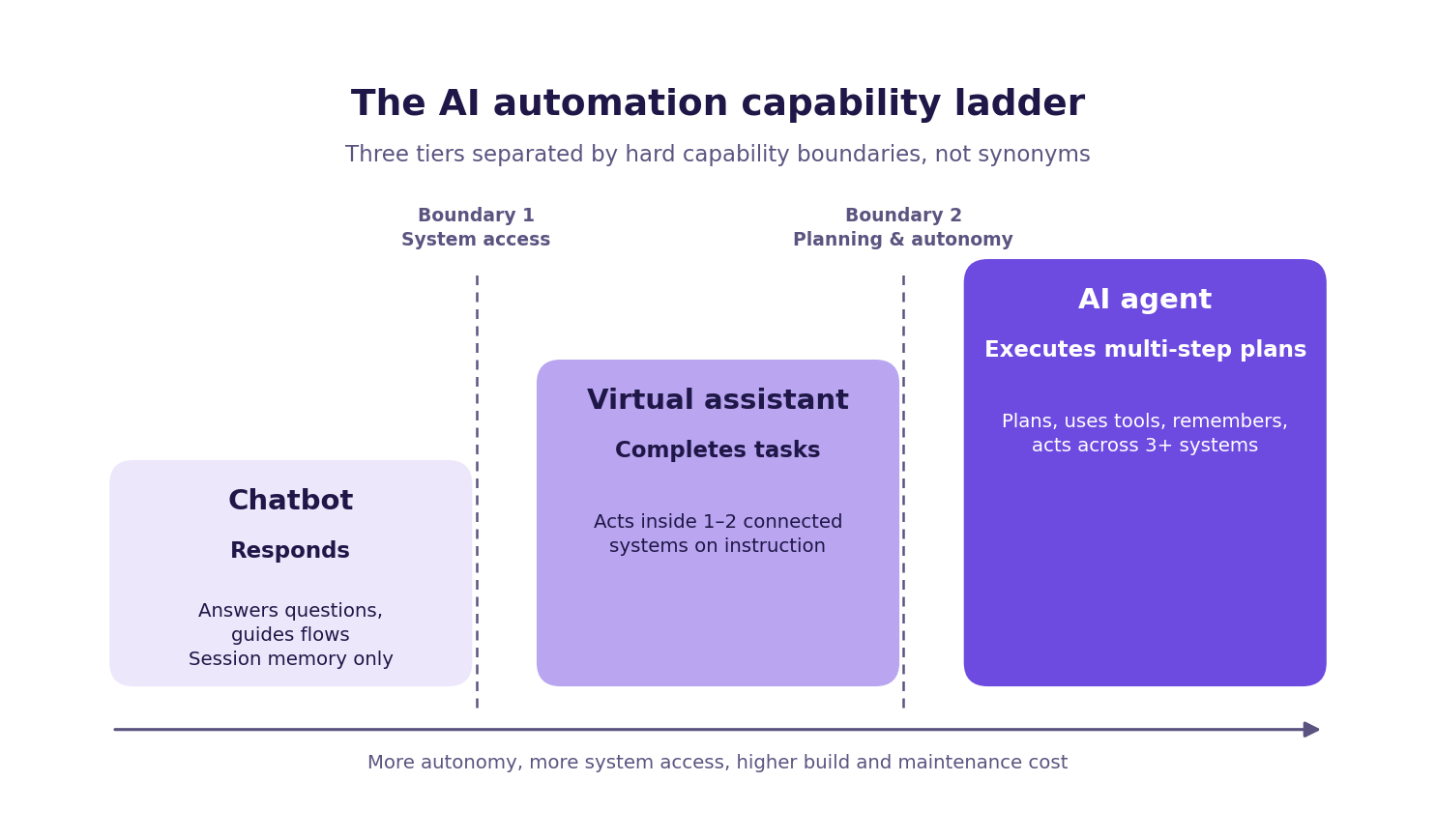
Here is the ladder in one sentence each. The AI chatbot vs virtual assistant distinction is not vocabulary: it is a hard capability boundary. A chatbot responds within a conversation: it matches inputs to outputs and answers questions from a trained knowledge base. A virtual assistant completes tasks inside a connected system: it can book a meeting, update a record, or retrieve data on your behalf. An AI agent executes multi-step plans across multiple systems with tool access and memory: it pursues a goal without waiting for a human prompt at each step.
The table above is the mental model you need before any vendor conversation. Each column represents a meaningful architectural boundary, not a feature upgrade. A chatbot cannot be "configured" to take cross-system actions without being substantially rearchitected toward a higher tier. A virtual assistant cannot plan across systems without becoming an agent.
The sections below unpack each tier in detail: what it does, where it stops, and what a real deployment looks like. The final section gives you a decision framework for choosing between them based on your actual workflow, not a vendor's feature list.
One note before you read on: this article addresses B2B software tools. Consumer voice assistants such as Siri and Alexa are technically virtual assistants, but they are personal device tools with no relevance to the procurement decision you are making. They will not appear again.
What a chatbot actually does (and where it stops)
A chatbot is a conversational interface that responds within a single channel. It matches a user's input to a trained output: either a scripted response, a knowledge base answer, or a guided flow that walks the user through a set of options. It does not take actions outside the conversation. When the conversation ends, the chatbot's job is done.
That definition sounds limiting, but it is not a criticism. For the right workflows, a chatbot delivers genuine ROI. There are three SMB use cases where chatbots consistently earn their place. First, FAQ deflection: if your support inbox handles the same 30 questions on repeat, a chatbot trained on your knowledge base can answer most of them without a human ever seeing the ticket. Second, guided selection flows: a chatbot can walk a prospect through a product or service decision tree and surface the right option without a sales rep involved. Third, after-hours inquiry capture: a chatbot can collect contact details, qualify intent, and queue a lead for follow-up during business hours, so nothing falls through overnight.
These are high-volume, low-complexity, single-system interactions. The chatbot lives inside one channel: your website, your support widget, your messaging app: and handles the conversation entirely within that channel. That is its strength, and it is also its ceiling.
The difference between a chatbot and a virtual assistant is not vocabulary; it is system access. As TechTarget explains, a chatbot cannot update a CRM record, book a calendar slot, or route a document through an approval workflow. It cannot remember a user across sessions or send a follow-up email after the conversation closes. It cannot pull a live account balance from your billing system either. Any workflow that requires an action outside the conversation requires a higher tier.
The mismatch cost is direct. If you deploy a chatbot on a workflow that requires cross-system action, your support team still closes the loop manually, every time. The chatbot captures the request, and a human completes the task. You have added a layer without removing the workload. That is not automation: it is a more expensive version of the same problem.
The honest question to ask before deploying a chatbot is: does this workflow end when the answer is given, or does it require something to happen in another system? If the answer is the former, a chatbot is the right tool. If the answer is the latter, you are already in virtual assistant territory.
Before committing to any tier, it is worth understanding the real cost gap between them. Review chatbot build costs to see what each tier costs to build and maintain, so the decision is grounded in numbers rather than feature lists.
What a virtual assistant adds (and what it still cannot do)
The term "virtual assistant" carries two meanings in vendor marketing, and confusing them wastes time. Consumer VAs: Siri, Alexa, Google Assistant: are voice-activated personal device tools. They are not relevant to a B2B software procurement decision, and this section does not address them further. The B2B software definition is different: a virtual assistant is a task-execution layer that can access one or more integrated systems to complete a defined job on the user's behalf.
That distinction matters because the B2B VA capability is genuinely useful and genuinely bounded. A virtual assistant can book a meeting by accessing your calendar, pull a contact record from your CRM, send a templated follow-up email, or update a field in a database. It operates within a defined scope, on systems it has been explicitly integrated with, and it completes tasks rather than just answering questions. That is a meaningful step up from a chatbot.
What a real deployment at scale looks like: Strategic Education deployed a virtual assistant named Irving to handle student support inquiries online. According to Google's published customer story, Irving has completed over 740,000 student conversations. Irving illustrates the VA tier precisely: high-volume, repetitive task support within a defined domain, without the cross-system autonomous execution that characterises an AI agent.
Irving does not plan across multiple goals, does not use tools it was not pre-configured for, and does not make decisions about which action to take next. It completes the task it was built to complete.
That is also where the ceiling sits. A VA still requires a human to define the scope, configure the integrations, and handle exceptions. It does not reason across multiple goals simultaneously. It does not retain context from a session six weeks ago and use it to inform a decision today. It does not call a system it was not pre-configured to access.
The virtual assistant vs AI agent distinction becomes a real procurement decision at exactly this threshold. That threshold is reached when your workflow requires the system to plan, to use tools it selects itself, or to pursue a goal across three or more systems without step-by-step instruction.
If your workflow requires completing a task inside one or two connected systems, a virtual assistant is the right tier. If it requires something more, you are looking at an agent. As Cloudflare's explainer on agentic AI notes, the shift to agentic systems introduces new requirements around permissions, fallback logic, and error handling that task-level VAs simply do not face.
Understanding those requirements before you commit to a build is not optional. Agentic systems that lack defined fallback paths create new manual work rather than removing it: a more expensive version of the problem you started with. The sections below explain what that looks like in practice and how to avoid it.
What an AI agent is and why it is a different category
An AI agent is not a smarter chatbot. It is a categorically different type of system. According to IBM's definition and Google Cloud's framing, an AI agent is software that pursues a defined goal by planning steps, using tools, and taking actions across multiple systems. It does not require a human prompt at each step. That last point is the boundary.
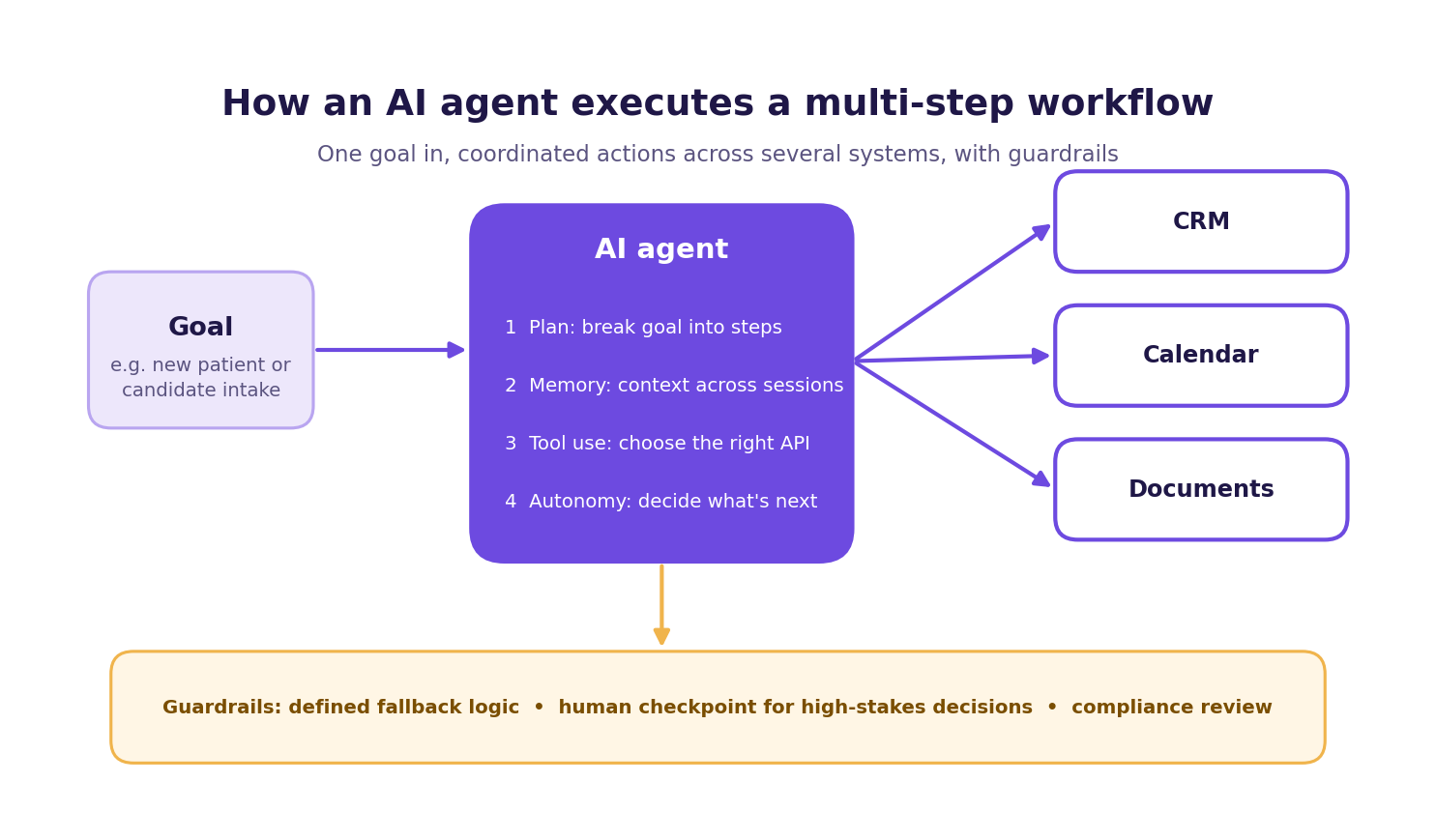
Four capabilities separate an agent from everything below it. First, planning: the agent breaks a goal into sub-tasks and sequences them. Second, memory: it retains context across sessions, so a decision made on Monday informs an action on Thursday. Third, tool use: it calls external APIs and systems, choosing the right tool for each task. Fourth, autonomy: it decides what to do next without waiting for a human instruction.
As McKinsey's explainer and AWS fundamentals both describe, the distinction between a virtual assistant and an AI agent is not about intelligence level. It is about whether the system can initiate actions across systems or only respond within one.
In practice, this distinction produces measurable results. For a Switzerland-based psychiatry clinic, arsuno.ai reports a 70% reduction in manual work and 3.5x automation efficiency, achieved by synthesizing patient data across intake records, clinical notes, and summary workflows. For a US-based recruitment company, arsuno.ai reports 2x faster project delivery and a 50% increase in client satisfaction through AI-accelerated candidate sourcing across multiple data sources. Both figures come from arsuno.ai's published case studies and are not independently audited. They illustrate what cross-system autonomous execution delivers at the SMB level.
The honest limits matter equally. Real agentic systems require guardrails, defined fallback logic, and human-in-the-loop checkpoints for high-stakes decisions. An agent that hits an ambiguous instruction or a failed API call needs a defined path forward. Designing that path requires human judgment. Understanding how AI agents work before you commit to building one is not optional: it is the difference between a system that runs reliably and one that creates a more expensive problem than the one you started with.
Agentic builds also carry higher compliance requirements than chatbot or VA deployments. In regulated sectors: healthcare, recruitment, financial services: the review process for a system that acts autonomously across multiple data sources is materially more involved than for a system that answers questions or completes a single defined task. That review time is a real cost and a real timeline factor. Factor it into your build decision before you commit to the tier.
Which automation layer does your workflow actually need
Complexity is a cost, not a feature. The right tool is the simplest one that solves the actual job. Vendor marketing consistently pushes buyers toward higher tiers than their workflows require, and the mismatch cost runs in both directions.
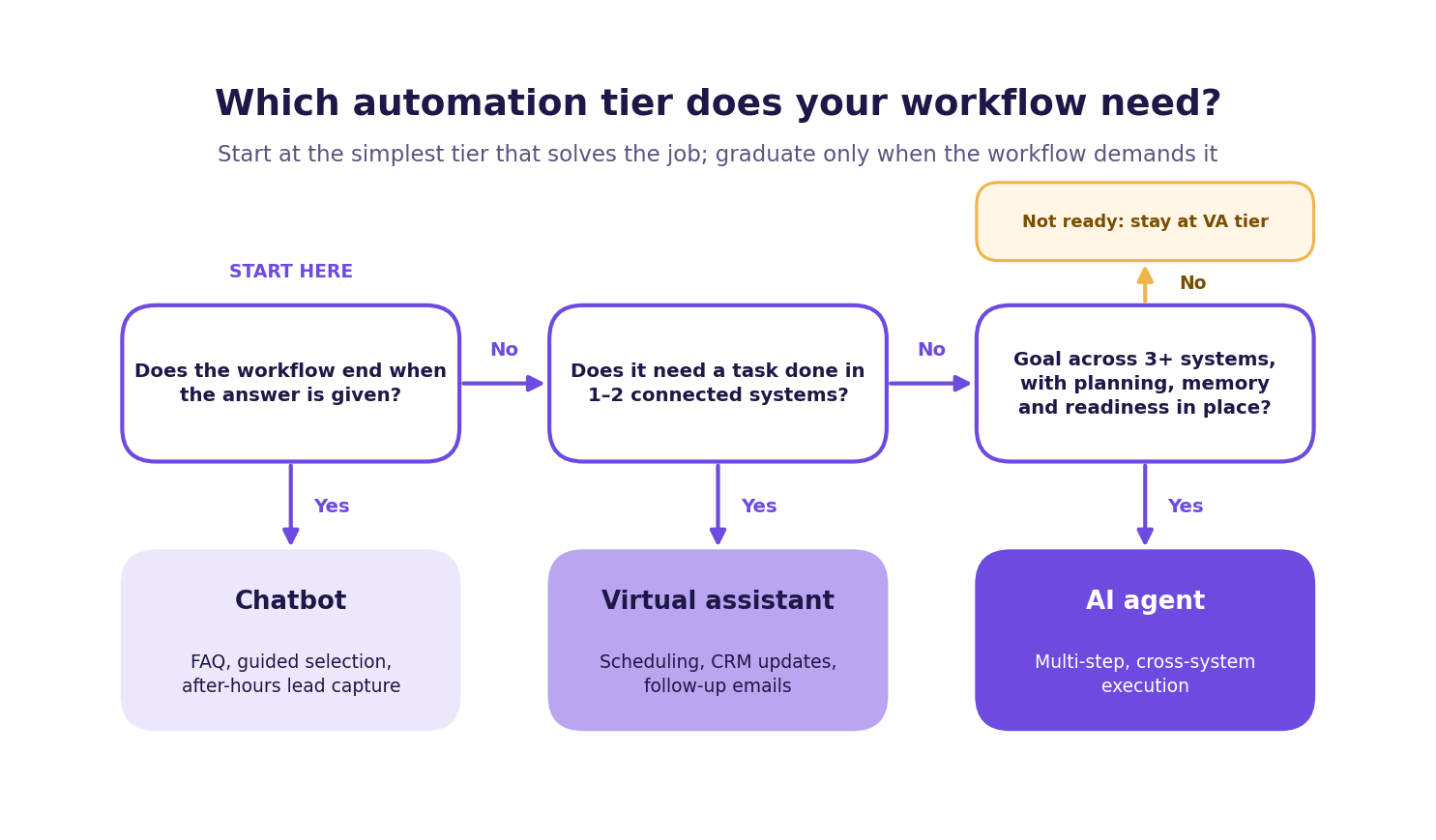
The business automation layers map to workflow complexity thresholds. Use the framework below in a vendor meeting or a message to your co-founder: start at the tier that fits your current workflow, and graduate only when the job demands it.
- Start with a chatbot if the workflow is a single channel, the task is answering a question or guiding a flow, and no system action is required outside the conversation. Graduate when the workflow requires completing a task inside a connected system, such as booking a slot, updating a record, or retrieving live data.
- Start with a virtual assistant if the workflow requires completing a task inside one or two integrated systems. Graduate when the workflow requires planning across multiple systems, conditional logic, or memory that persists across sessions.
- Use an AI agent only when the workflow requires multi-step goal pursuit, tool use across three or more systems, and the business has the readiness to support it: documented APIs, fallback logic, compliance review, and defined failure modes.
The cost of mismatch runs in both directions. Under-buying means deploying a chatbot on a workflow that requires cross-system action: your team still closes the loop manually, and you have paid for a tool that created a handoff problem rather than removing one. Over-buying is equally real: deploying an AI agent for a simple FAQ workflow creates higher build and maintenance cost, longer timelines, and more failure risk.
Most SMBs will find their automation needs are met at the chatbot or VA tier before an agent is justified. That is not a limitation: it is the right outcome. Solving a manual task with a well-scoped chatbot is better than solving it with an agent build that costs many times more and takes longer to stabilise. As Decagon's practitioner framing confirms, the chatbot vs AI agent decision is primarily a workflow-complexity and integration-depth question, not a question of which tool sounds more advanced.
When you are ready to map your specific workflow to a tier, the most useful starting point is a structured conversation about what the workflow actually requires: not a vendor demo of the most capable tool on the market. The right tier is the one that removes the manual work you have today, at the lowest build and maintenance cost that achieves that outcome. Anything beyond that is complexity you are paying for without benefit.
Frequently Asked Questions
What is the difference between a chatbot and a virtual assistant?
A chatbot responds within a single conversation channel and returns answers without taking actions in external systems. A virtual assistant connects to one or more integrated systems and completes tasks on the user's behalf, such as booking a meeting or updating a CRM record. The boundary is system access: a chatbot stays inside the conversation; a virtual assistant acts outside it.
How does an AI agent differ from a virtual assistant?
An AI agent plans multi-step workflows, uses tools it selects itself, and acts across multiple systems without waiting for a human prompt at each step. A virtual assistant executes a defined task inside a pre-configured system and does not retain cross-session memory by default. The practical boundary is autonomy: a VA completes what it was told; an agent decides what to do next.
Is ChatGPT a chatbot or an AI agent?
In its default form, ChatGPT operates as a chatbot: it responds within a conversation and does not take actions in external systems. With API integrations or tool-use configurations, it can behave like a virtual assistant or a limited AI agent. The label depends on how it is deployed and what system access it has been given, not on the underlying model.
When is an AI agent the right choice for a small business?
Use an AI agent when your workflow requires pursuing a goal across three or more systems, with conditional logic, and without a human closing the loop at each step. Common triggers include multi-system intake processes, cross-platform candidate screening, or autonomous document routing through approval chains. If your workflow can be handled within one or two integrated systems, a virtual assistant is the more cost-effective and lower-risk choice.
What are the main risks of deploying an AI agent?
The primary risks are build cost, maintenance overhead, and failure modes that a simpler tool would not create. An agent that hits an ambiguous instruction or a failed API call needs defined fallback logic: without it, the system creates new manual work rather than removing it. Higher-tier builds also require more compliance review, especially in regulated sectors such as healthcare and financial services.
Can a chatbot be converted into an AI agent?
Not without substantial rearchitecting. A chatbot is designed to respond within a conversation; an agent is designed to plan and act across systems. Adding system access, memory, tool-use logic, and autonomous decision-making to a chatbot is not a configuration change: it is a different type of system.
How do I choose the right automation tier for my workflow?
Map the workflow you want to automate and ask three questions: does it require an answer, a task, or a goal? If it requires an answer within a single channel, a chatbot fits; if it requires completing a task in a connected system, a virtual assistant fits. If it requires pursuing a goal across multiple systems with conditional logic, an agent fits.
.webp)