

Key takeaways
- What is software automation: it's software that handles repetitive tasks automatically so your team stops doing the same thing by hand every week.
- Most SMB owners already have several workflows that qualify, including invoicing, lead follow-up, and document intake.
- The four-question test in this article identifies your first automation candidate before you spend anything.
- Automation handles the admin layer. Judgment, relationships, and compliance decisions stay with your people.
What software automation actually means for your business
Software automation is software that handles a repetitive task or sequence of tasks automatically, so a human does not have to do it manually each time. That definition is worth sitting with, because most owners hear "automation" and picture an IT project requiring developers, integrations, and months of setup. It is not that.
This is an operations decision, not a technology project. As the U.S. Chamber explains, business automation covers the full range of repetitive processes a company runs daily, including approvals, notifications, data entry, and routing. Any owner can identify these by examining their own day, not by calling IT.
Here is the fastest test: if you spent time this week doing something you have done the same way at least twenty times before, you already have your first automation candidate. That might be copying a new lead from a web form into a spreadsheet, sending a payment reminder after an invoice, or manually assigning a support request to the right team member.
The broader umbrella is what is business automation: the practice of using software to handle recurring operational tasks end to end. Once you see your own operations through that lens, the question stops being "does this apply to me?" It becomes "where do I start?"
The four types of automation and how they differ
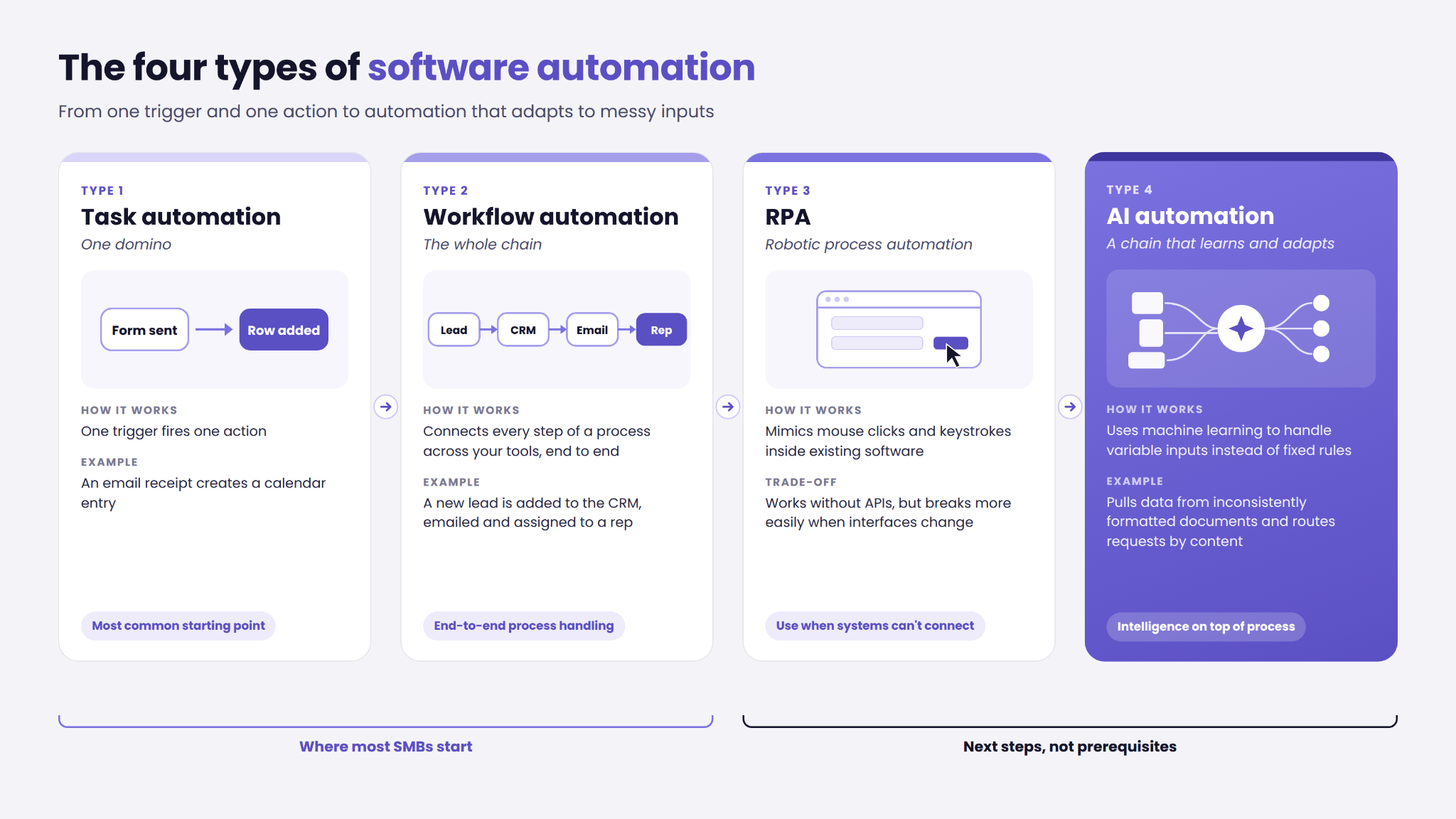
Not all automation works the same way. Understanding the four main types helps you match the right approach to the right workflow without overbuilding.
Task automation is a single domino: one trigger fires one action. An email receipt creates a calendar entry. A form submission adds a row to a spreadsheet. This is where most SMBs start.
Workflow automation is the whole chain. A new lead comes in, gets added to the CRM, receives an acknowledgment email, and gets assigned to a sales rep, all without anyone touching a keyboard. As AWS describes it, this is business process automation in practice: end-to-end process handling across systems.
Robotic process automation (RPA) mimics mouse clicks and keystrokes inside existing software. It works when systems have no API connections, but it is more brittle and more expensive to maintain than workflow automation when interfaces change.
AI automation for business is the chain that learns and adapts. Instead of fixed rules, it uses machine learning to handle variable inputs. Examples include extracting data from inconsistently formatted documents or routing requests based on content. Dynatrace's overview of software automation frames this well: intelligence layered on top of process, not a replacement for it.
Most SMBs start with task or workflow automation. RPA and AI-powered automation are next steps, not prerequisites.
What a real business can automate: five concrete examples
The automation examples that resonate most are the ones that match what you actually do on a Tuesday afternoon. Here are five from industries that map directly to real operational pain.
Recruitment: A US recruitment company achieved faster project delivery and higher client satisfaction after automating the administrative screening layer. CV routing and data aggregation ran automatically. Compliance-sensitive decisions stayed with consultants.
Healthcare: A Swiss psychiatry clinic achieved significant reductions in manual work after automating intake data synthesis. Clinical decisions remained with clinicians throughout.
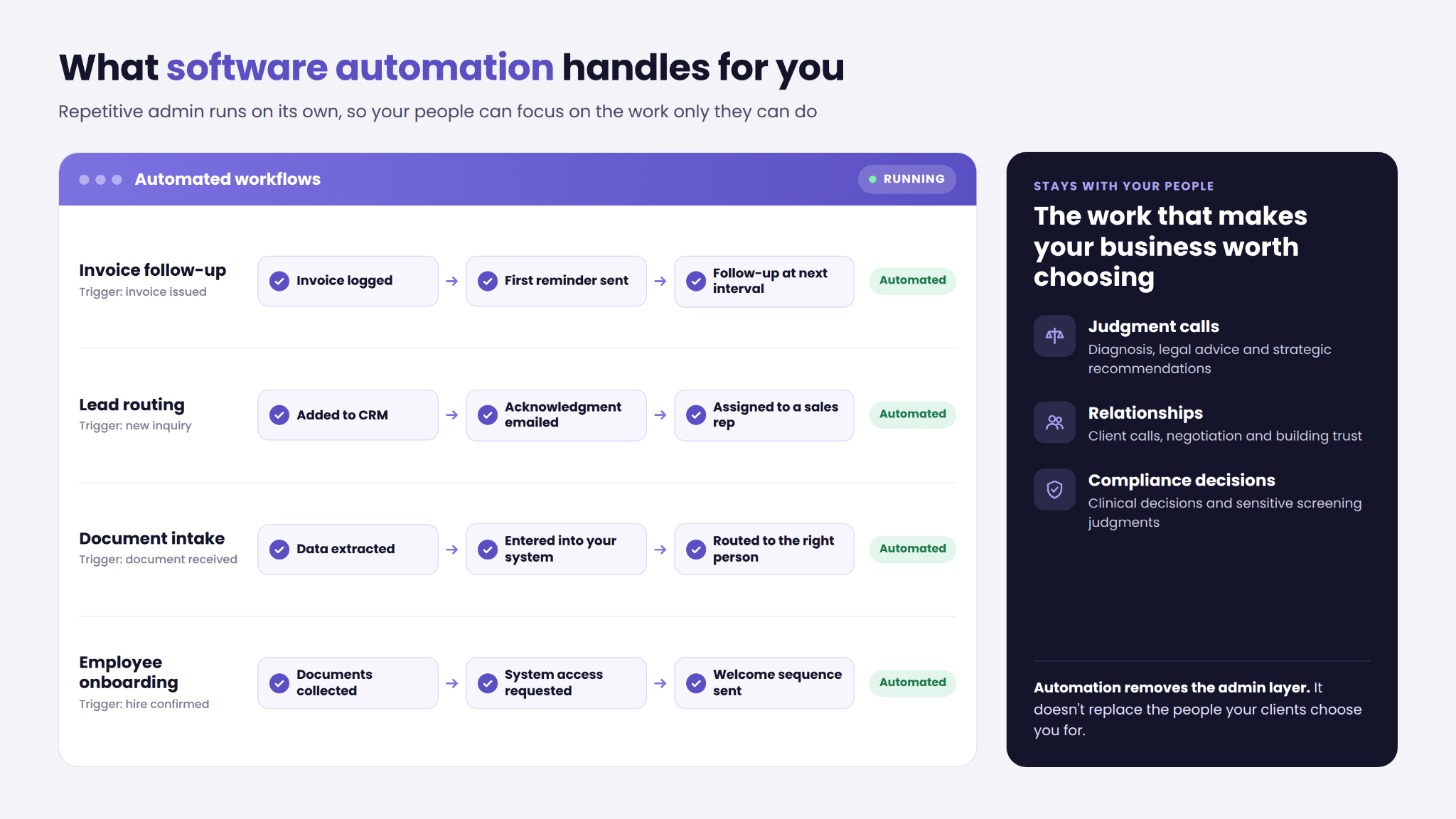
Invoicing: Trigger follow-up emails at set intervals after an invoice is issued. No one has to remember, check, or manually send. This is one of the most common first workflows for professional services firms.
Lead routing: Every new inquiry gets assigned, acknowledged, and followed up without anyone triaging an inbox. The manual handoffs between these steps are a consistent source of delay. For a closer look at cutting handoff delays across multi-step workflows, that guide covers the mechanics in full.
Employee onboarding: Document collection, system access requests, and welcome sequences all run automatically once a hire is confirmed. As Salesforce's SMB guide notes, onboarding is one of the highest-return early automation targets because the steps are identical for every new hire.
These five examples share one thing: they are all admin layers sitting on top of work that still needs human judgment to complete.
The four-question test: does your workflow qualify?
Before buying any software, run this test on the workflow you have in mind. The best first workflow to automate is predictable, repetitive, and already costing you measurable time. NetHunt's SMB guide makes exactly this point: start with what already has a pattern, not with what sounds impressive.
1. Is it repetitive?
Does this task happen at least weekly, in the same sequence, triggered by the same event? If a new client inquiry always produces the same three follow-up steps, that pattern qualifies. If it varies every time, it is not ready.
2. Is the rule consistent?
Can you write down exactly what should happen, with no judgment calls? If you can describe it as a numbered list with no "it depends" steps, automation can follow that rule reliably.
3. Does it cross more than one tool?
If completing this task means switching between two or more apps or copying data between systems, that handoff is exactly what automation handles. Understanding scope, timelines, and pricing before you engage a provider helps you arrive at that conversation with realistic expectations.
4. Does a human have to touch it manually every time?
If removing that manual touch saves meaningful time with no quality loss, the workflow qualifies. If the human adds something irreplaceable, like a judgment call or a relationship moment, it stays human.
Three or four "yes" answers means the workflow is ready. Pick the one that scores four out of four and consumes the most hours per week. That is your first workflow to automate.
What should stay human: the honest counterweight
Automation removes the admin layer. It does not replace the work that makes your business worth choosing.
Judgment-heavy work stays human. Any decision that depends on context, nuance, or professional expertise cannot be reduced to a consistent rule. Clinical diagnosis, legal advice, and strategic recommendations are not automation candidates.
Relationship-critical work stays human. Client calls, negotiation, and trust-building interactions are work where the human relationship is the product. Automation can route and schedule; it cannot replace the conversation.
Compliance-sensitive decisions stay human. In healthcare, automation handles administrative intake and data synthesis, while clinical decisions and compliance review remain with qualified staff. In recruitment, automation handles CV routing and data aggregation, while compliance-sensitive screening judgments stay with consultants.
Variable, exception-heavy workflows are poor candidates until the exceptions are mapped and reduced. If a process has frequent one-off variations requiring judgment each time, automating it before standardizing it creates more problems than it solves.
Automation removes the administrative layer so your people can do more of the work only they can do.
Your first move before you talk to anyone
You do not need a vendor, a developer, or a software trial to take the first step. Write down the last five tasks you did this week that you have done the same way at least twenty times. That list is your automation shortlist.
Apply the four-question test to each item. The one that scores four out of four and consumes the most hours is your starting point. This audit takes about 30 minutes and gives you something concrete to bring to any provider conversation.
Before selecting a tool or service, it helps to understand what choosing the right service actually involves at your scale. The gap between a custom-built system and a generic SaaS tool matters more than most owners expect.
Rippling's small-business automation research reinforces the same point: owners who audit their own workflows first arrive at better vendor conversations and faster decisions than those who start with tool comparisons. arsuno.ai's Proof of Value model is built around this reality: you see a working proof of concept before approving a full build.
Frequently Asked Questions
What is software automation?
Software automation is software that handles repetitive tasks with little or no manual effort each time. It covers business operations as much as IT tasks: invoicing, lead routing, document intake, and onboarding sequences all qualify. A single automated task handles one action in response to a trigger, while a broader automated workflow connects multiple steps across tools without human intervention at each handoff.
What is the difference between software automation and workflow automation?
Software automation is the broader term: it describes any software that removes manual effort from a repetitive task. Workflow automation is a specific type that connects multiple steps, apps, or handoffs in sequence. For example, a new lead captured on a web form can automatically trigger a CRM entry, an acknowledgment email, and a sales rep assignment. These run as one automated workflow rather than three separate manual actions.
What is business automation?
Business automation is the practice of using software to handle repetitive business processes so staff do not have to manage them manually each time. It covers a wide range of operational tasks, including approvals, notifications, data entry, and internal routing. The U.S. Chamber of Commerce frames it as applicable to businesses of any size, not only enterprises with dedicated IT teams.
What is business process automation?
Business process automation (BPA) refers to automating end-to-end business processes rather than individual tasks. Where task automation handles a single action, BPA covers the full sequence from trigger to outcome, usually across multiple systems. As AWS describes, BPA is typically applied to repeatable, rule-based processes where the steps are consistent enough to define in advance.
What tasks should a small business automate first?
Start with tasks that are repetitive, rule-based, and high-volume: the ones your team does the same way every week without variation. Appointment reminders, invoice follow-ups, lead acknowledgment emails, and document routing are strong early candidates. They are predictable, low-risk to automate, and immediately visible in time savings. The goal is a quick win that proves the model before expanding to more complex workflows.
What criteria help identify a workflow that is ready for automation?
A workflow is ready when it passes four checks: it happens repeatedly on the same trigger, the rule is consistent with no judgment calls in the middle, it crosses more than one tool or system, and a human currently has to touch it manually every time. Three or four "yes" answers means the workflow qualifies. Fewer than three usually means the process needs simplification or clearer rules before automation will.
How do software automation, workflow automation, and RPA differ?
Software automation is the umbrella term for any technology that removes manual effort from a repeating task. Workflow automation is a subset that chains multiple steps across apps in sequence. RPA is a distinct approach that mimics mouse clicks and keystrokes inside existing software interfaces, typically used when no API connection exists between systems.
.webp)