
1.webp)
Key takeaways
- Use this guide to calculate AI automation ROI with a complete formula chain: hours saved, annual labour value, net annual benefit, payback period, and first-year ROI percentage.
- Every formula includes both one-time build costs and annual recurring costs, not gross savings alone.
- Hours saved and cash saved are different numbers that require different CFO presentations.
- A copyable calculator table and three-scenario model let you build a board-ready range, not a single point estimate.
Why standard ROI calculations leave founders exposed
Most ROI models fail at the CFO stage because they are incomplete, not because the underlying project is weak. The most common version multiplies hours saved by an hourly rate, arrives at an impressive annual savings figure, and stops there. Two inputs a finance team will ask for first, the one-time build cost and the annual recurring operating fees, never appear in the model at all.
The second most common failure is ramp-period omission. A system deployed in month one rarely delivers its full projected savings until month two or three, once adoption stabilises and exceptions are handled. Applying steady-state savings to all twelve months of the first year systematically overstates returns, as total cost of ownership framing makes clear when you include implementation and recurring costs together.
The result is a business case that looks strong in a spreadsheet but collapses under the first finance-team question. When a CFO asks "what did this cost to build, and what does it cost to run each year?", a model built on gross savings alone has no answer. That destroys internal credibility at exactly the moment you need it most. The approach in this article is different: every formula uses the same three cost inputs so no number is ever calculated on gross savings alone.
The four inputs your formula needs before you start
The formula is only as reliable as the inputs you feed it. Before running any calculation, you need four specific figures. Miss one and the chain breaks.
1. Annual labour value
Annual Labour Value = Hours Saved per Period x Periods per Year x Fully Loaded Hourly Cost. The critical term here is "fully loaded." Fully loaded hourly cost means salary plus benefits, payroll taxes, and overhead, not just base pay. Your finance team will have an approved internal rate you should use rather than a generic figure.
For UK calculations, UK-specific sources such as HMRC guidance or ONS employer cost data are the appropriate reference. The BLS employer cost data is a useful U.S. reference for the general concept of employer-loaded cost but does not apply directly to UK payroll.
2. One-time build cost
This covers discovery, development, integrations, testing, and change management. Whether you pursue a custom or off-the-shelf solution affects this figure materially. A custom build scoped to your specific workflow carries different costs than a configured SaaS product. For a realistic scoped estimate rather than a generic range, the scope, timelines, and pricing page breaks down what drives implementation cost by project type.
3. Annual recurring cost
This covers software licences, infrastructure, monitoring, support, model retraining, and human-review time. Label this line clearly in your model so the CFO can see it as distinct from the one-time build. Kestra's automation ROI framework treats recurring costs as a mandatory component of total cost of ownership, not an optional footnote.
4. Ramp period
This is the weeks or months before the system reaches full production throughput. As Intelligex's calculator methodology notes, ramp time and adoption rate directly affect first-year value. Your first-year labour value must be adjusted downward to reflect partial delivery during this period. Otherwise your projected ROI will not match actuals.
One final caveat applies to all four inputs: the formula is only as reliable as the baseline measurement. Measure actual workflow time over at least two weeks before the build, not from memory or estimation. Skipping this step is the single most reliable way to produce a model that cannot survive post-implementation review.
The worked example: a complete formula chain from hours to ROI
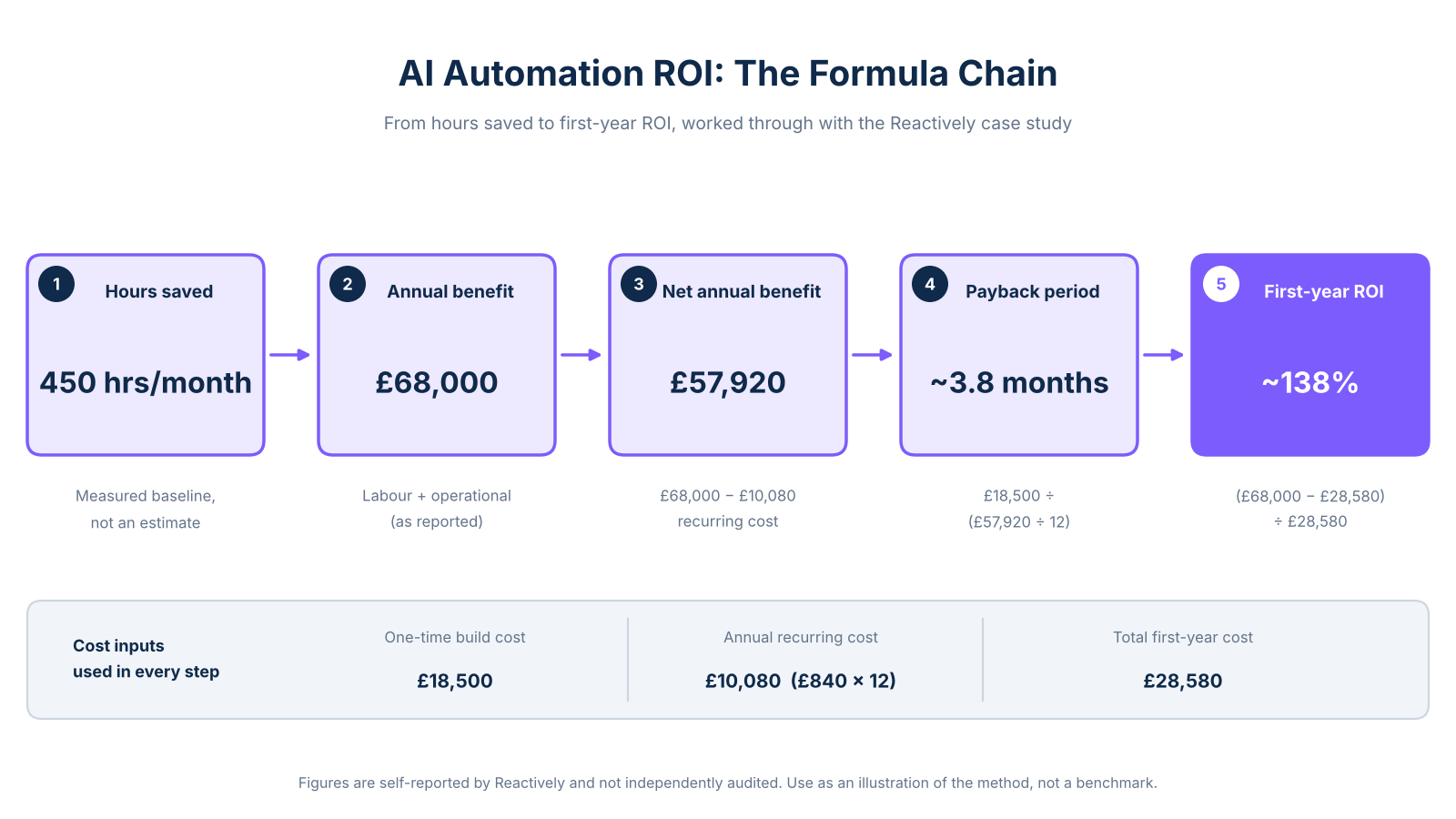
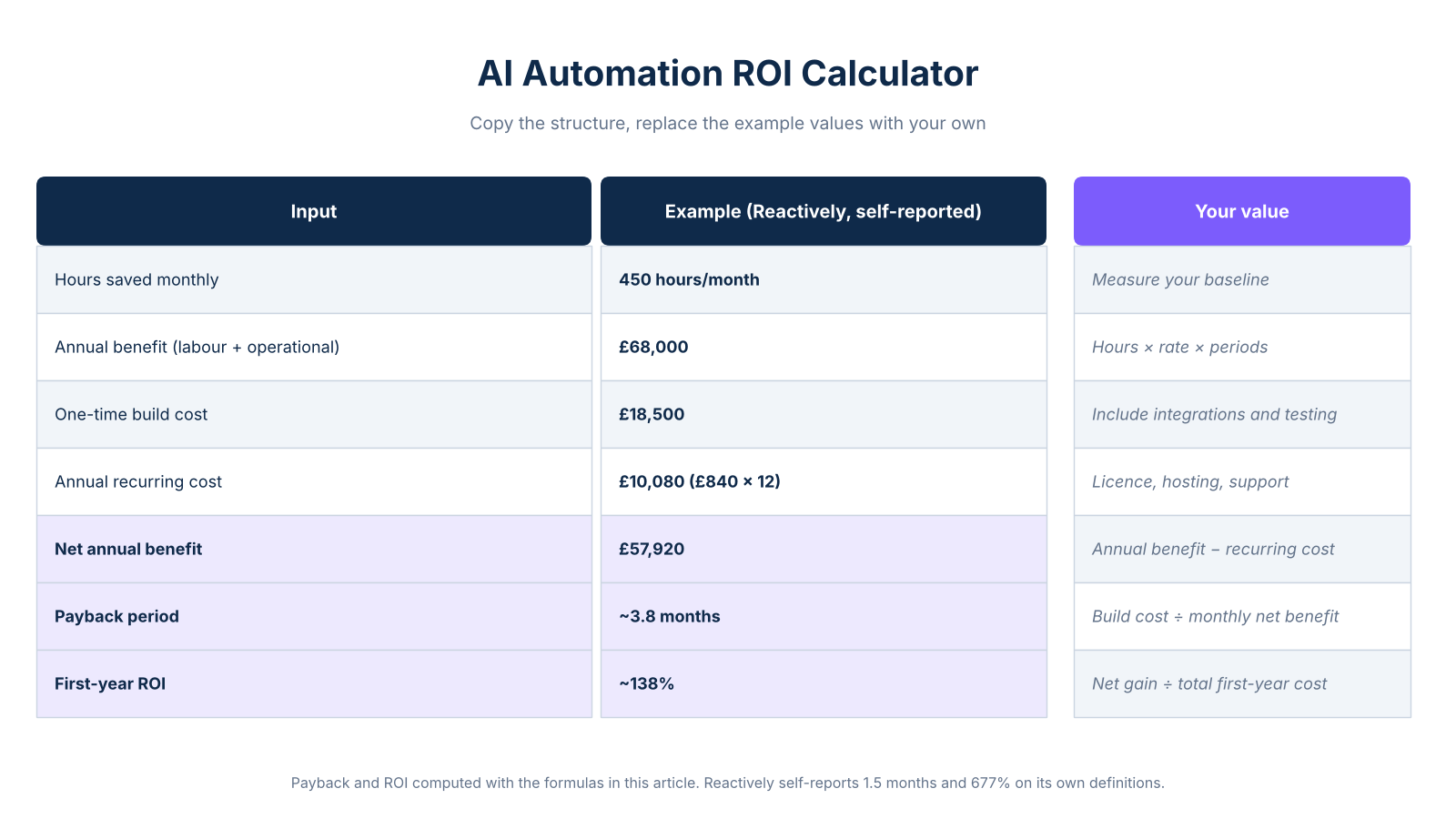
Reactively published a case study in which an anonymised client reduced manual work by 73% within three months. According to the full case study, the client recovered 450 hours monthly and generated £68,000 in annual benefit across labour and operational savings, with a total initial investment of £18,500 and a monthly operating cost of £840. Reactively self-reports a 1.5-month payback period and 677% 12-month ROI using their own benefit and cost definitions, which differ from the formula chain in this article (see Step 5 below).
These figures are self-reported and have not been independently audited. Use them as a worked illustration of the formula chain, not a universal benchmark.
Step 1: Annual labour value
The case study reports £68,000 in annual benefit, as cited above from the full Reactively case study. This figure encompasses labour and operational gains as reported by Reactively. It is not derived solely from a single hours-times-rate calculation, and it is used here as the gross benefit input before costs are deducted.
Step 2: Annual recurring cost
The monthly operating cost of £840, as reported in the Reactively case study, gives £840 x 12 = £10,080 per year in ongoing operating costs once the system is deployed.
Step 3: Net annual benefit
£68,000 - £10,080 = £57,920. This is the figure that matters for P&L conversations, not the gross savings number.
Step 4: Payback period
£18,500 / (£57,920 / 12) = approximately 3.8 months. Reactively self-reports 1.5 months using their own benefit recognition methodology. The difference reflects different benefit definitions, ramp-period treatment, and cost denominators, not a calculation error in either model. Understanding handoff delays and cycle time in your own workflow helps you set a more accurate ramp-period assumption before running this calculation.
Step 5: First-year ROI
The standard ROI methodology uses this formula: (Total Benefits - Total Costs) / Total Costs x 100. First-year ROI differs from steady-state ROI because the one-time build cost is included in year one only. Applying this formula to the figures in this article: (£57,920 - £28,580) / £28,580 x 100 = approximately 103%. Reactively's self-reported 677% figure uses a different benefit scope and cost definition. It is not reproducible from the formula chain presented here.
Costs that founders most commonly omit
Most incomplete ROI models share the same blind spots. Surfacing them before you present to a CFO is far less painful than being asked about them mid-meeting.
The most frequently missed cost is integration time. Connecting an automation to your CRM, inbox, or document store can add 20-40% to the build cost of a straightforward workflow. The second is human-review overhead: any AI system handling documents, customer communication, or decisions typically requires a human-in-the-loop step during the first 60-90 days. That review time is a real recurring cost and should appear in your annual operating line.
The third omission is change management. If staff need retraining, process documentation updates, or a period of parallel running, those hours carry a cost. A model that excludes them will understate total first-year cost and overstate first-year ROI. As Alice Labs' cost-benefit framing notes, scenario modelling that includes these variables produces more defensible outputs than a single-point estimate.
Conservative, expected, and upside scenarios
A single ROI number is not CFO-presentable. Finance teams expect a range. The table below applies the same formula chain to three benefit assumptions while holding costs constant. Varying the benefit assumption is the most honest way to show sensitivity, because costs are typically more predictable than adoption rates.
All three benefit figures in this table are derived directly from the Reactively case study expected value of £68,000, scaled proportionally to illustrate sensitivity. Two points about this table are worth noting. First, the conservative scenario produces a negative first-year ROI because the one-time build cost is included in year one. By year two, with no build cost in the denominator, the same conservative benefit level generates a strong positive return. Second, the payback period is a cash-flow question, not a profitability question. A CFO in a cash-constrained business will weight it more heavily than a growth-stage founder focused on P&L.
Hours saved versus cash saved: how to present each to a CFO
This distinction is the single most common reason a business case stalls at the finance stage. Recovered hours have real value, but they do not automatically reduce payroll. A CFO will ask: "So are we cutting a role?"
If the answer is no, the honest framing is capacity value. The automation frees your team to handle higher-value work, take on more clients, or reduce contractor spend. That is a legitimate business case, but it requires a different narrative. You are not reducing costs; you are increasing throughput without increasing headcount.
Quantify that by projecting what the recovered capacity enables: additional client volume, faster delivery cycles, or avoided hiring. If the answer is yes, a headcount reduction or avoided backfill is a direct cash saving. It should appear as a separate line in your benefit schedule. Keep it separate from capacity value so the CFO can evaluate each on its own terms.
Blending the two into a single "labour savings" figure invites the challenge that deflates the whole model. The Alice Labs ROI calculator methodology separates these categories explicitly, which is worth reviewing before you present your own numbers.

Frequently Asked Questions
How do you calculate AI automation ROI?
ROI is calculated as (Total Benefits - Total Costs) / Total Costs x 100. Total costs include both the one-time implementation cost and all recurring annual operating costs. Total benefits represent the annual labour value or cash savings generated. You need to set a clear measurement period, typically the first year or a steady-state year, and keep those periods consistent across every formula step.
What costs should be included when calculating AI automation ROI?
You need two cost categories: one-time and recurring. One-time costs cover discovery, process mapping, development, integrations, testing, training, security, and change management. Recurring costs cover software licences, infrastructure, monitoring, support, maintenance, model retraining, and human-review time. Use finance-approved internal labour rates for any staff time on implementation and ongoing oversight.
How is the payback period for AI automation calculated?
Payback Period = Upfront Implementation Cost / Monthly Net Benefit, where monthly net benefit is your annual labour value minus annual recurring costs, divided by twelve. You must adjust the benefit figure for ramp time and adoption before dividing. A system that takes two months to reach full production does not deliver steady-state savings from day one.
Does hours saved equal cash savings?
No, and conflating the two is the most common reason a CFO rejects an automation business case. Hours saved become cash savings only when they reduce actual payroll, overtime, contractor spend, or prevent a hire that would otherwise have been made. When hours are redeployed to higher-value work rather than eliminated from the payroll, that is recovered capacity, not a cash line.
How should ramp time and adoption affect first-year ROI?
Ramp time reduces first-year benefits because a newly deployed system rarely delivers its full projected throughput immediately. Model the period required for implementation, training, adoption, exception handling, and stabilisation. Apply reduced benefits during that window rather than using steady-state savings for all twelve months. Keep steady-state ROI separate from first-year ROI in your presentation so the CFO can see both the initial-year picture and the ongoing return.
What inputs are needed for an AI automation ROI calculator?
You need transaction volume, manual time per transaction, post-automation time, number of affected employees, and fully loaded hourly cost on the benefit side. On the cost side, you need one-time build cost, recurring software and support costs, oversight time, adoption rate, and ramp period. Include measurable quality, error-rate, throughput, or avoided-cost benefits where they apply to your workflow.
What happens if the automation does not generate a positive net benefit?
Mark the project as not recouped and do not force a payback figure when net benefit is zero or negative. Recheck your baseline measurements, adoption assumptions, workflow scope, recurring cost estimates, and benefit realisation logic before concluding the project is unviable. Test whether a narrower pilot targeting a single high-volume workflow improves the economics before abandoning the build entirely.