

Key takeaways
- For a types of software automation, automation software for small business falls into five categories: RPA, workflow automation, BPA, integration automation, and AI automation. Match the type to your bottleneck, not to what sounds most advanced.
- These categories combine in practice. A single process often uses two or three types in sequence.
- Use the decision guide below to map your specific bottleneck, intake forms, CV screening, invoicing, support tickets, to the right starting type and first step.
The manual work problem automation is built to solve
A significant portion of your team's week disappears into tasks that require no judgment. Someone is manually copying invoice data into your accounting system. Another is opening CVs one by one and pasting notes into a spreadsheet. A third is answering the same five support questions for the twentieth time this month.
This is not a people problem. It is an operations problem, and it costs more than time. Manual data entry introduces errors, slow intake processes push back appointments, and missed SLAs frustrate clients.
When workload grows, the instinct is to hire. But the underlying process stays just as slow with an extra person doing it. Most SMB owners eventually face the same decision: hire again, or automate.
If you have started researching automation software for small business, you have likely encountered terms like RPA, workflow automation, BPA, and AI automation. Most explanations stop at definitions without telling you which one applies to your situation. That is the gap this article closes.
For a foundational overview, this primer on what automation means is a useful starting point. Here, the focus is practical: which category fits your specific bottleneck today? The answer depends on what your process requires, not on which type sounds most advanced.
A business with a legacy accounting system and no API access needs a different starting point than one running modern SaaS tools with open integrations. Understanding the five main categories is the fastest way to figure out where you stand.
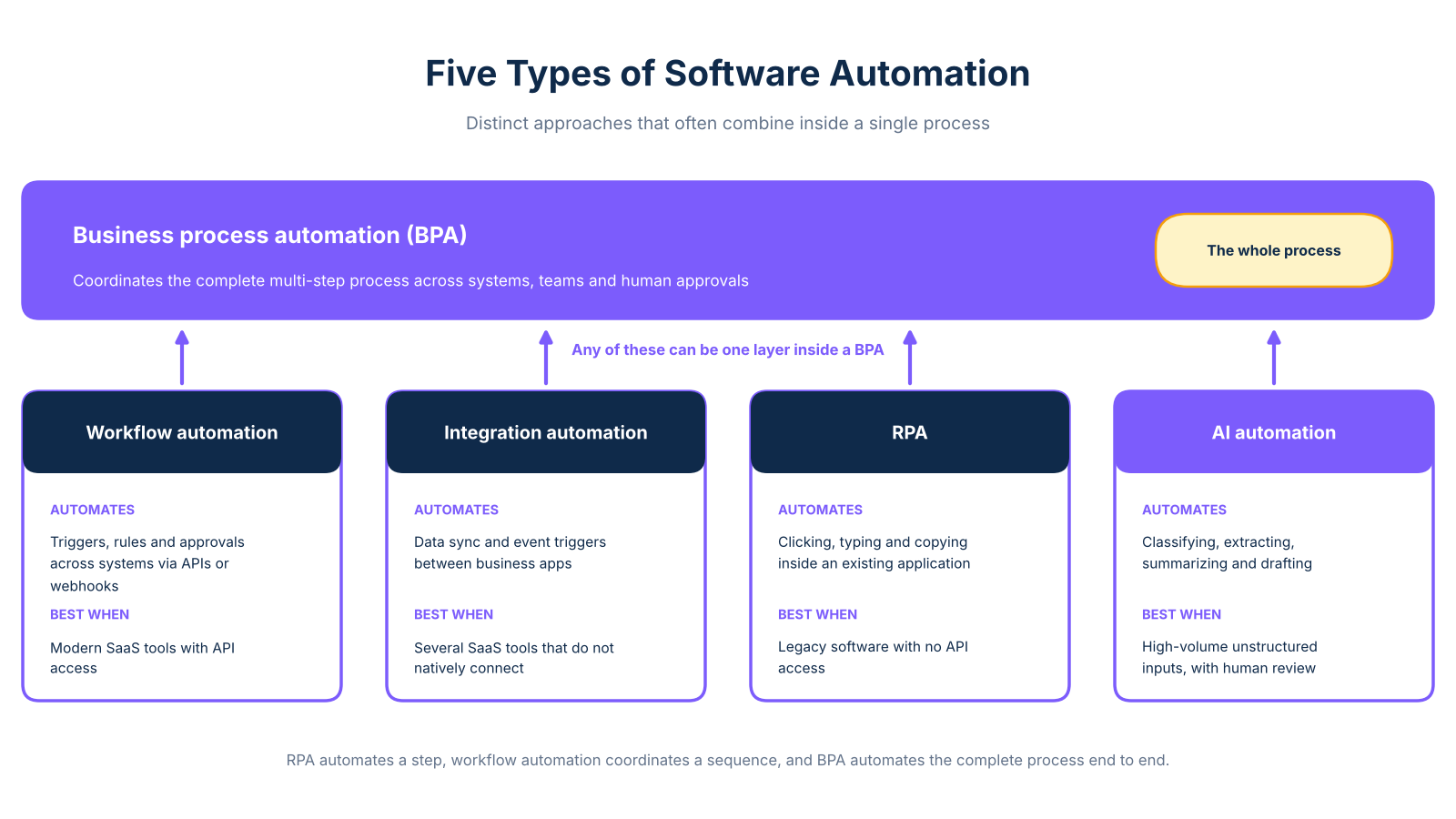
The five main types of software automation
These automation categories are not a hierarchy to climb. They are distinct approaches that often combine inside a single process. One distinction worth noting upfront: test automation validates whether software behaves correctly, while process automation runs business operations. If you are not building or testing software, test automation is not relevant to your situation.
Robotic process automation (RPA)
RPA imitates what a human does on a screen: clicking, typing, and copying inside an existing application. It does not require API access, making it practical for legacy systems where no integration is available. Bots may need remediation when an interface changes, so RPA works best for stable, bounded tasks.
Credigy Solutions uses RPA to process vendor invoices: their team forwards attachments by email, and a bot creates each invoice inside the existing system. The Credigy case study illustrates how screen-based automation handles legacy entry without requiring a system replacement. As the RPA vs workflow comparison on Coursera explains, RPA operates on the user interface while workflow automation operates on the data underneath.
arsuno.ai builds this: For clients with older back-office systems and no integration layer, arsuno.ai deploys RPA to handle repetitive data entry, freeing staff for higher-value work without requiring a system replacement.
Workflow automation
Workflow automation connects systems using triggers, rules, and approvals via APIs, webhooks, or native connectors. A new form submission can create a record, assign an owner, and send a confirmation automatically. The coordination happens across systems, not inside a single application screen.
What it automatesWho it suitsTypical effortBusiness exampleSequences of handoffs, approvals, and notificationsBusinesses using modern SaaS tools with API accessLower ongoing maintenance than RPA when integrations are stableIntake form triggers record creation, owner assignment, and confirmation email
Workflow automation is generally more maintainable than RPA when systems can communicate directly. A support ticket arriving by email can trigger priority classification, owner assignment, and a response timer without human involvement.
arsuno.ai builds this: arsuno.ai uses n8n and similar orchestration tools to build workflow automation for client intake, lead routing, and support escalation across service businesses.
Business process automation (BPA)
BPA coordinates a complete multi-step process across systems, teams, and human-in-the-loop approvals. Examples include employee onboarding, client intake, and candidate placement, processes that cross departments, require approvals, and involve multiple handoffs. The BPA services guide covers what to evaluate when choosing a provider.
What it automatesWho it suitsTypical effortBusiness exampleEnd-to-end processes crossing multiple systems and teamsBusinesses with complex, multi-department workflowsHigher upfront design; significant time savings once deployedRecruitment agency coordinating sourcing, screening, shortlisting, and client delivery
The scope distinction matters: RPA automates a step, workflow automation coordinates a sequence, and BPA redesigns and automates the complete process end to end.
arsuno.ai builds this: A US recruitment agency worked with arsuno.ai to automate their end-to-end candidate placement process, achieving faster project delivery and measurable improvement in client satisfaction.
Integration automation
Integration automation handles system-to-system data sync and event-driven triggers between business apps, keeping your CRM, ERP, and helpdesk aligned without manual exports. It is especially valuable when you run several SaaS tools that do not natively connect, eliminating the version-mismatch errors that accumulate when two systems hold the same data independently.
What it automatesWho it suitsTypical effortBusiness exampleData sync and event triggers between platformsBusinesses running multiple SaaS tools that do not natively connectLow to moderate, depending on integration complexityCRM-to-ERP sync that updates customer records after a sale closes
arsuno.ai builds this: arsuno.ai sets up integration layers between client CRM, finance, and operations tools, ensuring data flows correctly without staff manually reconciling records each week.
AI automation
AI automation handles steps that require interpretation rather than rule-following: classifying documents, extracting data, summarizing tickets, and screening candidates. For clarity on whether you need a chatbot or a full agent, the chatbot vs AI agent breakdown explains the differences.
Human review remains necessary for high-stakes decisions in hiring, clinical, and financial contexts. AI assists with interpretation; it does not replace accountability. A psychiatry clinic in Switzerland uses AI automation to synthesize complex patient data into clinical summaries, achieving a significant reduction in manual work.
How automation types work together in practice
Most business processes need more than one automation type working in sequence. The categories describe what each layer does, not what a complete solution looks like. Starting with one type does not mean you are locked into only that type.
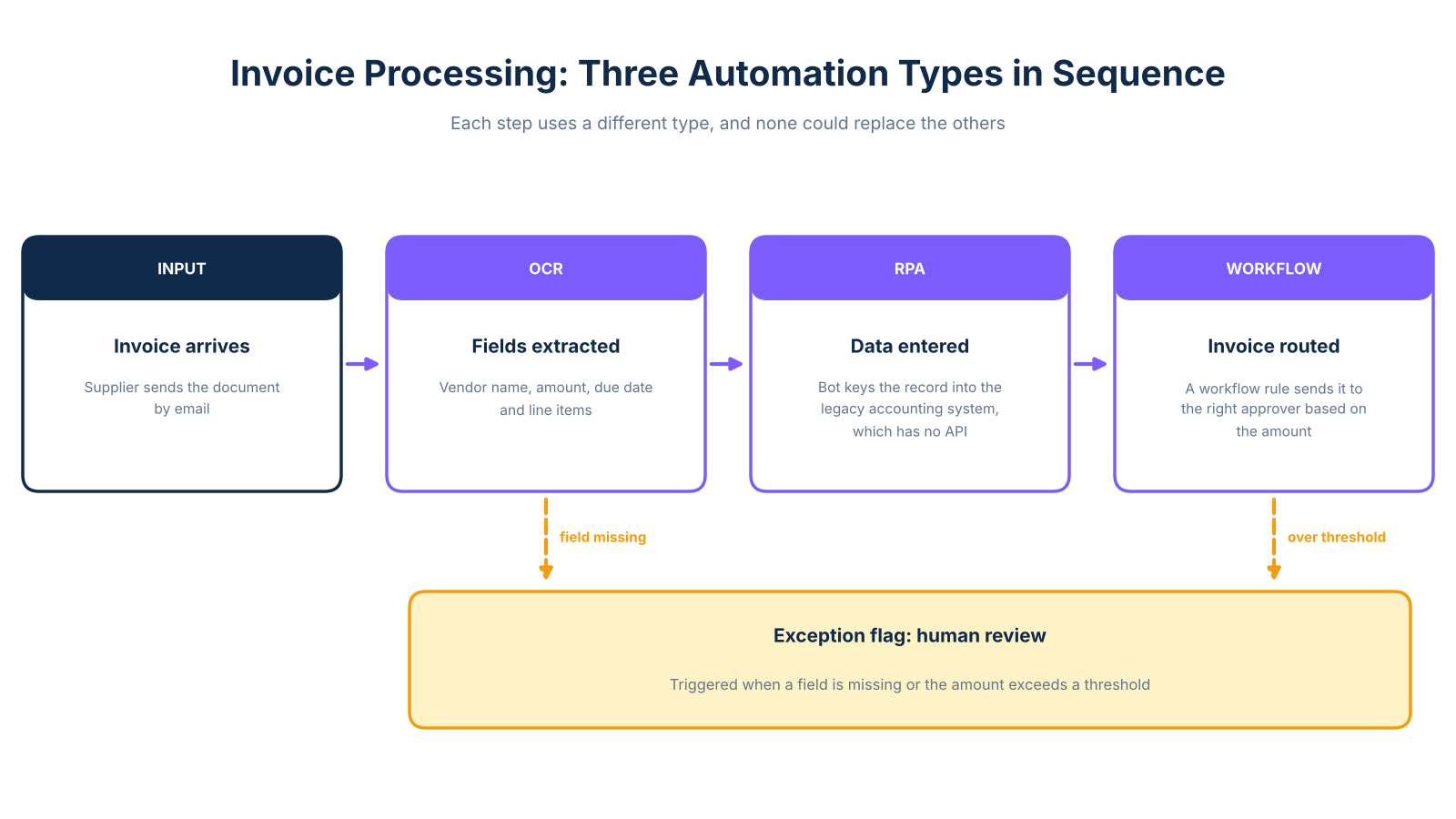
Consider intelligent automation for invoice processing. A supplier sends a document by email. OCR reads it and extracts the relevant fields: vendor name, amount, due date, and line items. An RPA bot then enters that data into the legacy accounting system, because the system has no API. A workflow rule routes the invoice to the right approver based on the amount. If a field is missing or the amount exceeds a threshold, an exception flag triggers a human review.
As intelligent document processing frameworks illustrate, OCR, RPA, and workflow routing frequently operate as connected layers rather than standalone solutions. Each step uses a different automation type, and none could replace the others.
The practical question is therefore not "which type should I use?" but rather "which step in my process is the bottleneck, and which type addresses that step?"
Which type fits your situation: the decision guide
This section maps common SMB bottlenecks to a starting automation type and a recommended first step. Most processes will eventually involve more than one type.
Intake forms moving too slowly: Start with workflow automation. A form submission should automatically create a record, assign an owner, send a confirmation, and trigger the next step, no manual handoff required. Effort is low when your tools support webhooks or native connectors.
CV screening taking too long: Start with AI automation combined with a workflow layer. AI can extract candidate qualifications, classify applications against your criteria, and route shortlisted profiles for human review. Your team handles the judgment calls. This guide covers seven high-impact processes to automate across a small business.
Manual invoice entry into a legacy system: Start with RPA if your accounting software has no API. If it does, use integration automation or intelligent document processing instead. As n8n's RPA maintenance risk analysis explains, the right choice depends on whether your system accepts direct connections.
Support ticket volume overwhelming your team: Start with workflow automation for routing and prioritization, then layer in AI for triage and draft replies. Include a clear escalation rule so complex cases always reach a human.
Employee onboarding inconsistent across departments: Start with BPA. Onboarding crosses systems and teams, involves approvals, and requires multiple handoffs, a workflow alone won't cover the full scope. BPA maps the complete process, then automates each stage in sequence.
Where arsuno.ai fits in your automation plan
arsuno.ai designs and builds custom automation systems for service businesses. The team builds all five types covered in this article: RPA for legacy system tasks, workflow automation for handoffs and approvals, BPA for end-to-end process redesign, integration automation for connected platforms, and AI automation for interpretation-heavy steps including document extraction, candidate screening, and support triage.
Every engagement starts with a Proof of Value phase. You see a working system before committing to a full build, and onboarding begins within one to two weeks. The right starting point depends on your specific bottleneck, not on which automation type sounds most advanced. If you know what your process looks like but are unsure which type fits, that is exactly the conversation arsuno.ai is built for.
Frequently Asked Questions
What are the main types of software automation?
The five main categories are RPA, workflow automation, business process automation, integration automation, and AI automation. Each addresses a different kind of operational task: from repeating screen-based actions in legacy software, to coordinating multi-step processes across teams, to interpreting unstructured documents and messages. These categories overlap in practice, and a single business process often uses two or three of them working together.
What is the difference between RPA and workflow automation?
RPA imitates what a human does on a screen, clicking and typing inside an application, and is most useful when no API or direct integration is available. Workflow automation, by contrast, connects systems using triggers, rules, and approvals via APIs, webhooks, or native connectors, and is generally more maintainable when systems can communicate directly.
What is the difference between RPA and BPA?
RPA is task-level automation: it handles one repetitive action inside an existing application, such as entering invoice data or copying records between screens. BPA, or business process automation, coordinates an entire multi-step process across systems, teams, and approval stages. As a result, BPA may include RPA as one component alongside workflows, integrations, document processing, and human-in-the-loop reviews.
Is workflow automation the same as process automation?
Workflow automation and process automation overlap but are not identical. Workflow automation handles a defined sequence of tasks or handoffs, such as routing a form submission to the right owner and sending a confirmation. Process automation, specifically BPA, coordinates a broader end-to-end business process that may span multiple departments, systems, and approval layers. In practice, a complete process often uses workflow automation as one of its layers.
When should a business use RPA?
RPA is most appropriate when work is repetitive, rules-based, and performed through a stable application screen that cannot be accessed via API. Legacy accounting systems, older ERP platforms, and industry-specific software without integration options are common examples. However, RPA bots may require remediation when an application's interface changes, so it is not the best first choice for processes that involve frequent system updates.
What is the difference between AI automation and RPA?
RPA follows predefined steps and rules, repeating the same action every time without interpreting what it processes. AI automation can assist with steps that require interpretation: classifying a document, extracting fields from unstructured text, summarizing a support ticket, or scoring a candidate profile.
What is an example of software automation?
A practical example is a patient intake process at a healthcare clinic. A new patient submits a form online, which automatically creates a record in the practice management system, assigns an intake coordinator, sends a confirmation email, and flags any missing fields for follow-up. If the form includes scanned documents, OCR extracts the relevant data before the record is created.