

Key takeaways
- To learn how to automate business processes without wasted spend, start with a two-axis audit before touching any tool.
- Run a bounded proof-of-value pilot before committing full budget.
- Involve frontline staff in both mapping and testing: not just managers.
- Set your measurement baseline at step two so post-launch ROI is provable, not estimated.
Why most automation projects stall before they start
Most automation projects fail not because the technology is wrong, but because the method is. Teams pick a process and a tool, then discover three months later that the system works technically but nobody uses it, or that it automates a workflow that was already broken.
Three failure modes account for most of these outcomes.
The first is skipping process analysis. When a team moves directly from "we have a repetitive problem" to "let's build a solution," they skip the step that reveals why the process is slow in the first place. Unnecessary approval steps, duplicate data entry, and unclear ownership all get encoded into the automated system. The result is a faster version of the same broken workflow.
The second is treating a demo as proof. Many teams treat a vendor demo as proof of concept: it is not. A demo shows what the tool can do in ideal conditions. A proof-of-value pilot shows what it does with your data, your systems, and your users. Without a controlled pilot, the first real test happens at full deployment, where failure is expensive and difficult to reverse.
The third is excluding frontline staff. When the people who own a process have no input into its redesign, they build workarounds. Those workarounds become shadow processes, and shadow processes undermine adoption from day one.
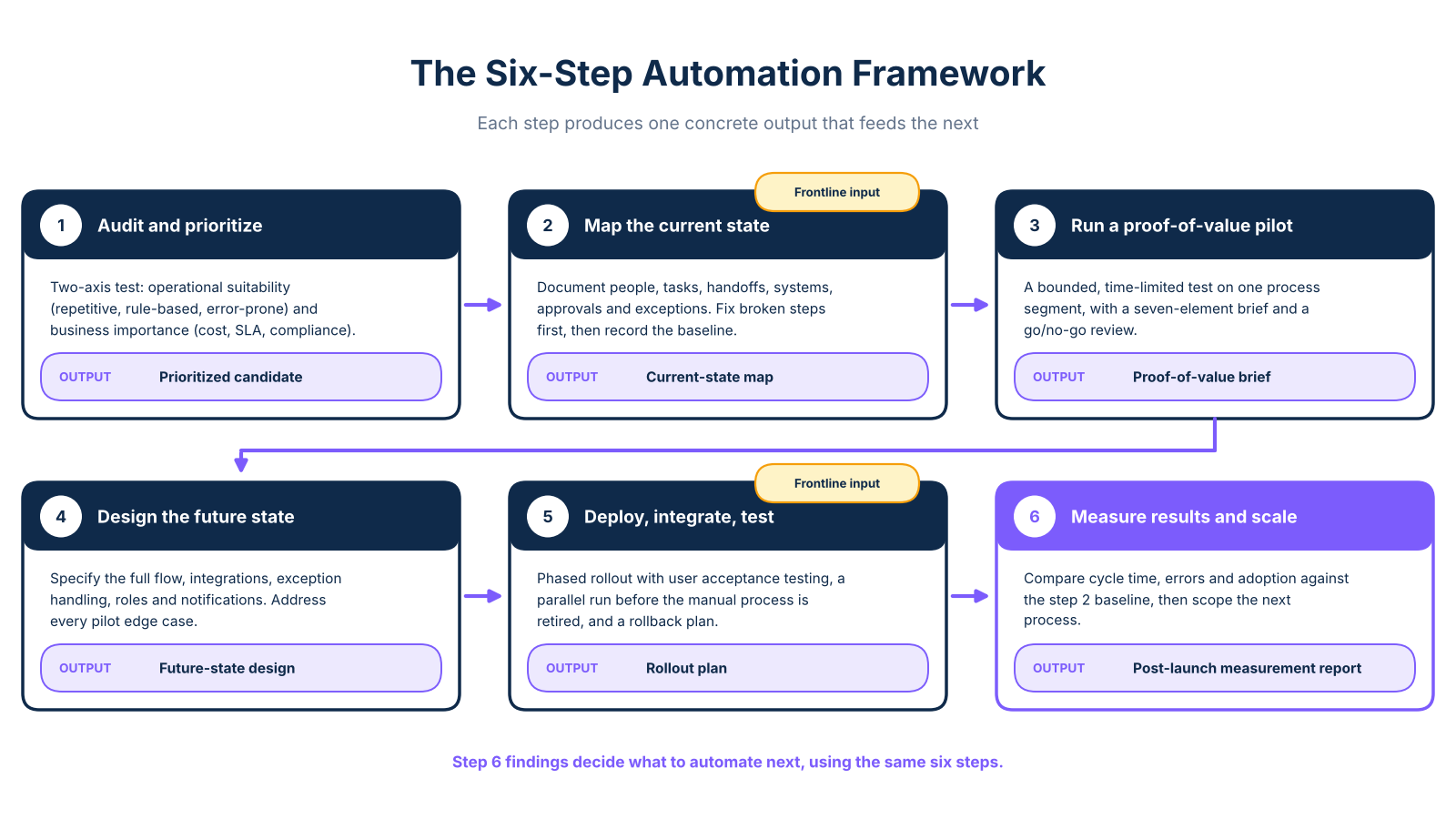
The framework in this article is structured around arsuno.ai's four-phase delivery model: Strategy and Alignment, Proof of Value, Deployment and Integration, and Scale and Optimization. Those four phases expand into six actionable steps that address each failure mode directly. This is not a checklist of principles: it is a sequenced method with decision points, a named brief structure, and a real case study carried through every step.
Steps 1 and 2: audit your operations and map the right process
Steps 1 and 2 establish the foundation for every decision that follows. Without a rigorous audit and a validated current-state map, later steps rest on assumptions rather than evidence.
Step 1: Audit and prioritize. Your goal is to identify which workflow to target, using a two-axis test rather than gut feel. The first axis is operational suitability: is the process repetitive, high-volume, rule-based, and error-prone? The second axis is business importance: does it carry cost exposure, SLA risk, compliance relevance, or strategic impact? A process that scores high on both axes is your strongest candidate.
This article covers the implementation method, not the selection logic. For a detailed breakdown of which workflows to target first, the small business automation guide covers selection in depth. This framework picks up where selection ends.
Step 2: Map the current state. Once you have a candidate, document it fully before writing any scope. Capture people, tasks, inputs, outputs, handoffs, systems, approvals, business rules, and exception paths. Then validate the map with the people who perform the work, not just the manager who oversees it. Microsoft's process mapping guidance recommends this as the foundation for every automation candidate evaluation, because the map reveals what the system must actually handle: including the exceptions that a demo never shows.
Apply the "redesign before you automate" principle here. The map must surface unnecessary approvals, duplicate data entry, and unclear ownership. Fix those problems first. Automating a broken process encodes the problem permanently, and no amount of monitoring in step 6 will undo a flawed design.
For workflow automation in operations teams, this mapping phase also sets your measurement baseline. Record current cycle times, error rates, and manual hours now: you will need those numbers to demonstrate ROI after deployment.
Case study: psychiatry clinic, Switzerland. Clinical staff were spending a significant portion of consultation-preparation time manually pulling and synthesizing patient intake data from disconnected sources. The mapping exercise revealed three redundant data-entry steps and no single system of record for intake summaries. Those findings directly shaped the pilot scope in step 3.
Step 3: run a proof-of-value pilot before committing full budget
A proof-of-value pilot is a bounded, time-limited test of a single process segment. Its purpose is to confirm feasibility, surface integration issues, and produce a go/no-go decision before full budget is committed. It differs from a demo, which shows capability in ideal conditions, and from a prototype, which may not use real production data or real users.
Oracle NetSuite's prototype and test guidance separates analysis, design, and testing phases for exactly this reason: moving from mapping to full deployment without a controlled test is where most mid-market projects fail. A business process automation pilot brief has seven named elements.
Define the brief using these components: Scope (which process segment, users, and systems are included); Baseline (current cycle time, error rate, or manual hours from your step 2 map); Target outcome (the specific measurable improvement the pilot must demonstrate); Affected users (everyone who touches the process during the test); Integrations (which systems must connect during the pilot window); Exception paths (what happens when the automation cannot handle a case); and Go/no-go review (explicit criteria and a named decision owner who will make the call at the end of the pilot).
For the psychiatry clinic, the pilot covered intake-summary generation only. The baseline captured manual preparation time per patient before any automation. The target was a defined reduction in prep time, confirmed against a pre-agreed threshold with no increase in clinician review time. Two admin staff and one supervising clinician were the affected users, and the integration connected to the existing patient record system within a GDPR-aligned architecture. Exception paths covered cases the system could not process automatically, routing them to manual review, and the go/no-go criterion was hitting the time target across a representative sample of test cases within the pilot window.
Step 4: design the future-state workflow
The pilot produces a go/no-go decision and a set of findings. Step 4 uses those findings to design the production-grade future-state workflow.
Future-state design translates the validated pilot into a full specification: the complete process flow, all integration points, data transformation rules, exception-handling logic, user roles and permissions, and notification triggers. Every element that surfaced as an edge case during the pilot must be addressed explicitly in the design: not deferred to post-launch.
SAP's automation design guidance recommends treating exception handling as a first-class design requirement, not an afterthought. Processes that handle exceptions gracefully have significantly higher adoption rates than those that route every edge case to a manual override queue without structure.
For the psychiatry clinic, the future-state design specified how the system would handle incomplete intake forms, late submissions, and cases flagged for clinical complexity. Each exception type received a defined routing rule rather than a generic fallback. That specificity reduced the volume of manual overrides in the live system.
Step 5: deploy, integrate, and test with real users
Deployment is not a single event: it is a sequenced rollout with integration validation, user acceptance testing, and a parallel-run window before the manual process is retired.
Intuit's workflow testing guidance recommends user acceptance testing with the employees who own or rely on the process, covering representative scenarios, exception paths, permissions, data transfers, and fallback procedures. This is the right approach for deploying operational automation without disrupting live workflows: test with real users on real cases before the system is live for everyone.
The psychiatry clinic rollout used a phased approach. Admin staff ran the new intake-summary workflow alongside the existing manual process for the first two weeks, which allowed direct comparison and immediate identification of gaps. Clinicians reviewed both the AI-generated summaries and their own notes during that period, confirming that the structured output matched their preparation needs. Only after that parallel-run window did the team retire the manual process.
Adoption is an outcome of user acceptance testing done well, not of a training session delivered after launch. Teams that adopt a system rather than work around it are frequently those who were involved in testing it. Therefore, plan your rollout around adoption conditions: users understand what changed, why it changed, and what to do when something goes wrong.
Document the rollback procedure before you go live. If a critical integration fails or a data-quality issue surfaces post-launch, the team needs a clear path back to the manual process without losing continuity of service.
Step 6: measure results and scale
A successful deployment is not the finish line. It is the start of the measurement cycle that determines whether the automation delivers its intended value and where to expand next.
Post-launch KPI tracking should compare directly against the baselines you recorded in step 2. Useful metrics include cycle time, throughput, error rate, exception frequency, completion rate, and user adoption. Microsoft's process monitoring guidance recommends using process analytics to identify bottlenecks and optimization opportunities on a regular review cadence, rather than treating launch as a one-time event.
The measurement findings also determine what to automate next. If exception rates are higher than expected, that signals a design refinement before expansion. If adoption is strong and cycle time has improved, the next candidate process can be scoped using the same six-step method. For a structured method to calculate and present those numbers to leadership, the AI automation ROI guide walks through baseline setting, cost modeling, and outcome reporting.
Scale and Optimization is not a separate project. It is a built-in phase of the same engagement, using the same framework applied to the next highest-priority process on your two-axis map.
From framework to live system
The six steps in this article are not abstract stages. They are a sequenced decision method, grounded in arsuno.ai's four-phase delivery model, that moves an operations team from a named workflow problem to a measurable, adopted, production-grade system. Each step produces a concrete output: a prioritized candidate, a current-state map, a proof-of-value brief, a future-state design, a rollout plan, and a post-launch measurement report.
The failure modes described at the start of this article: automating before mapping, skipping the proof stage, and excluding frontline users: are not inevitable. They are the predictable result of treating automation as a technology decision rather than an operational method. The question for most operations leaders is not whether to automate. It is whether to follow a method that gives the team a fair chance of success before committing full budget and disrupting existing workflows.
Frequently Asked Questions
What are the steps in business process automation?
Business process automation follows a lifecycle that includes operational discovery, current-state mapping, a proof-of-value pilot, future-state workflow design, deployment with integration and user acceptance testing, and ongoing measurement and optimization. The exact number of steps varies by source, but any credible implementation method covers both the build phase and post-launch measurement.
Which processes should be automated first?
Apply a two-axis test: score each candidate on operational suitability (repetitive, high-volume, rule-based, error-prone) and business importance (strategic impact, cost exposure, SLA risk, compliance relevance). Processes that score high on both axes offer the strongest combination of automation feasibility and measurable business return.
How do you map a business process before automating it?
Document every element of the current workflow: people, tasks, inputs, outputs, handoffs, systems, approvals, business rules, and exception paths: then validate the map with the people who perform the work, not only the manager who oversees it. The mapping step reveals unnecessary approvals, duplicate data entry, and unclear ownership that should be resolved before any automation is scoped.
How do you create a pilot for business process automation?
Define a seven-element brief covering scope, baseline, target outcome, affected users, integrations, exception paths, and a go/no-go review with explicit criteria and a named decision owner. Use a representative workflow segment rather than a simplified demonstration case, so the pilot surfaces real integration issues and exception volumes before full budget is committed.
How do you test an automated workflow?
Testing must cover representative scenarios, exception paths, permissions, data transfers, notifications, and fallback procedures: not only the standard happy-path case. Include user acceptance testing with the employees who own or rely on the process, because they will identify edge cases and override scenarios that technical testing misses.
How do you monitor and optimize automated processes?
Establish baseline and post-launch KPIs before deployment, including cycle time, throughput, error rate, exception frequency, and user adoption, then review process analytics at 30, 60, and 90 days post-launch and on a regular quarterly cycle thereafter. Microsoft's process monitoring guidance recommends using those reviews to identify failures, bottlenecks, and expansion opportunities before they become visible operational problems.