

Key takeaways
- Choosing between software automation vs rpa comes down to process structure, not technology maturity: these are three distinct operating models, each solving a different problem.
- RPA suits stable, rule-based tasks in systems without usable APIs. It breaks when inputs vary, screens change, or exceptions are frequent.
- Workflow automation handles multi-step approvals and cross-system handoffs better than any UI-based bot.
- AI automation interprets unstructured inputs but requires confidence thresholds and human review built in by design, not added later.
Why the maturity-ladder framing sends operations teams in the wrong direction
Most vendor content presents software automation, RPA, and AI as a progression: start with basic automation, graduate to RPA, then eventually move to AI. That framing can benefit vendors more than buyers. It also leads operations teams to spend months reworking implementations that were wrong from the start.
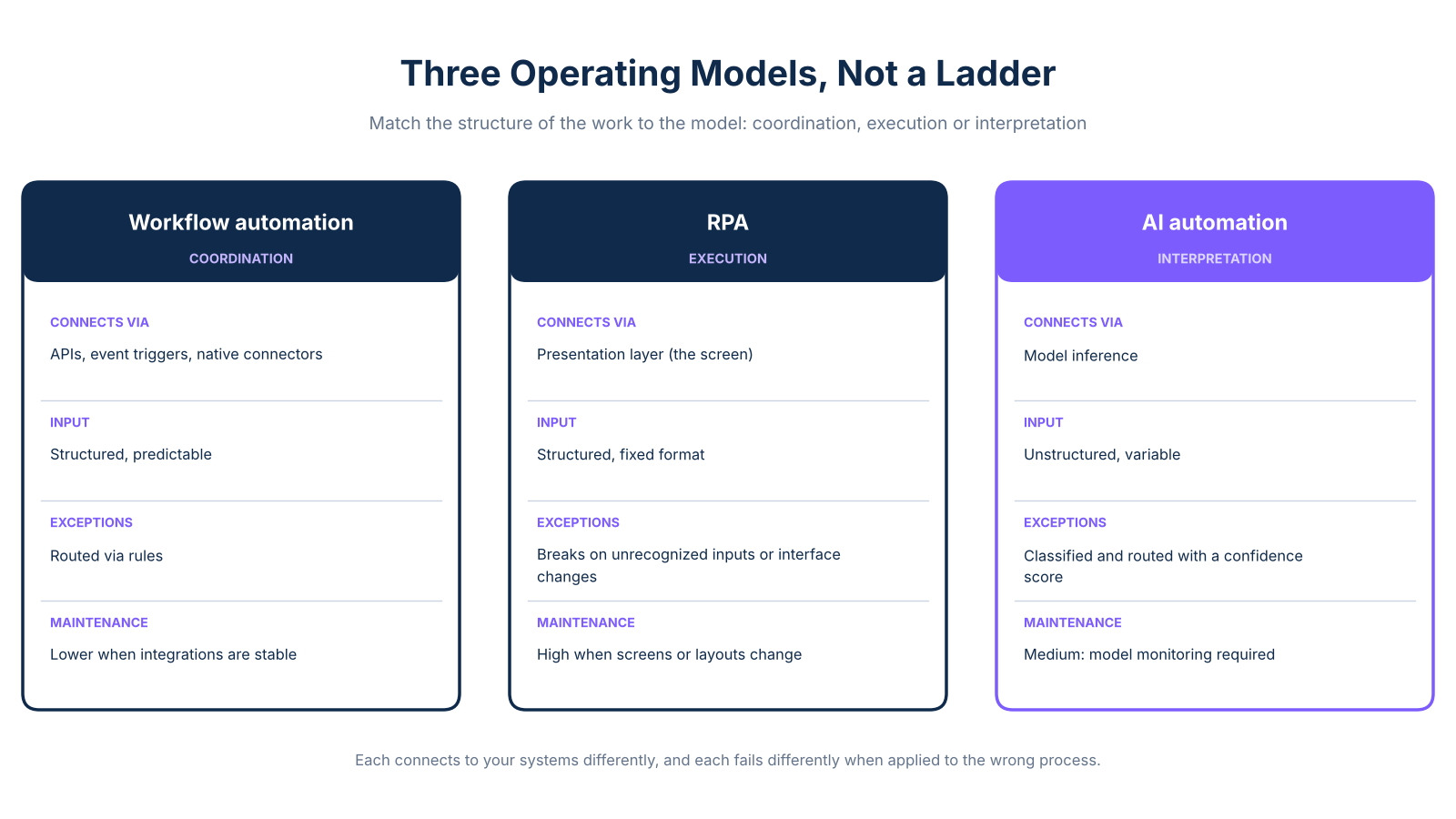
The three approaches are not stages. They are structurally different operating models, each designed to solve a different kind of problem. Workflow automation coordinates systems, events, and handoffs through APIs and rules. RPA mimics a human user interacting with an application screen. AI automation uses model inference to interpret variable or unstructured inputs and route decisions. Each connects to your systems differently, and each fails differently when applied to the wrong process.
Operations leaders who accept the ladder framing tend to make one of two expensive mistakes. First, they over-invest in RPA as a stepping stone to AI, deploying bots against processes that are too variable to stay stable. Second, they assume they need AI when a well-configured workflow tool would solve the problem faster, with lower maintenance overhead and less governance complexity.
As Allata explains, the structural difference between workflow automation and RPA is not sophistication: it is the layer at which each approach connects to your systems. Workflow automation operates at the API and event level. RPA operates at the presentation layer. That distinction determines what breaks when something changes, and how much it costs to fix it.
The right frame is not a ladder. It is a tool selection problem. Before you choose an approach, you need to understand what kind of work you are trying to automate: coordination, execution, or interpretation.
What each approach actually does and how it connects to your systems
Understanding the difference starts with how each approach reaches your systems, not with how advanced the technology is. For broader grounding in what software automation covers, that context is worth reviewing before comparing approaches.
Workflow automation connects to applications through APIs, event triggers, and native connectors. It handles structured, predictable data and coordinates multi-step processes across systems without touching a user interface, the right fit for approvals, cross-team handoffs, and well-defined logic. As Coursera's comparison notes, workflow automation is fundamentally about orchestrating process logic across connected systems, not imitating user behavior.
RPA interacts with application interfaces the way a human user would: clicking buttons, reading screen fields, copying values. It requires no API access, making it practical for legacy systems with no integration layer. However, it relies on UI selectors or screen coordinates that break when layouts change.
AI automation uses model inference to interpret inputs too variable for rules-based processing. It classifies documents, extracts fields with a confidence score, and routes low-confidence items for human review. It does not eliminate exceptions, it manages them probabilistically. Confidence thresholds and human escalation are design requirements, not optional additions.
Maintenance burden is the column most automation comparisons underweight. It determines long-term cost more than implementation speed does.
Where RPA breaks down: the variable-input failure pattern
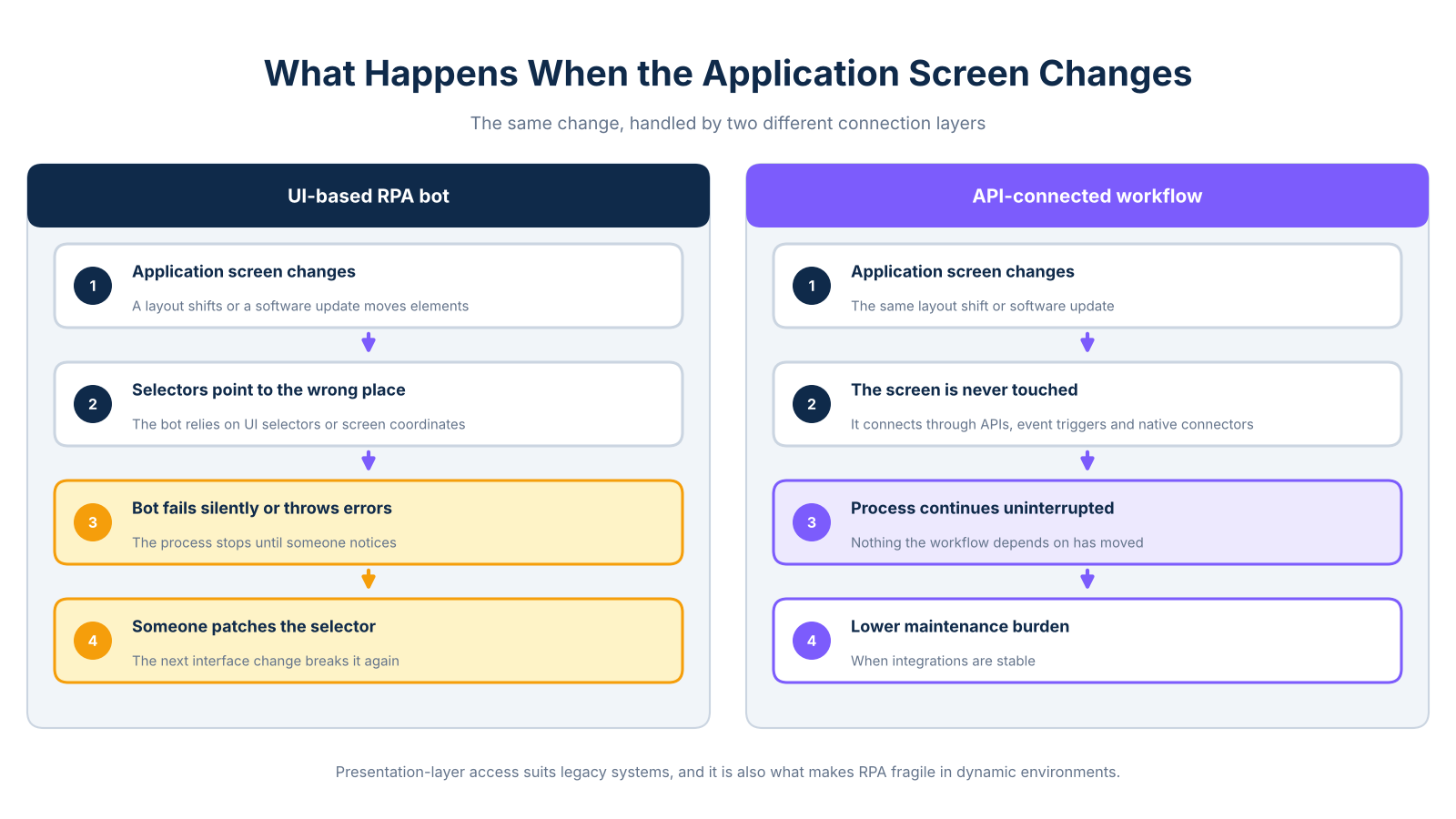
Consider a document-intake process: supplier invoices, insurance claims, or patient intake forms arriving from multiple sources. A team deploys an RPA bot against the most common document format. It works well, until a supplier changes their invoice layout, a new insurer sends forms with different field positions, or a software update shifts the screen elements the bot was reading.
The UI selectors the bot relies on now point to the wrong locations. The bot fails silently or throws errors. Someone patches the selector, the next interface change breaks it again, and the team shifts from process improvement to bot maintenance. As Microsoft's guidance on UI automation notes, this is the predictable result of deploying UI-based automation against an unstable interface or input set.
Oracle's RPA guidance is direct on the limits: RPA is poorly suited to unstructured data, complex decisions, and dynamic workflows. It is designed for deterministic, stable processes with predictable inputs and fixed paths. When those conditions are absent, maintenance costs compound with every system update or new document format.
The presentation-layer access that makes RPA useful for legacy systems is also what makes it fragile in dynamic environments. For processes where reducing handoff delays is the real goal, workflow automation with API access is the more durable choice.
RPA remains a practical fit when conditions are right: stable screens, structured inputs, high volume, and a legacy system with no usable API. The failure is not the technology; it is applying RPA to a process that does not meet those conditions.
Which approach fits your operational bottleneck
The decision is not about which technology is most advanced. It is about matching the structure of the work to the operating model of the tool.
Legacy-system data migration with no API available: The process is structured, repetitive, and runs against a stable screen. Inputs are predictable, volume is high, and exceptions are rare. Use RPA. Accept the maintenance commitment: if the legacy system is ever updated, the bot will need attention.
Multi-step approval routing across departments: The process crosses teams, requires conditional routing, needs an audit trail, and connects to SaaS tools with usable APIs. Use workflow automation. It handles cross-system handoffs cleanly without touching a user interface.
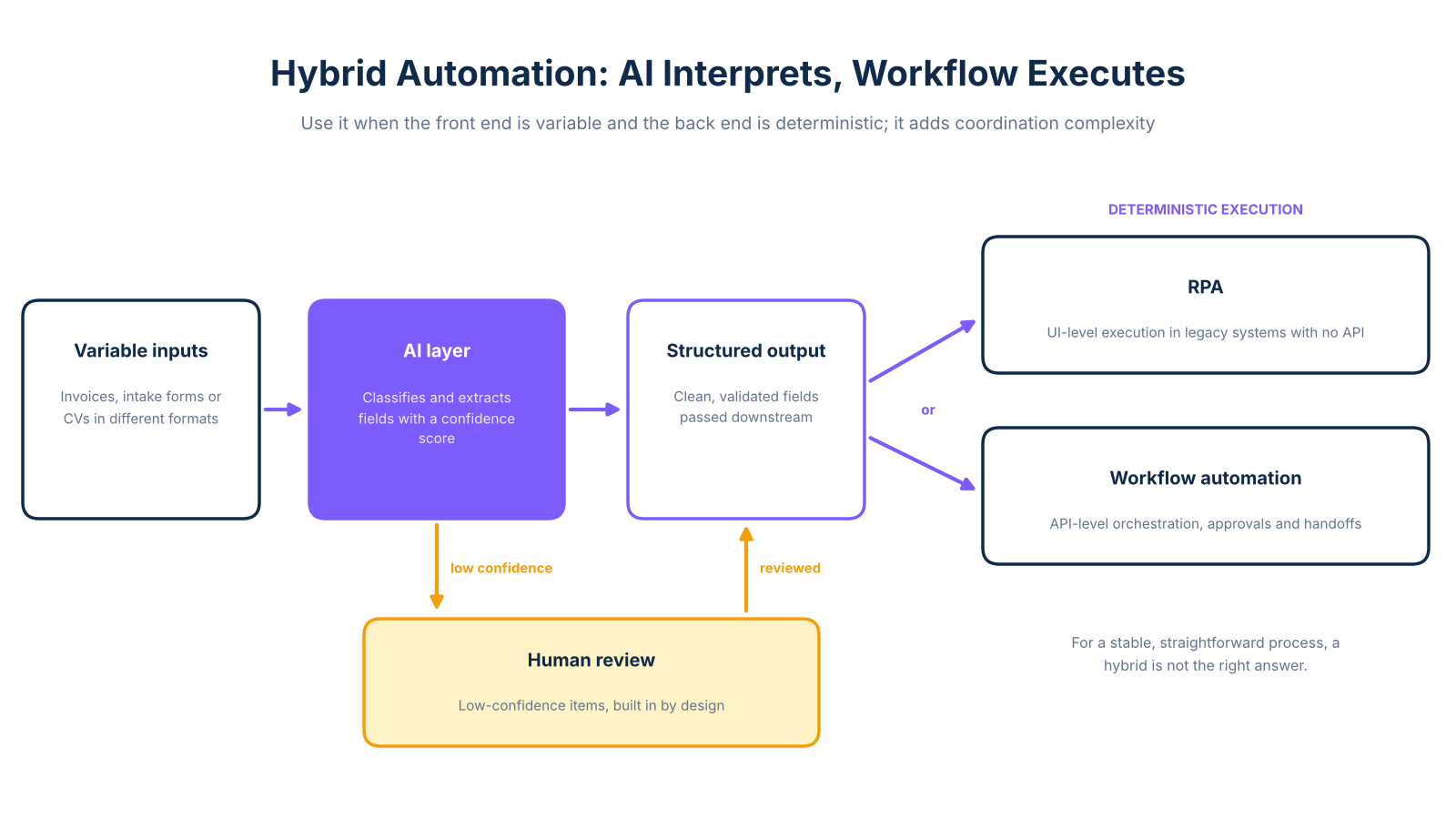
Variable-document intake: Supplier invoices, patient intake forms, or CVs arrive in different formats and require interpretation before data can be entered downstream. AI automation classifies the document, extracts relevant fields with a confidence score, and routes low-confidence items for human review. Build the human review layer in from the start. For conversational automation, see the chatbots and AI agents comparison.
Mixed process with a variable front end and a deterministic back end: As NICE describes, AI interprets the variable input and passes structured output to RPA or workflow automation for execution. Use a hybrid architecture, but be honest about the tradeoff: hybrid designs add coordination complexity and are not the right answer for stable, straightforward processes.
For implementation scope and timelines, the scope and pricing breakdown covers what a real engagement looks like.
What workflow automation looks like when the fit is right
A retail operations team was manually consolidating sales, stock, and incident data from three separate systems each week. The process consumed significant staff time and delivered reporting data with a seven-day lag. By the time the team saw last week's numbers, the week was already over.
The solution was an automated pipeline that connected the point-of-sale and ERP systems, processed the combined data, and updated a live dashboard. A weekly report was then delivered automatically, giving the team access to the previous day's data instead of the previous week's, as documented in the Synkra case study. The process worked because the systems had usable integrations, the data was structured, and the logic was well-defined. There was no variable input requiring interpretation, and no legacy screen requiring a UI bot.
This is what a good workflow automation fit looks like: the problem is coordination, the systems are accessible, and the output is deterministic. Deploying RPA against this process would have introduced unnecessary fragility. Using AI automation would have added governance overhead without solving the actual bottleneck.
Matching the approach to the process before your next vendor call
The most common automation mistake is not choosing the wrong vendor. It is choosing the wrong tier. A vendor selling RPA will frame your problem as an RPA problem. A vendor selling AI will frame it as an AI problem. Neither framing starts with the structure of your specific process.
Three questions are worth answering before any vendor conversation. First, does the process require coordination across systems with usable APIs, or does it require interacting with a screen that has no integration layer? Second, are the inputs structured and predictable, or do they vary in format, source, or content? Third, how often does the underlying process, screen, or logic change? The answers point to workflow automation, RPA, AI automation, or a hybrid more reliably than any vendor demo.
The maturity-ladder framing persists because it simplifies the sales conversation. Replacing it with a process-structure diagnostic takes more time upfront and saves significantly more time after implementation begins. That is the practical value of comparing these approaches: not a ranking of technologies, but a framework for matching the right operating model to the right problem before budget is committed.
Frequently Asked Questions
When should I use RPA instead of workflow automation?
Use RPA when the process is repetitive, rule-based, and runs against a stable application that has no usable API. RPA is especially practical for legacy systems where direct integration is unavailable, provided inputs are structured and predictable.
What is the difference between RPA and workflow automation?
Workflow automation coordinates process logic across systems using APIs, event triggers, and native connectors, without touching a user interface. RPA imitates a human user interacting with an application screen, making it useful when no integration layer exists. As Coursera's comparison explains, the key distinction is system access method: API-level orchestration versus presentation-layer interaction.
What processes should not be automated with RPA?
Processes with frequent exceptions, changing screen layouts, or unstructured inputs are poor RPA candidates. Workflows that require judgment, contextual interpretation, or complex conditional decisions should not be automated with RPA, as bots depend on predefined steps and fixed paths.
Is RPA part of AI automation?
RPA and AI automation are distinct capabilities, though they are often combined in practice. RPA executes structured, rule-based actions at the interface level; AI automation interprets variable inputs and routes decisions based on model inference. As NICE explains, a common hybrid pattern has AI classify or interpret information first, then pass structured output to RPA for downstream execution.
Can AI automation replace RPA?
AI automation is not a direct replacement for RPA; the two handle structurally different problems. RPA is well suited to stable, deterministic UI tasks where speed and volume matter and inputs are predictable. AI automation is more appropriate when inputs are variable, classification is required, or context-dependent routing is needed.
Is workflow automation better than RPA?
Workflow automation is better suited to multi-step approvals, cross-team handoffs, and end-to-end process orchestration where the systems involved have usable APIs. It provides cleaner audit trails, better visibility, and lower maintenance burden when integrations are stable. Allata's analysis recommends reserving RPA for stable, repetitive tasks where direct integration is unavailable.
How do you choose between RPA and workflow automation?
Start by assessing whether the process crosses teams or systems, and whether those systems have usable APIs. Then evaluate input structure, exception frequency, approval requirements, and how often the underlying screens or logic change. As Automation Atlas summarizes, use RPA for stable, UI-bound tasks with structured inputs and use workflow automation for coordinated, integration-led processes.