
Key takeaways
- The strongest AI customer support strategies layer chatbots, routing, AI agents, and human escalation into one connected decision flow, not four separate tools.
- Start with routing before adding AI agents: routing delivers faster resolution with lower risk for a small team.
- Set concrete escalation triggers and define exactly what context the human receives at handoff, or resolution quality will suffer.
- Measure resolution rate and repeat contact rate, not just how many tickets the bot handled.
Why most small business chatbots fall short
Most small businesses deploy a chatbot, point it at a FAQ page, and call it their AI support strategy. That single-layer approach handles the easy stuff well enough, but it stalls on anything that requires a decision, a lookup in a connected system, or a judgment call. When the bot stalls, the customer emails or calls anyway. Your team picks up exactly where they would have without any AI involved.
The real problem is not the chatbot. It is the missing architecture around it. Without routing logic to classify where a query should go, and without escalation rules to hand off when the bot reaches its limit, you end up with a system that looks productive on paper. Repeat contacts and unresolved issues accumulate quietly in the background. Resolution quality does not improve.
The difference a connected system makes is not theoretical. Hospitable, an accommodation-management software company, deployed Intercom's Fin AI chatbot as part of a coordinated support workflow. The result: 500 backlogged queries were cleared instantly, 30% of inbound questions are now resolved automatically, and response times dropped by 95%, according to the Intercom Hospitable case study. The chatbot itself did not produce those outcomes. The architecture around it did.
For a team of 3 to 20 people, this distinction is especially costly. Every ticket that bounces back to a human after a failed bot interaction costs the same time it would have cost without any AI at all. You have added complexity without adding resolution. The fix is not a better chatbot. It is a better system.
The four layers of an effective AI support system
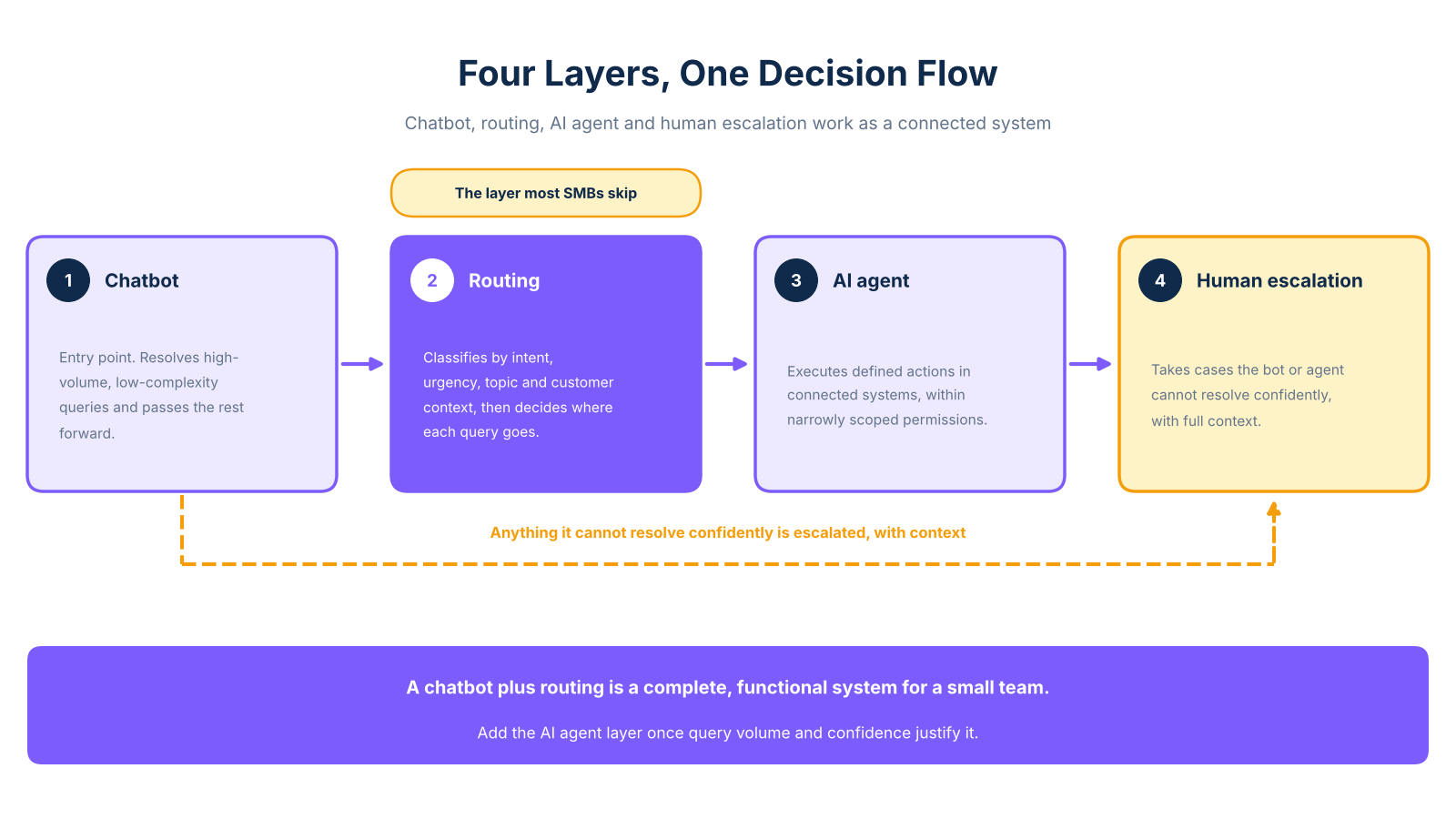
Think of AI customer support as a decision flow with four connected layers. You do not need to deploy all four at once, but you do need to understand how they connect before deciding where to start.
Layer 1, the chatbot, is the entry point for inbound contacts in a chatbot-first setup. It handles high-volume, low-complexity queries using a trained knowledge base: answering FAQs, confirming order status, collecting initial information. Its job is to resolve what it can and pass everything else forward cleanly.
Layer 2, routing, classifies each query by intent, urgency, topic, and customer context. It decides whether the query goes to self-service, an AI agent workflow, or a human queue. This is the layer most SMBs skip, and it is the one that determines whether the rest of the system works. Without it, the chatbot either tries to handle everything or hands off blindly.
Layer 3, the AI agent, executes defined actions inside connected systems: booking appointments, updating records, issuing confirmations. It operates within narrowly scoped permissions and is not appropriate for billing changes, refunds, or sensitive queries without human review. Businesses scaling beyond basic chatbot deployment can explore more complex architectures in the enterprise chatbots guide.
Layer 4, human escalation, receives cases the bot or agent cannot resolve confidently. Its quality depends entirely on what context transfers at handoff. A human who receives a full conversation summary and relevant account details is far better positioned to resolve the issue in one interaction. A human who receives only a ticket number cannot.
For a small team, these layers do not need to go live simultaneously. A chatbot plus routing is a complete, functional system. Agent capabilities can follow once query volume and confidence justify the added complexity.
Comparing your options: chatbot, AI agent, routing, and escalation
The right starting point depends on three variables: how many queries you handle per week, how many of those are repetitive, and what happens when the system fails.
For most businesses under 15 people, routing combined with a well-trained chatbot delivers more value in the first six months than an AI agent does. The agent layer adds capability, but it also adds configuration, permissions management, and failure-mode planning. For a detailed breakdown of what each option costs to build or buy, the chatbot cost comparison guide covers SaaS versus custom options across different query volumes and workflow complexity levels.
One firm rule across all four layers: do not allow AI to execute billing changes, issue refunds, or modify payment details without a human review step. The risk to customer trust and your business is not worth the automation gain.
Smart routing: the layer most SMBs skip
For most small teams managing more than a handful of query types, routing is the decision engine that makes everything else in your support system work. Without it, you are relying on the chatbot to handle queries it was not designed for, or sending everything to a human queue that defeats the purpose of automation.
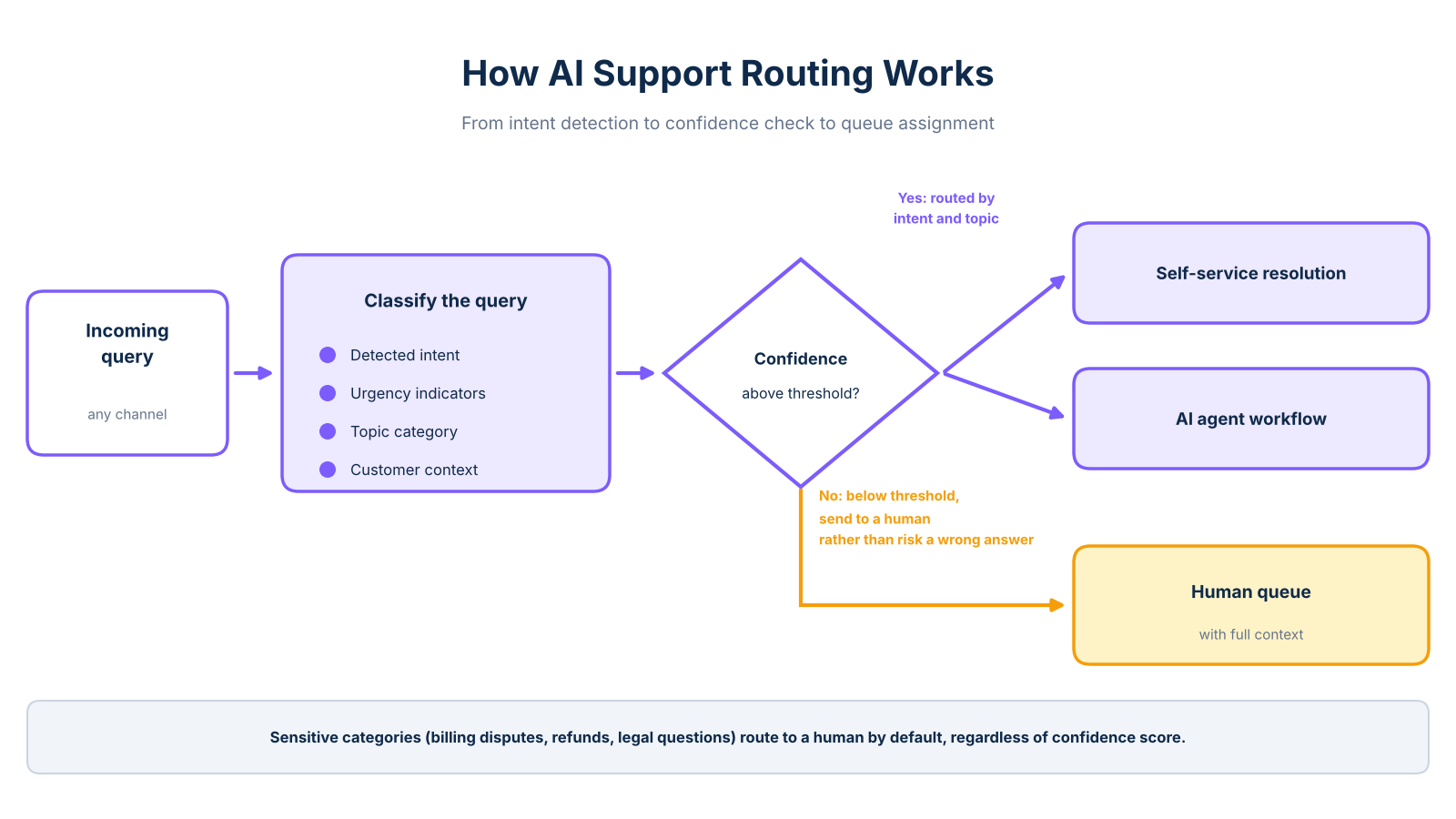
Routing works by classifying each incoming query against a set of signals. Detected intent tells the system what the customer is trying to do: get information, change something, or resolve a problem. Urgency indicators pick up language that suggests frustration or time sensitivity. Topic category separates billing from technical from general enquiries. Customer context adds account tier, open tickets, and authentication status.
Together, these signals determine where the query goes next. Once classified, the routing logic assigns the query to one of three destinations: self-service resolution, an AI agent workflow, or a human queue. The assignment is governed by confidence thresholds. If the system's confidence falls below a set level, it routes to a human rather than risking a wrong answer. According to IrisAgent's routing documentation, automated classification by intent, priority, skills, and customer context reduces misassignment and speeds up resolution.
For an SMB deciding what to automate first, a practical starting point is the AI chatbot for small business guide, which maps the highest-volume, lowest-risk query types for teams without IT support.
One common failure mode: routing rules set at launch are never reviewed. When misclassification or repeat contacts start to increase, it usually means routing rules need updating to reflect new query patterns, not that the AI is broken. A team handling 50 to 100 support queries per week with no dedicated support staff will typically see meaningful resolution improvement from routing before any other single investment.
Human escalation and handoff design that actually works
Most AI support guides tell you to "have a human available." That is not a design. The difference between escalation that works and escalation that frustrates customers comes down to two things: knowing exactly when to escalate, and knowing exactly what to hand over.
Five triggers should prompt an immediate escalation. Each one signals a distinct failure mode that automation cannot safely handle.
- Low confidence score. The system is guessing, and guessing wrong in front of a customer is worse than not trying. Any response below a defined confidence threshold should pause the automated workflow before it reaches the customer.
- Repeated failed attempts. Two or more turns without resolution signal the bot has reached its limit. Continuing past this point increases frustration without improving the outcome.
- Negative sentiment signal. Frustration, urgency, or explicit complaint means the interaction needs a human tone. Automated responses to distressed customers tend to escalate the problem rather than resolve it.
- Sensitive topic category. Billing disputes, refund requests, and legal questions carry risk that automated responses should not carry. These categories should route to a human by default, regardless of confidence score.
- Explicit human request. This should always be honoured immediately, without additional deflection attempts.
According to Kore.ai's escalation documentation, any one of these triggers should pause the automated workflow and create a human task before the next response is sent.
What the human receives at handoff matters as much as when the escalation happens. A complete handoff packet includes the conversation transcript or concise summary, detected intent, customer and account details, authentication status, and actions already attempted. It also includes a sentiment indicator and a recommended next step. According to Capacity's escalation guidance, this context transfer allows a human agent to resolve the issue in a single interaction rather than starting over.
A handoff without this context forces the customer to repeat themselves. This is a primary driver of escalation dissatisfaction. Human-in-the-loop support is not about having a person on standby. It is about giving that person everything they need to close the case cleanly. For teams concerned about preserving a personal service feel, the guide on how to automate customer support without losing the human touch covers how to design that boundary well.
Measuring what actually matters in AI support
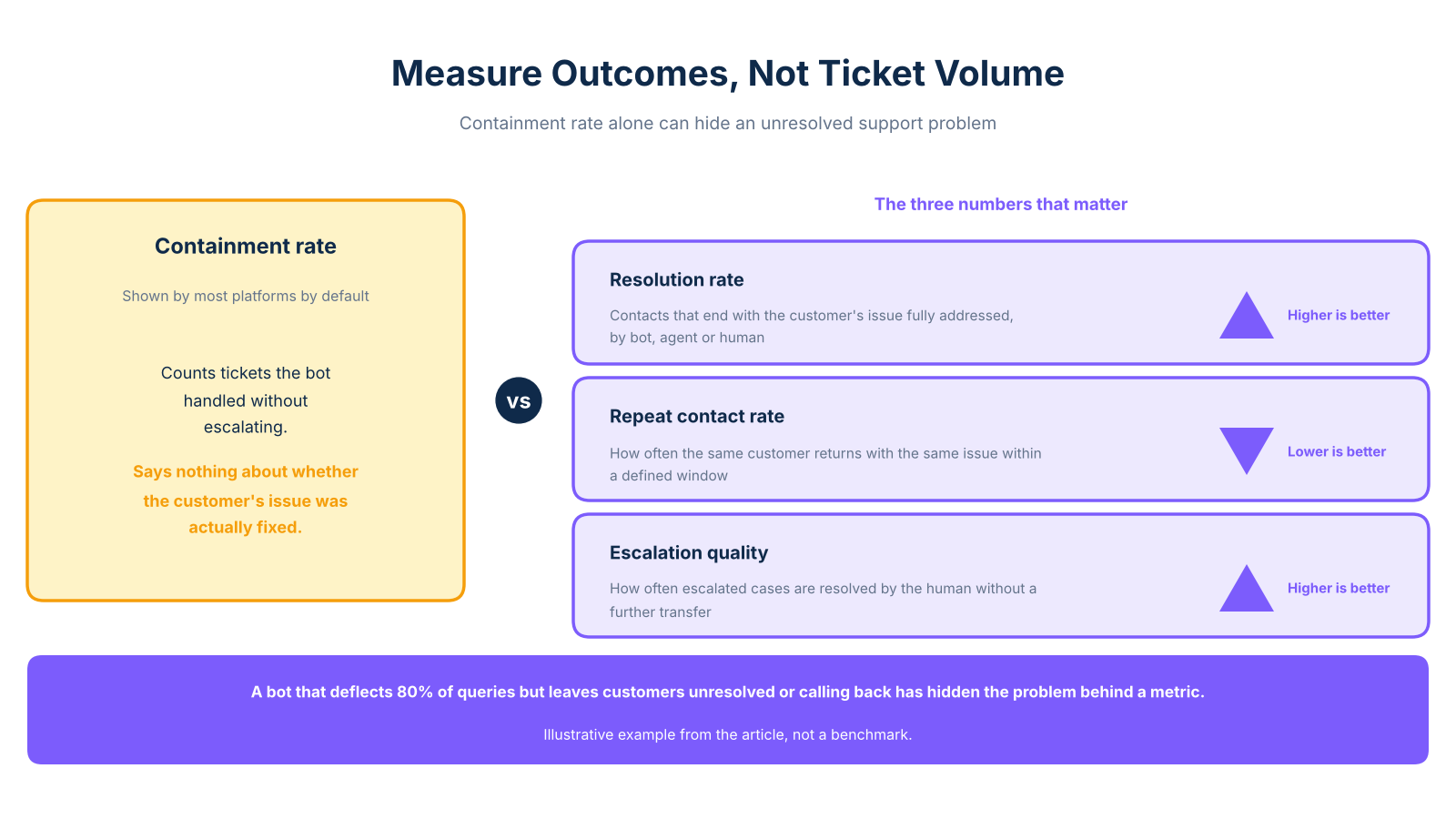
Most platforms surface containment rate by default: how many tickets the bot handled without escalating. It is also the easiest number to misread on its own. A bot that deflects 80% of queries but leaves customers frustrated, unresolved, or calling back the next day has not improved your support operation. It has hidden the problem behind a metric.
The three numbers that matter are support resolution rate, repeat contact rate, and escalation quality. Resolution rate measures how many contacts end with the customer's issue fully addressed, whether by the bot, an agent, or a human. Repeat contact rate measures how often the same customer returns with the same issue within a defined window. That is a direct signal of unresolved first contacts. Escalation quality measures how often escalated cases are resolved by the human without a further transfer, which reflects the strength of your handoff design.
According to Databricks' analysis of AI customer service, confidence thresholds and human review protocols are critical for maintaining quality in sensitive support actions. A system that escalates appropriately and transfers complete context will show lower repeat contact rates and higher escalation quality over time. Containment alone cannot tell you that.
For teams using arsuno.ai-designed support systems, the pattern is consistent: faster first responses, fewer repeat contacts, and reduced manual handling volume as routing and escalation logic matures. No two deployments produce identical numbers, but the direction is reliable when the architecture is built correctly from the start.
Frequently Asked Questions
When should a chatbot escalate to a human?
A chatbot should escalate when the customer explicitly requests a person, when the system's confidence score falls below a defined threshold, when two or more turns have failed to resolve the issue, or when the conversation signals frustration, urgency, or a sensitive topic such as billing, legal, or complaints. Escalation should pause any automated actions and transfer the full conversation context to the human before the next response is sent.
What information should pass during AI support escalation?
A complete handoff should include the conversation transcript or a concise summary, the detected intent behind the customer's request, relevant customer and account details, authentication status, and a record of actions already attempted. Sentiment or urgency indicators and a recommended next step, where the system can generate one, should also transfer.
What is the difference between a chatbot and an AI agent?
A chatbot is primarily conversational and information-oriented: it answers questions, collects details, and guides customers through defined paths using a trained knowledge base. An AI agent goes further by executing defined actions inside connected systems, such as booking an appointment, updating a record, or sending a confirmation.
How does AI support ticket routing work?
Routing classifies each incoming query by intent, urgency, topic, and customer context, then assigns it to the most appropriate destination: self-service, an AI agent workflow, or a human queue. The assignment uses confidence thresholds, so queries the system cannot classify reliably are sent to a human rather than handled incorrectly.
Is AI customer service safe for billing and refunds?
AI can handle low-risk information requests related to billing, such as confirming a payment date or explaining a charge, when proper authentication and access controls are in place. However, actions that change account details, issue refunds, or modify payment information should require a human review step before execution.
Can AI agents replace customer service representatives?
AI agents are well suited to repetitive, bounded tasks: answering FAQs, routing requests, booking appointments, and sending confirmations. They are not suited to complex, emotional, or high-consequence cases that require human judgment, empathy, or authority.
How do you hand off an AI support conversation to a human?
A well-designed handoff follows a defined sequence: detect the escalation trigger, pause or suspend the automated workflow, and create a human task before any further automated response is sent. The system routes the case to the appropriate person or queue based on topic, urgency, or skill requirements, and transfers the full conversation context alongside it.