

Key takeaways
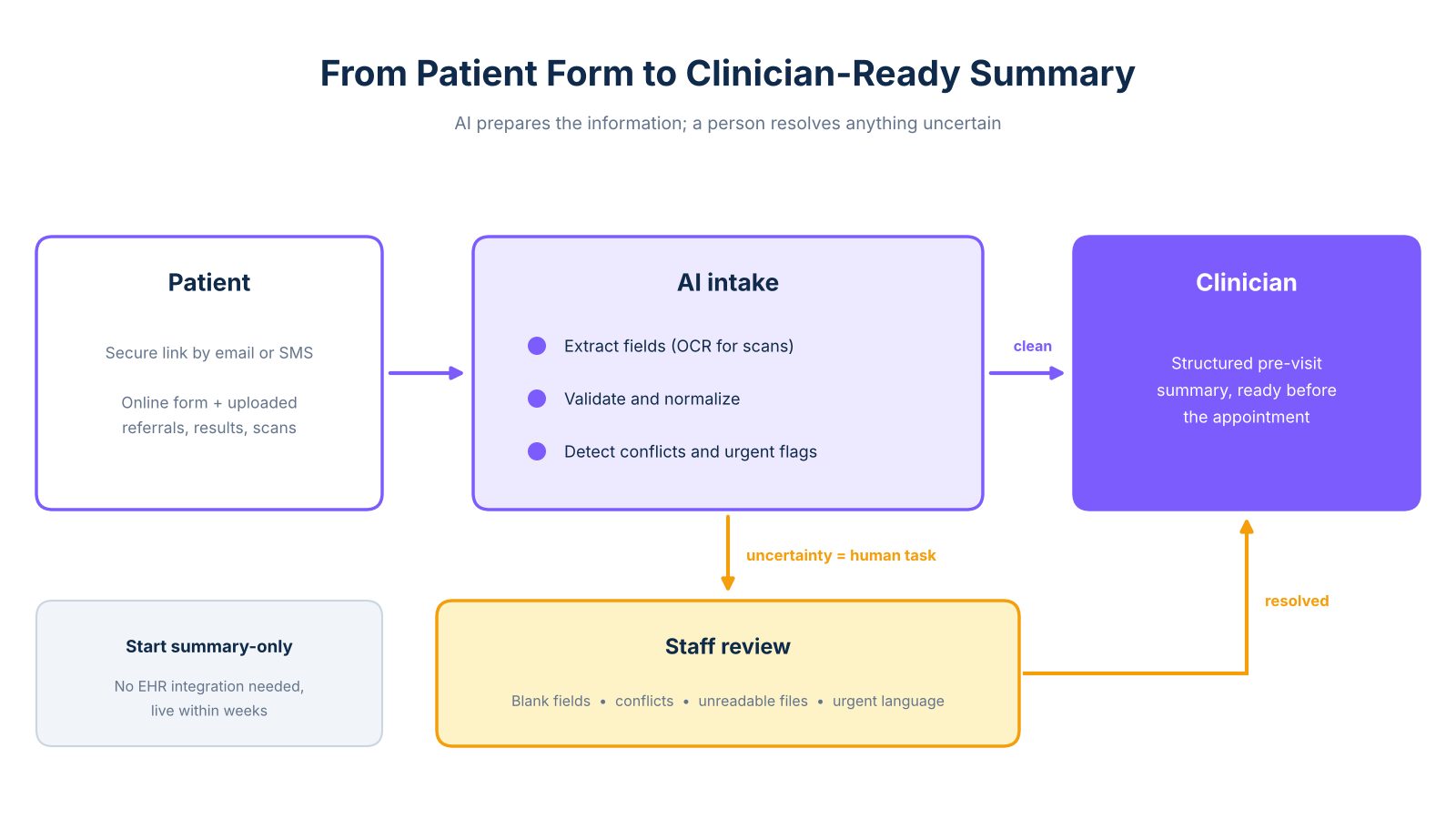
- AI patient intake turns unstructured patient submissions into clinician-ready summaries without replacing your current record system.
- Start with a summary-only deployment: no EHR integration required, operational within weeks.
- Uncertainty always creates a human review task; blank fields, conflicts, and urgent flags route to staff, never through silent automated processing.
- Verify GDPR and HIPAA controls before sharing any patient data with a vendor.
Why pre-visit admin breaks down before the appointment starts
Most clinics don't have a data problem. They have a handoff problem. The information exists, sitting in a PDF attachment, a scanned form, a handwritten note, or an email thread, but someone has to read it, re-key it, and get it into the right place before the clinician walks in. That process is manual, inconsistent, and almost always unfinished.
In a typical pre-visit sequence, a patient submits a form online or drops off paperwork at reception. A staff member opens the file, reads through it, and manually enters relevant fields into the EHR or a shared document. Uploaded referral letters or test results go into a separate folder. By the time the appointment starts, the clinician may have a partial picture at best: allergies in one place, current medications in another, and the reason for the visit buried in a free-text box.
The cost is not just time, it is the quality of the clinical encounter. A clinician who spends the first five minutes reconstructing a patient's history is not delivering the care they trained to deliver. Providers at Windsor-Essex County Health Unit reported time savings when AI assisted with clinical documentation, as described in the Tali case study. That study focuses on documentation during consultations rather than pre-visit intake specifically, but the time pressure it describes applies across the full admin chain.
The structural issue is that the handoff between patient submission and clinician preparation has no owner, no validation step, and no escalation path when something is missing. Adding more staff to a broken handoff does not fix it. A structured, AI-assisted intake workflow addresses this directly, without requiring you to replace existing systems.
How the AI intake workflow runs, step by step
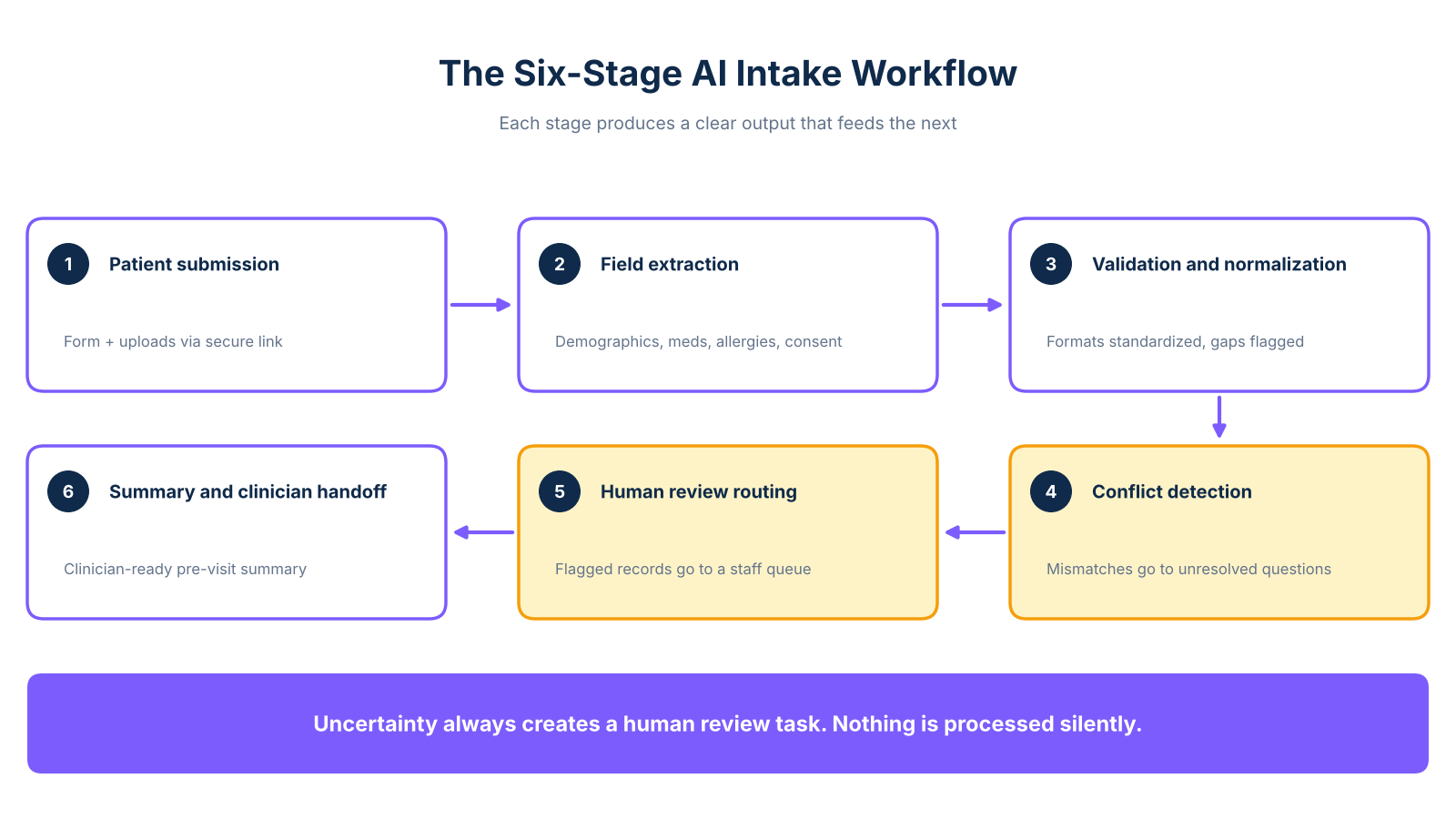
The workflow has six stages. Each produces a clear output that feeds the next. The Emerline workflow guide describes this kind of sequence as the point where unstructured patient language becomes structured clinical data, the most useful way to think about what the AI is doing at each stage.
1. Patient submission
The patient receives a secure link before their appointment, by email or SMS, and completes a digital form or uploads documents such as referral letters, test results, or scanned notes. The form is configured to match the appointment type, so new and returning patients see different fields.
2. Field extraction
The AI reads responses and uploaded documents, pulling structured fields including demographics, reason for visit, medications, allergies, insurance details, and consent. For scanned or handwritten content, optical character recognition processes the image before extraction begins.
3. Validation and normalization
Extracted fields are checked for completeness and format consistency. Date formats are standardized, medication name variants are normalized, and out-of-range values are flagged. This is data hygiene, not clinical interpretation.
4. Conflict detection
The AI cross-checks fields against each other. If a medication conflicts with a stated allergy, or two uploaded documents contain different medication histories, the discrepancy is surfaced in the unresolved questions field rather than passed silently to the clinician.
5. Human review routing
Records with flagged conflicts, missing fields, or escalation triggers are queued for a staff member before the summary is finalized. Clean records proceed automatically. This step is not optional: it is where a human takes responsibility for anything the system could not resolve with confidence.
6. Summary generation and clinician handoff
A structured pre-visit summary is delivered to the clinician before the appointment. The ai automation for clinics intake to admi covers the full intake-to-admin sequence, including billing, referral handling, and follow-up documentation.
What the clinician receives before the appointment
The summary is not a raw data export. It is a structured document prepared for the clinician's use in the minutes before an appointment, giving them a consolidated view of what the patient submitted without requiring them to search for it.
Here is what an anonymized sample summary looks like in practice:
Pre-visit patient summary
Reason for visit: Follow-up for persistent lower back pain, reported worsening over the past three weeks.
Relevant history: Previous L4-L5 disc herniation (2021), physiotherapy completed. No surgical history. Non-smoker.
Current medications: Ibuprofen 400mg as needed, Omeprazole 20mg daily.
Allergies: Penicillin (rash). No known food allergies.
Documents reviewed: GP referral letter (uploaded), previous MRI report (uploaded, dated March 2023).
Unresolved questions: Patient did not complete the pain-scale section. Insurance details are missing from the submitted form.
Escalation status: No urgent flags detected. Staff review required for two incomplete fields before appointment.
The summary does not interpret clinical findings or suggest a diagnosis. It organizes what the patient submitted so the clinician can apply their own judgment from the moment they enter the room. How uploaded PDFs and scanned documents are converted into structured fields is explained in the automated document processing how ai ext, which covers OCR extraction, field normalization, and confidence scoring.
Independent evidence supports the efficiency case for AI-assisted documentation. A 12-month study at the University of Freiburg Medical Center, published in PLOS Digital Health, found that clinicians using AI documentation support improved documentation speed substantially, while the control group did not. That study covered outpatient ophthalmology rather than intake forms specifically, but the principle holds: when AI prepares structured information for human review, clinicians spend less time on administration.
What happens when data is missing, conflicting, or urgent
The happy path is easy to describe: a patient completes every field, uploads a legible document, and the system generates a clean summary. Clinic operations are not built around that path.
Blank required fields are the most common exception. When a patient skips a required field, the system flags the record and creates a staff task to follow up before the appointment. The clinician sees an explicit note that the field is pending confirmation, the gap is surfaced clearly rather than silently omitted.
Conflicting medication data is more serious. If a patient lists a drug that conflicts with a stated allergy, or if two uploaded documents contain different medication histories, the conflict appears in the unresolved questions field. The record is held from the clinician queue until a staff member reviews it. The AI surfaces the conflict; it does not resolve it.
Unreadable uploads are handled by preserving the original file and creating a staff review task. If a scanned document falls below the OCR confidence threshold, the system does not guess at the content, it flags the file for manual review with a note explaining why it could not be processed.
Urgent symptom language triggers escalation. If a patient describes symptoms matching configured escalation criteria, the record routes immediately to a senior staff member rather than joining the standard queue. The clinical team defines what qualifies as urgent, and those thresholds should be validated before the workflow goes live.
The routing principle across all four scenarios is the same: uncertainty creates a human review task. The AI does not make decisions when data is ambiguous, incomplete, or potentially urgent, it makes the problem visible and assigns responsibility to a person.
How to start without replacing your existing systems
The most common reason clinics delay intake automation is the assumption that it requires a large IT project. That assumption is often wrong. There are three implementation levels, and the lowest-risk option requires no changes to your existing EHR at all.
Summary-only deployment is the starting point for most clinics. The AI collects patient responses, processes uploaded documents, and delivers a structured pre-visit summary by email, secure message, or shared folder. Nothing writes to the EHR automatically. Staff review the summary and paste or attach relevant information manually. This level requires no integration work and can be running within weeks.
Light integration connects the intake workflow to an existing inbox, document system, or approved connector. Summaries appear inside a tool the team already uses, such as a task management system or clinical inbox, without requiring a direct EHR API connection. This adds convenience without adding complexity.
Direct write-back sends structured fields into the EHR after validation and staff authorization. It requires an approved integration, role-based authorization, and a review step before any clinical record is updated. This level is appropriate once the summary-only workflow is stable and the team has confidence in data quality.
Starting with summaries lets you test the workflow, measure the impact on staff time, and identify exceptions specific to your patient population before committing to deeper integration.
A psychiatry clinic in Switzerland built an AI clinical assistant with arsuno.ai that synthesizes complex patient data into integrated summaries, improving risk assessment and diagnostic accuracy while freeing staff for direct patient interaction. Outcomes are documented in the ai clinical assistant case study.
On compliance: two frameworks apply depending on geography. US clinics must have a signed Business Associate Agreement before a vendor handles protected health information, as set out in HHS guidance. EU and UK clinics must establish a data processor agreement under Article 28 GDPR, detailed in ICO guidance. Controls to verify include: encryption in transit and at rest, role-based access, audit logs, and defined data retention and deletion periods. Ask vendors to demonstrate each control, not just assert compliance.
What to check before you choose an intake automation approach
A practice manager evaluating intake automation needs answers to a short set of operational questions before any vendor conversation goes further.
On workflow fit: does the system handle your specific appointment types, or does it apply a single generic form to every visit? Can it process uploaded documents, not just structured form responses? What happens when a patient cannot complete the digital intake before their appointment?
On system coexistence: does the summary-only option genuinely require no EHR changes, or does the vendor's definition of "no integration" still require IT involvement? What format does the summary arrive in, and who on your team receives it?
On compliance: will the vendor sign a Business Associate Agreement or data processor agreement before any patient data is shared? Where is patient data stored, and how long is it retained?
On exception handling: what is the escalation path for urgent symptom flags outside business hours? Who owns the decision when a conflict is detected in medication data? Is there an audit log showing who reviewed and approved each record?
These questions separate a workflow that runs reliably in a clinical environment from one that creates new problems while solving old ones.
Frequently Asked Questions
Can AI patient intake work with an existing EHR?
Yes, and the lowest-risk starting point requires no direct EHR connection at all. A summary-only deployment delivers a structured pre-visit document to the clinician through a secure message or shared folder, while staff manually transfer any fields they need to update in the EHR. Light integration and direct write-back are available as later options once the workflow is stable, but neither is a prerequisite for getting started.
Is AI patient intake HIPAA compliant?
Compliance depends on the specific workflow, vendor configuration, and the clinic's own responsibilities, not on the use of AI alone. HIPAA-covered entities must have a signed Business Associate Agreement in place before a vendor handles protected health information on their behalf, as required under HHS guidance.
How does AI process patient intake forms?
The AI reads completed forms and any uploaded documents, extracting structured fields such as demographics, medications, allergies, reason for visit, and consent status. For scanned or handwritten content, optical character recognition converts the image to text before extraction. Fields are then checked for completeness and consistency, conflicts are flagged, and a structured summary is generated.
Does AI patient intake require human review?
Human review is a required part of a well-designed intake workflow, not an optional add-on. Any record containing a flagged exception, including blank required fields, conflicting medication data, unreadable uploads, or urgent symptom language, should be reviewed by a staff member before the summary is finalized. The AI handles collection, extraction, and flagging; a qualified human takes responsibility for resolving anything the system could not process with confidence.
What security controls should a clinic verify before using AI for intake?
Ask the vendor where patient data is stored, how it is encrypted in transit and at rest, and which staff roles can access summaries. Verify that audit logs record every access and modification, that retention and deletion periods are defined, and that patients can request access, correction, or deletion of their data.