

Key takeaways
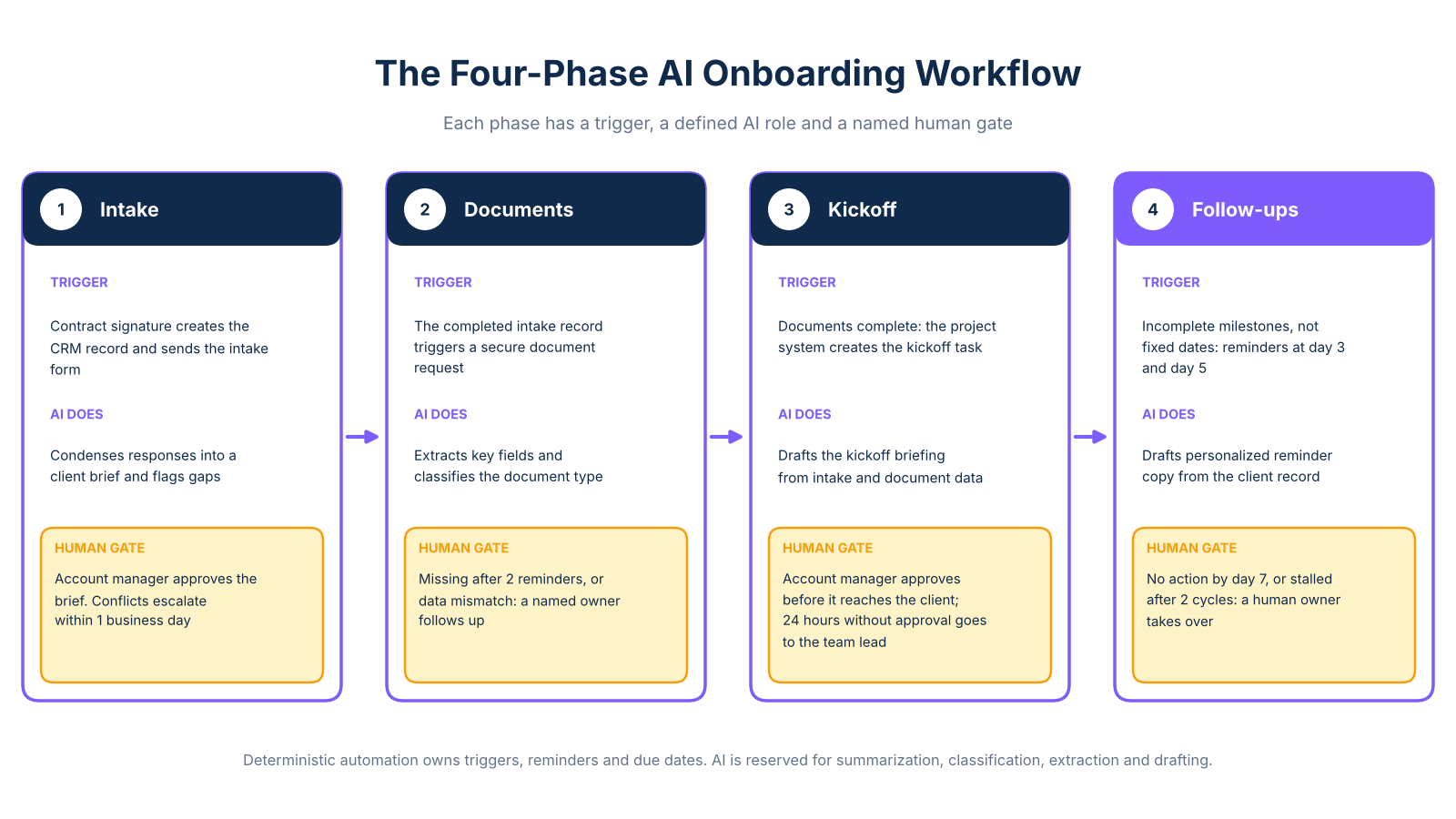
- A structured ai client onboarding workflow covers four phases: intake, document collection, kickoff, and follow-ups, each triggered automatically rather than by manual email.
- Deterministic automation handles reminders and due dates; AI handles summarization, classification, extraction, and drafting.
- Every phase needs a named human review gate before a compliance-aware team will approve it.
- Measure baseline touch time across five recent onboardings before you build anything.
Why manual onboarding costs more than most teams realize
Manual onboarding is not one task. It is five to eight disconnected handoffs across a CRM, an email inbox, a document folder, a calendar, and a project tool. Each handoff requires a human to notice something is missing and act on it. When no single system owns the process, the work falls through the gaps between them.
The operational cost shows up in two ways. First, there is the direct time: chasing documents, updating CRM records after calls, scheduling kickoffs by email, and sending reminder messages one by one. Second, there is the inconsistency: different team members run onboarding differently, which creates compliance gaps and a variable client experience that is hard to audit or improve.
The before/after difference can be significant. A tech consulting firm, as documented by Nexus Automation Labs, reduced onboarding setup time from two days to 15 minutes after deploying an automated multi-system workflow. The provider reports 70 hours saved per month across the team. These figures are provider-reported and not independently audited.
The table below uses illustrative per-phase estimates based on the referenced case studies. Individual results will vary by team size, client type, and existing tools.
Before building anything, IBM's automation guidance recommends recording active staff touch time separately from client waiting time. That distinction is what makes a business case defensible to a CFO. The figures above are illustrative estimates drawn from the referenced case studies; your baseline will differ based on team size, client type, and existing tools.
The six-layer system connecting every onboarding phase
The reason most onboarding automation guides fail to deliver a working system is that they describe tools in isolation. Instead, you need to understand which system owns the client record, how data moves between phases, and what triggers each handoff. That requires a clear architecture before you choose any specific product.
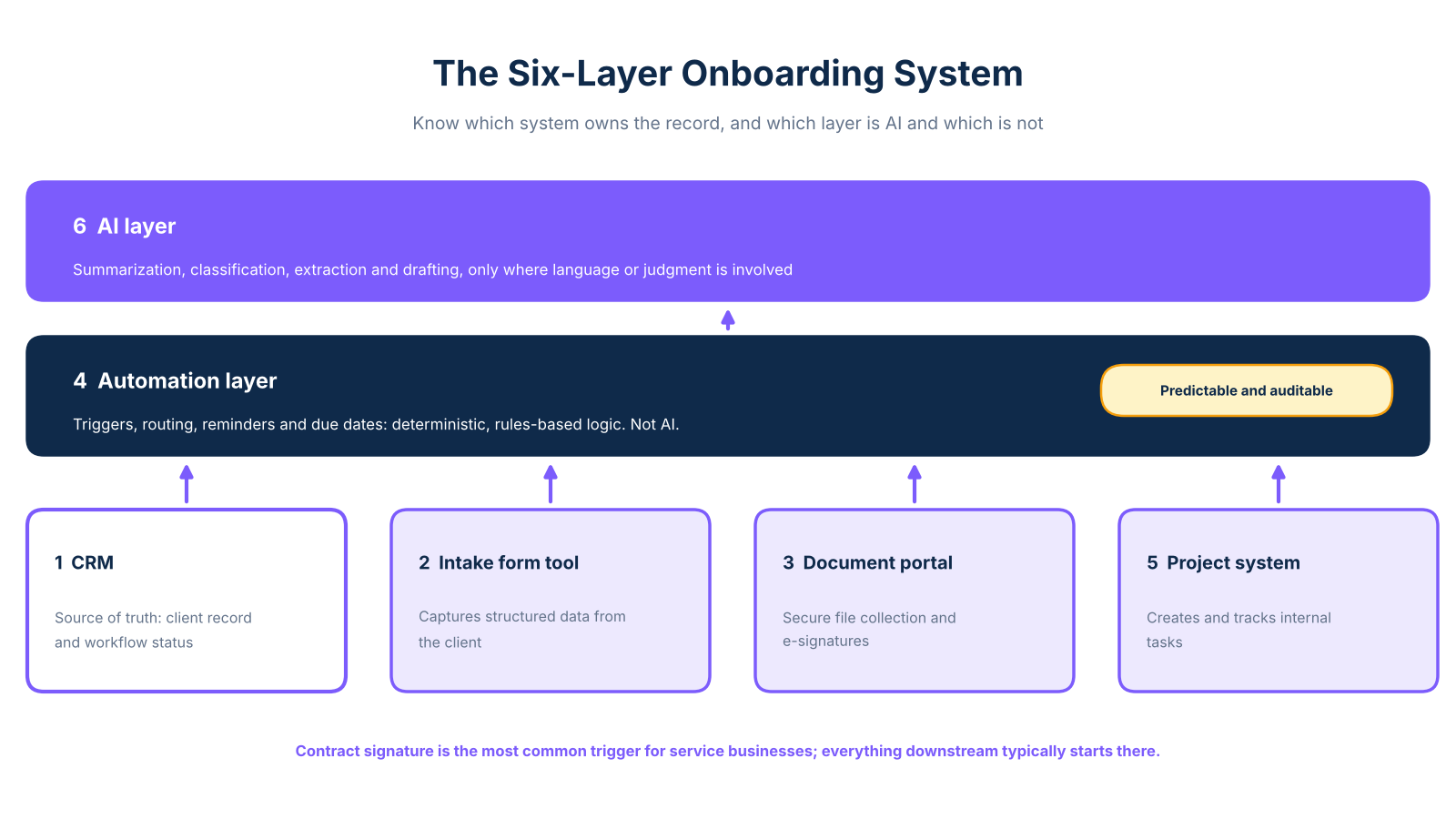
The six layers work as follows. The CRM is the source of truth: it holds the client record and workflow status throughout. The intake form tool captures structured data from the client. The document portal handles secure file collection and e-signatures. The automation layer owns triggers, routing, reminders, and due dates: this is deterministic, rules-based logic, not AI. The project system creates and tracks internal tasks. The AI layer sits on top and handles summarization, classification, extraction, and drafting, specifically where judgment or language is involved.
The distinction between the automation layer and the AI layer matters for compliance. Triggers, reminders, and due dates are predictable and auditable. They do not require AI, and describing them as AI to a technically literate ops team will undermine your credibility. Reserve the term for capabilities that involve language or classification. As Slate Rock Automation documents, contract signature is the most common trigger for service businesses: everything downstream typically starts there.
When evaluating which tools to connect these layers, the guide to process automation services covers how to assess compatibility with your existing stack before committing to a build.
Phases 1 and 2: intake and document collection
These two phases form the foundation of the onboarding workflow automation. Each depends on a clean handoff from the previous step, so trigger conditions and human gates must be defined before any tool is configured.
Phase 1: intake
Contract signature triggers two things automatically: CRM record creation and dispatch of the intake form. No human needs to notice the deal closed and manually send a welcome email.
AI's role in intake is summarization, not triggering. Once the client submits the form, an AI layer condenses free-text responses into a structured client brief and flags incomplete or inconsistent answers. That brief goes to the account manager for review before the record is marked complete, this is the human gate for Phase 1.
The escalation trigger is specific: if AI-flagged responses conflict with CRM data, or if a required field is missing, a named team member receives a notification and resolves the issue within one business day. OnboardMap recommends standardizing required fields and completion criteria before adding any AI layer, because incomplete inputs produce unreliable summaries downstream.
Phase 2: document collection
The completed intake record triggers a secure document request from the document portal. AI's role here is extraction and classification: once documents are uploaded, AI extracts data from key fields, dates, names, identifiers, then classifies the document type for routing.
GDPR compliance is a core consideration. Documents containing personal data should be encrypted at rest and in transit, access should follow least-privilege principles, and clients should be informed of what data is collected and why before uploading. Your obligations will depend on data sensitivity, lawful basis for processing, and any applicable processor arrangements. SignWell's workflow guidance covers how document-triggered workflows connect to CRM record updates and completion tracking.
The human gate for Phase 2: if a required document is missing after two automated reminders, or if extracted data does not match the CRM record, the case escalates to a named owner for direct follow-up.
Phases 3 and 4: kickoff and follow-ups
Phases 3 and 4 convert a completed intake and document set into a live client relationship. The automation layer handles scheduling and reminders; the account manager handles judgment calls and approvals. Onboarding coordination is consistently among the highest-ROI processes to automate first for service businesses because it removes avoidable back-and-forth before the relationship has properly started.
Phase 3: kickoff scheduling
Once document collection is complete, the project system creates the kickoff task and sends a scheduling link to the client. The most valuable step is not the calendar invite, it is the AI-drafted kickoff briefing, generated from the intake summary and extracted document data, that the account manager reviews before the meeting.
The briefing covers client goals, outstanding questions, and flagged inconsistencies from intake. The human gate is explicit: the account manager approves the draft before it reaches the client. If approval does not happen within 24 hours, the task escalates to the team lead. This is also where the account manager adds context the AI cannot access, such as verbal agreements made during the sales process.
Phase 4: follow-ups and task completion
Follow-up reminders are triggered by incomplete milestones, not fixed calendar dates. If a required document remains unsubmitted, the automation sends a first reminder at day three and a second at day five. If no action occurs by day seven, the case routes to a human owner rather than continuing automated outreach.
Vantage Point's CRM automation guide describes milestone-based reminders as more reliable than time-based ones because they stop automatically once the client acts, preventing over-communication and keeping the audit trail clean. AI's role in follow-ups is drafting: the system generates personalized reminder copy from the client record, but a human reviews any escalated communication before it sends.
The human gate for Phase 4: any account flagged as stalled after two reminder cycles, or identified as high-value or contractually sensitive, routes to the account manager for direct outreach. Standard reminder cases run without intervention.
Sample onboarding checklist
Use this as a starting template. Adapt triggers, owners, and escalation timing to your own stack and client type.
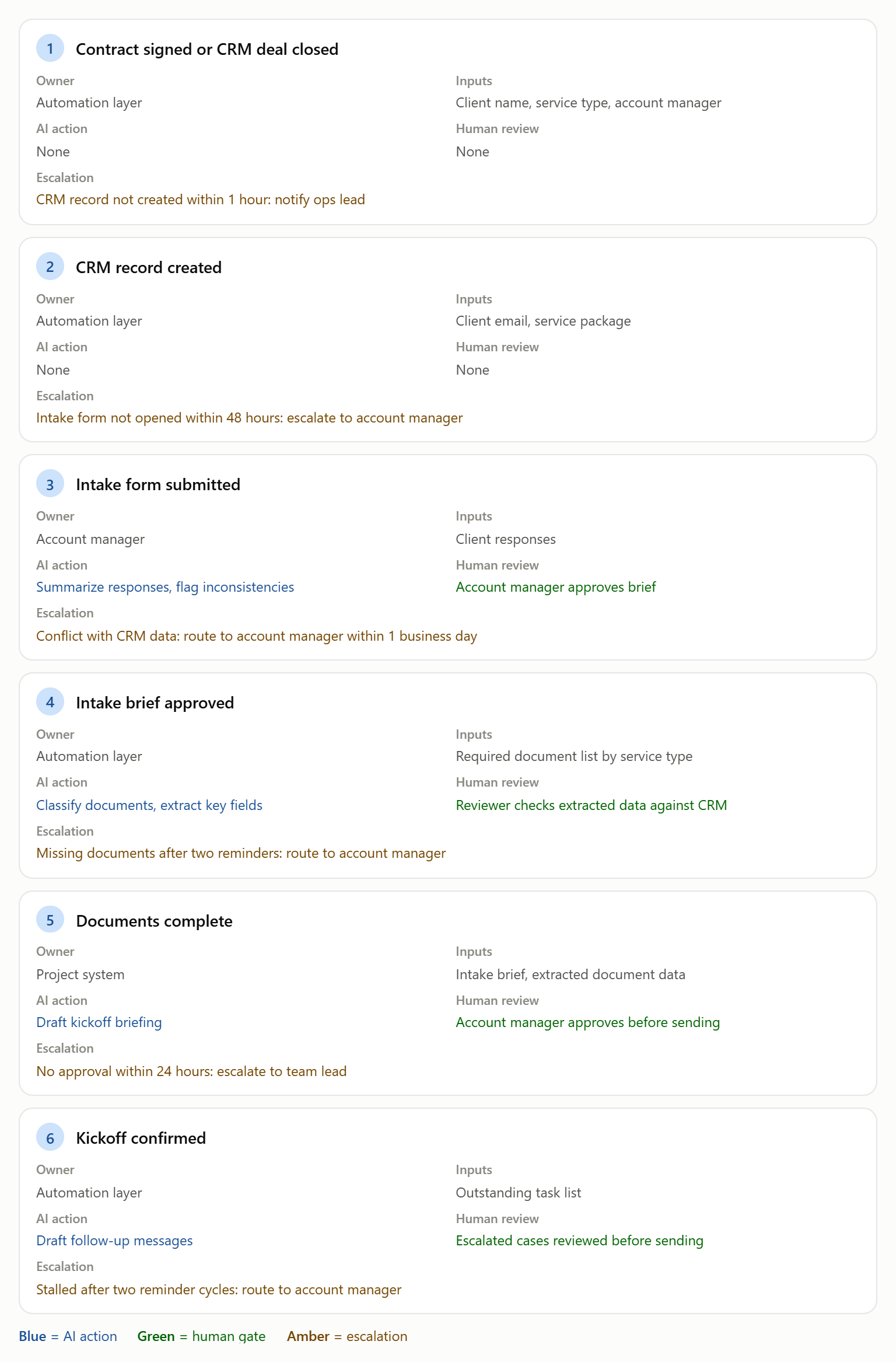
This checklist is a starting point. Adjust every trigger interval and escalation threshold to match your own client agreements and team structure.
How to measure the time savings before you build anything
The most common reason an onboarding automation project stalls at approval is that the business case relies on efficiency claims without a reproducible measurement method. Here is a five-step approach that gives you defensible numbers before a single line of code is written.
Step 1: Select five to ten recent onboardings that represent your standard client type. Exclude unusual or complex cases from the baseline.
Step 2: For each onboarding, record active staff touch time per phase, not elapsed calendar time. A document sitting in a client's inbox for three days is client waiting time, not your team's cost.
Step 3: Run a controlled pilot with three to five new clients using the automated workflow. Keep the same account managers and client types as the baseline to reduce variables.
Step 4: Compare per-phase touch time, total completion time, reminders sent, missing-item rate, and escalation frequency between the baseline and pilot groups.
Step 5: Report standard cases and exception cases separately. Exceptions always take longer; grouping them with standard cases understates the efficiency gain for routine onboarding.
For a detailed framework on presenting results to leadership, the automation ROI guide covers how to structure a board-ready business case with before/after metrics. This framework requires no data team and is the most credible foundation for a CFO conversation, because it uses your own operations data rather than industry averages.
Frequently Asked Questions
How do you automate a client onboarding workflow?
Start with a signed-contract or closed-deal trigger that creates the client record in your CRM and dispatches the intake form automatically. From there, the workflow requests documents, schedules the kickoff, creates internal tasks, and sends reminders based on incomplete milestones rather than fixed dates. Add human approval gates for exceptions, sensitive files, and incomplete information so the system remains auditable.
What should you automate first in client onboarding?
Begin with repetitive, rules-based actions that have clear completion criteria: intake form dispatch, document requests, task creation, status updates, and reminder sequences. These are low-risk starting points because they do not require AI judgment, and the efficiency gains are immediately visible. Keep judgment-heavy decisions, such as reviewing flagged intake responses or approving AI-drafted communications, routed to a human owner.
What tools are needed to automate client onboarding?
You need six functional layers: a CRM to own the client record, an intake form tool, a document portal for secure file collection and e-signatures, an automation layer for triggers and reminders, a project system for internal task management, and an AI layer for summarization, classification, and drafting. Most service businesses already have the first four in some form. The automation and AI layers are typically the gap.
How can automated client onboarding collect documents and signatures?
Define the required documents for each client type or service package before configuring any tool. The document portal sends a secure request, tracks upload completion, and issues reminders when items are missing. AI classification and extraction then process the uploaded files and flag data that does not match the CRM record.
How do automated onboarding reminders work?
Reminders should be triggered by incomplete milestones rather than arbitrary calendar dates. When a required document or action remains outstanding, the automation layer sends a first reminder, then a second after a defined interval. If no action occurs after the second reminder, the account routes to a human owner rather than continuing automated outreach.
How can onboarding automation savings be measured?
Record active staff touch time per phase across five to ten recent onboardings, separating that from client waiting time. Run a controlled pilot with three to five new clients using the automated workflow, keeping client type and account managers consistent with the baseline group. Compare per-phase touch time, total completion time, missing-item rate, and escalation frequency.
How can AI support client onboarding without removing human review?
Use deterministic automation (triggers, permissions, due dates, reminders) for predictable, auditable actions. Reserve AI for summarization, classification, extraction, and drafting, where language or judgment is involved. Require human review when data is sensitive, when AI confidence is low, when records conflict, or when the client request falls outside standard parameters.